Page 89
877-877-2269 | blackbox.com
Chapter 5: Configuring the Router
Click the Delete Selected button to delete selected entries in the table.
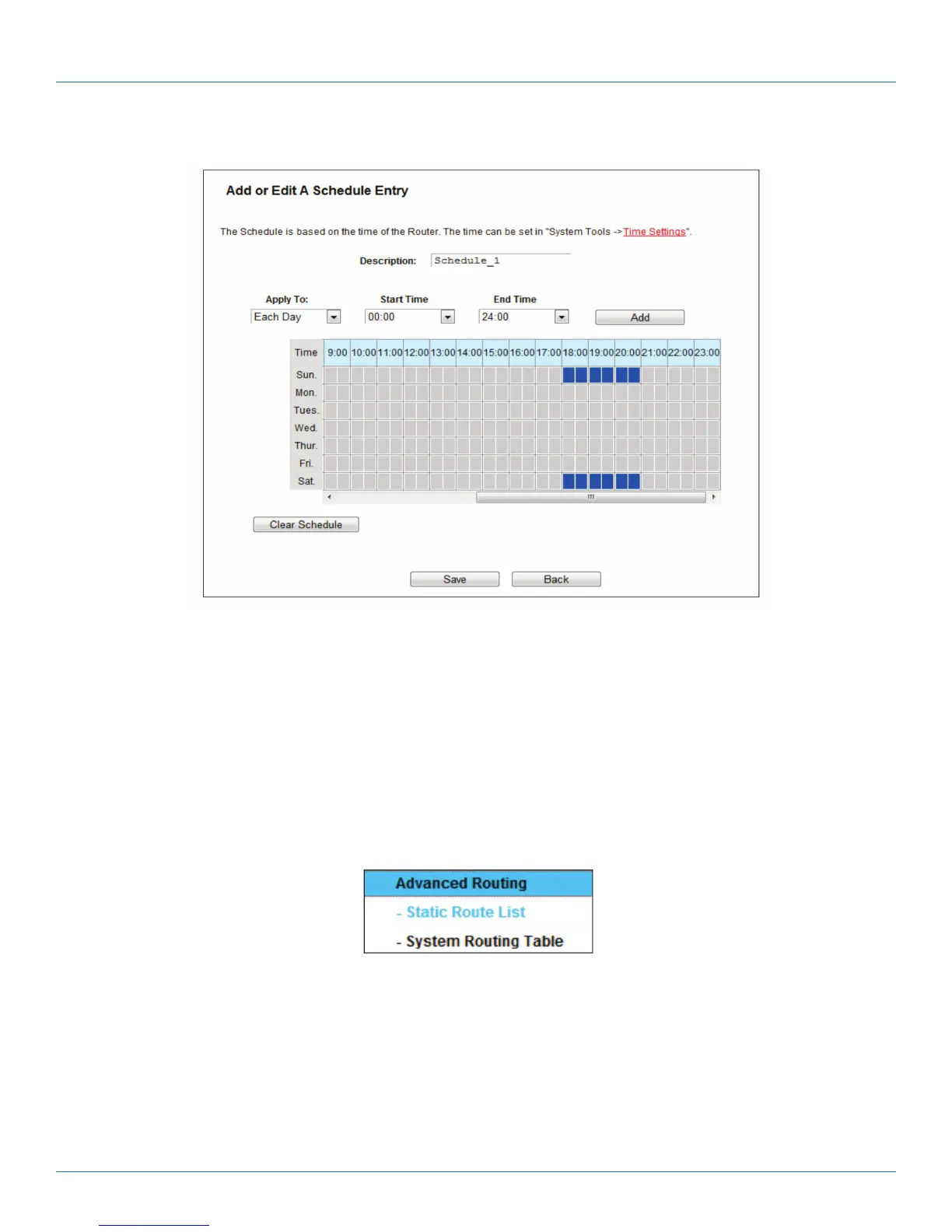
Figure 5-92. Advanced Schedule Settings.
For example: If you desire to restrict the internet activities of host with MAC address 00:11:22:33:44:AA to access www.google.
com only from 18:00 to 20:00 on Saturday and Sunday, follow the steps below:
1. Click the Add New button to enter the Advanced Schedule Settings page.
2. In the Description field, create a unique description for the schedule (e.g. Schedule_1).
3. In the Day list, select Each Week from the drop-down list and click Sat and Sun.
4. In the Time list, select 18:00 for Start Time field and 20:00 for Stop Time. And then click the Add button.
5. Click Save to complete the settings.
5.16 Advanced Routing
Figure 5-93. Advanced Routing.
There are two submenus under the Advanced Routing menu: Static Route List and System Routing Table. Click either of them,
and you will be able to configure the corresponding function.



 To Next Page