877-877-2269 | blackbox.com
Page 66
Chapter 5: Configuring the Router
5.10.3 Storage Sharing
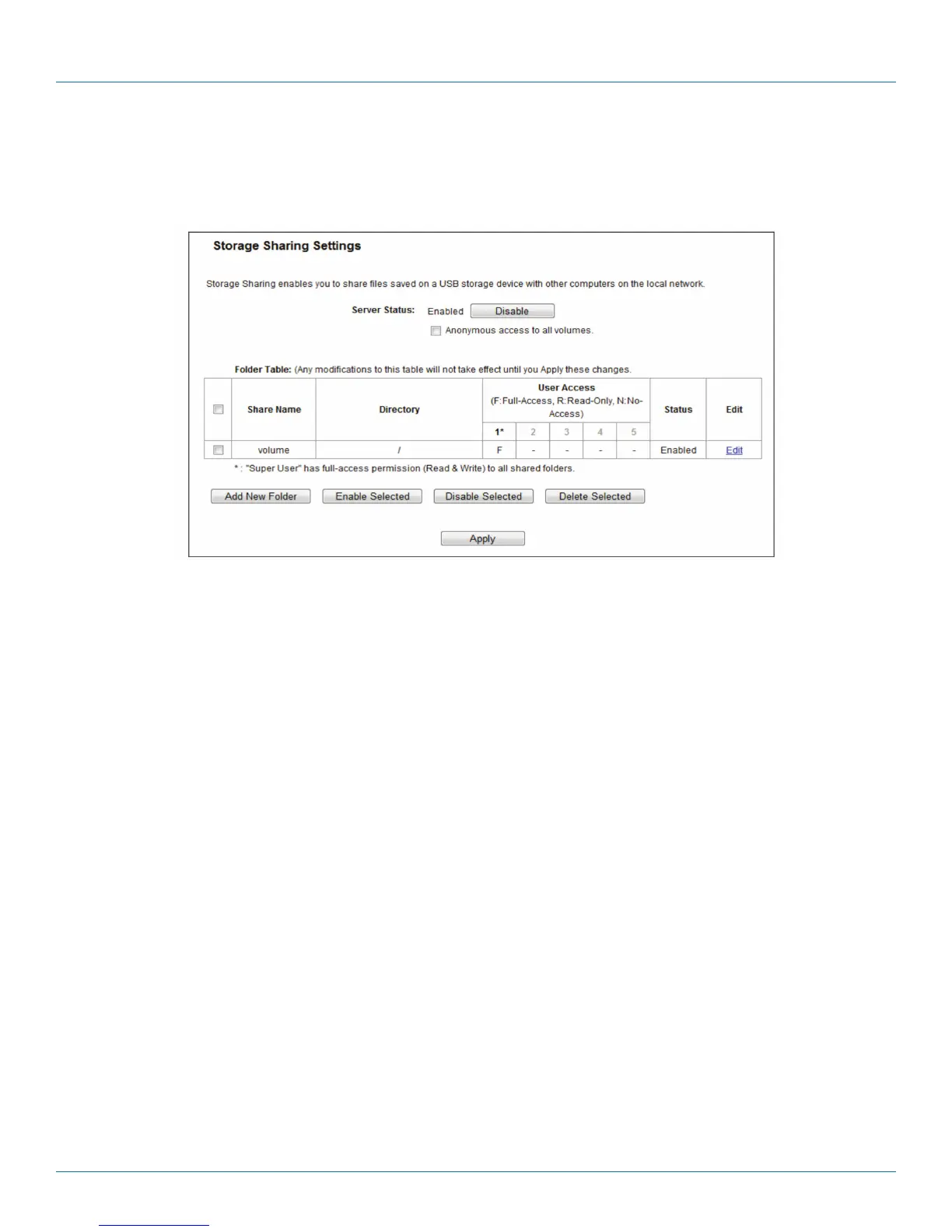
Choose “USB Settings―Storage Sharing,” then you can configure a USB disk drive attached to the router and view volume and
share properties such as share name, directory, user access, and status on this page as shown below.
Figure 5-56. Storage Sharing.
• Server Status—Indicates the Storage Sharing server's current status. You can click the Enable button to start the Storage Sharing
service and click the Disable button to stop it.
• Anonymous access to all volumes—Check this box to allow users to access all volumes without username or password.
• Shared Name—The volume name of the USB drive the users have access to.
• Directory—The directory of the shared folder.
• User Access—Indicates user access of the shared folder. F stands for fully access, R stands for read-only, and N stands for no-
access.
• Status—Indicates the shared or non-shared status of the volume.
• Edit—Click Edit to edit the entry.
To add a new folder, follow the instructions below.
1. Click Add New Folder in the next screen.



 To Next Page