Page 65
877-877-2269 | blackbox.com
Chapter 5: Configuring the Router
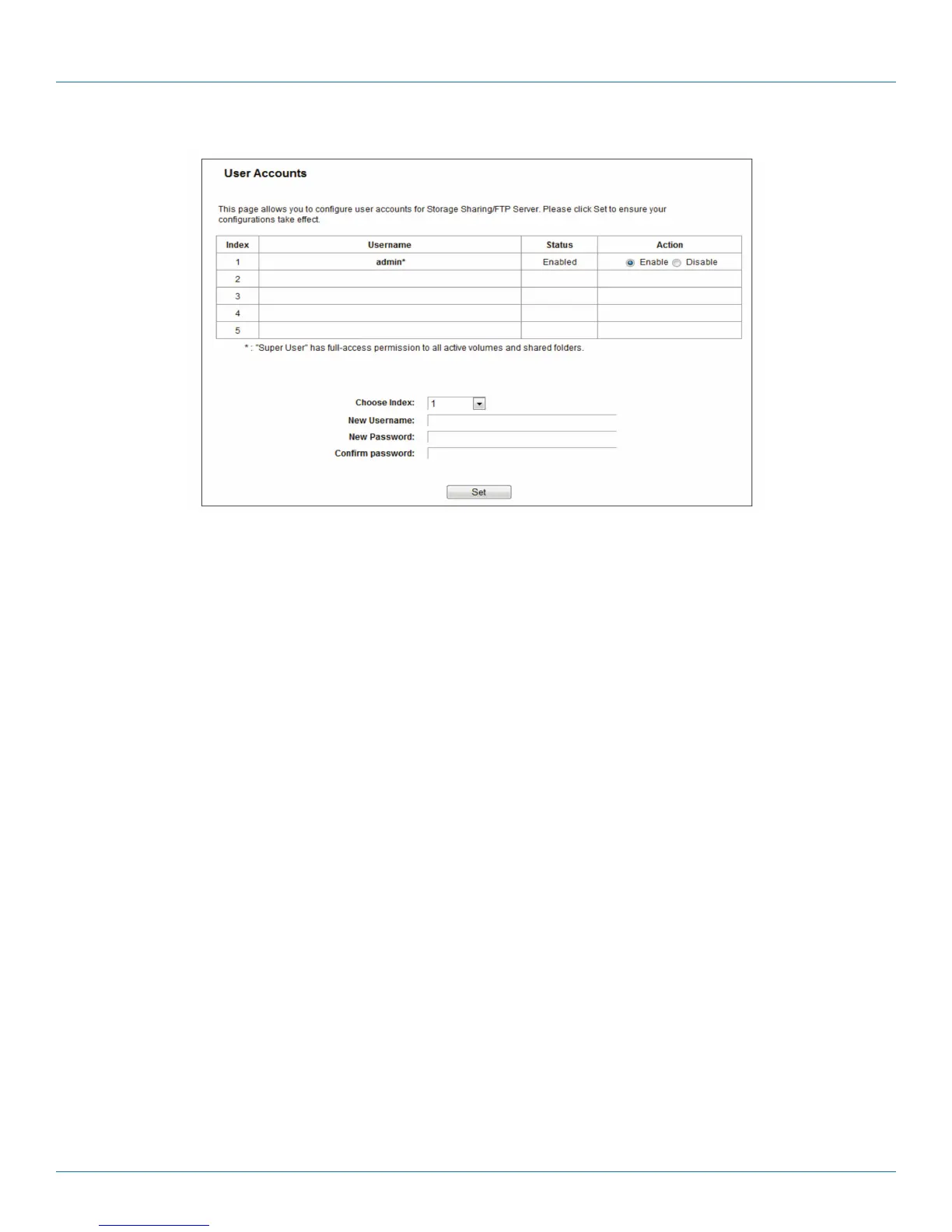
Figure 5-55. User Account Management screen.
Only an Administrator can use a Web browser to transfer the files from a PC to the writable shared volume on the USB drive.
To add a new user account, follow the steps below:
1. Choose the Index from the drop-down list.
2. Self-define a User Name.
3. Enter the password in the Password field.
4. Re-enter the password in the Confirm Password field.
5. Click Set to make your settings take effect.
• New Username—Type the user name that you want to give access to the USB drive. The user name must be composed of
alphanumeric symbols not exceeding 15 characters in length.
• New Password—Enter the password in the Password field. The password must be composed of alphanumeric symbols not
exceeding 15 characters in length. For security purposes, the password for each user account is not displayed.
• Confirm Password - Re-enter the password here.
NOTES:
1. Restart the service for the new settings to take effect.
2. If you cannot use the new user name and password to access the shares, press Windows logo + R to open the Run dialog box
and type net use \\192.168.1.1 /delete /yes and press Enter. (192.168.1.1 is your router's LAN IP address. If the LAN IP of the
modem connected with your router is 192.168.1.x, the default LAN IP of the router will automatically switch from 192.168.1.1
to 192.168.0.1 to avoid IP conflict; in this case, try net use \\192.168.0.1 /delete / yes.)



 To Next Page