877-877-2269 | blackbox.com
Page 48
Chapter 5: Configuring the Router
4b. Enter wireless station A/B in the Description field.
4c. Select Enabled in the Status drop-down list.
4d. Click the Save button.
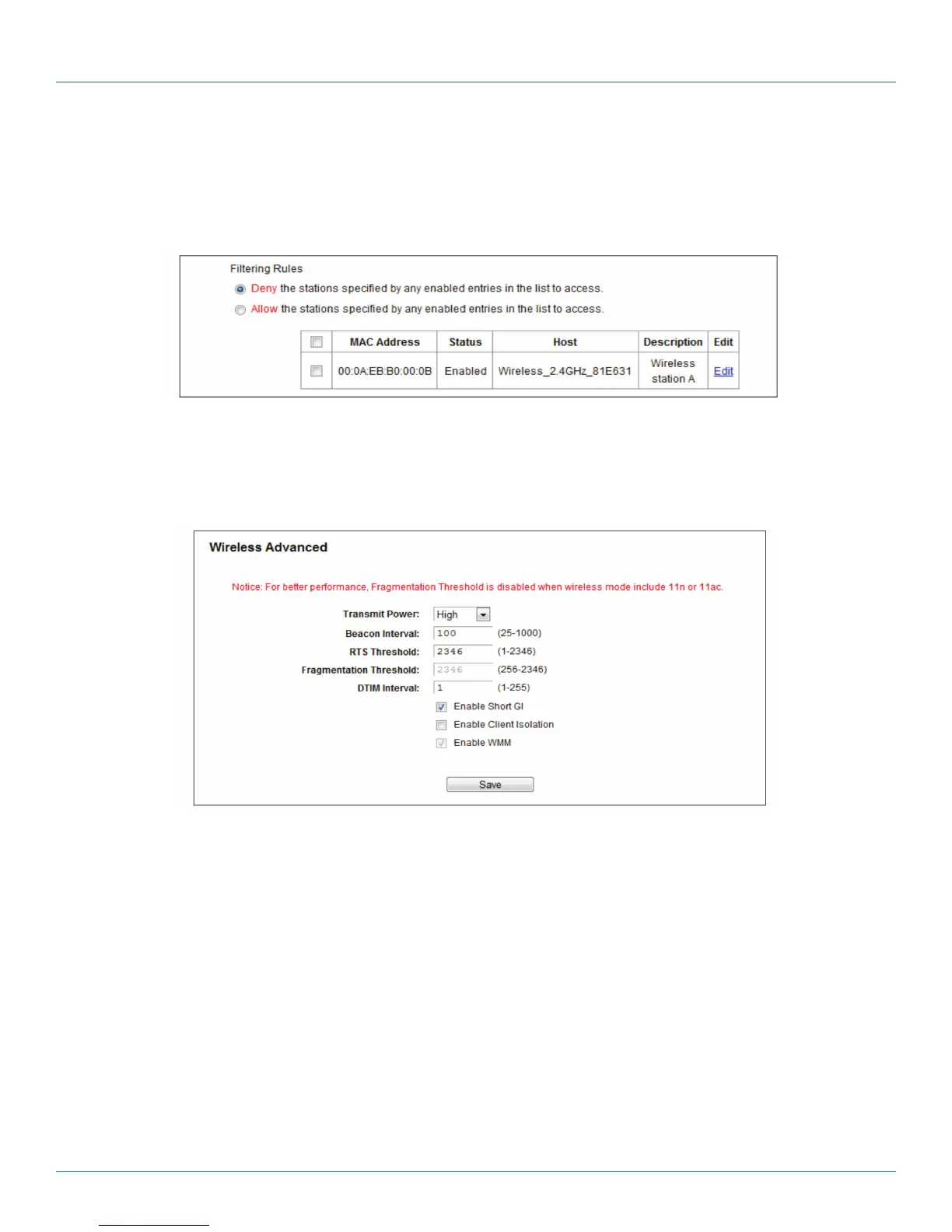
The filtering rules that you configured should be similar to the following list:
Figure 5-27. Filtering rules.
5.6.5 Wireless Advanced
Choose “Wireless 2.4GHz —> Wireless Advanced,” then you can configure the advanced settings of your wireless network.
Figure 5-28. Wireless Advanced.
• T ransmit Power—Here you can specify the transmit power of the router. You can select High, Middle, or Low. High is the
default setting and is recommended.
• Beacon Interval—Enter a value between 20–1000 milliseconds for Beacon Interval here. The beacons are the packets sent by the
router to synchronize a wireless network. Beacon Interval value determines the time interval of the beacons. The default value is
100.
• RTS Threshold —Here you can specify the RTS (Request to Send) Threshold. If the packet is larger than the specified RTS
Threshold size, the router will send RTS frames to a particular receiving station and negotiate the sending of a data frame. The
default value is 2346.
• Fragmentation Threshold—This value is the maximum size that determines whether packets will be fragmented. Setting the
Fragmentation Threshold too low may result in poor network performance because of excessive packets. 2346 is the default
setting and is recommended.



 To Next Page