Page 39
877-877-2269 | blackbox.com
Chapter 5: Configuring the Router
NOTES:
1. If you change the IP Address of LAN, you must use the new IP Address to log in the router.
2. If the new LAN IP Address you set is not in the same subnet, the IP Address pool of the DHCP server will change accordingly
at the same timewhile the Virtual Server and DMZ Host will not take effect until they are re-configured.
5.4.3 MAC Clone
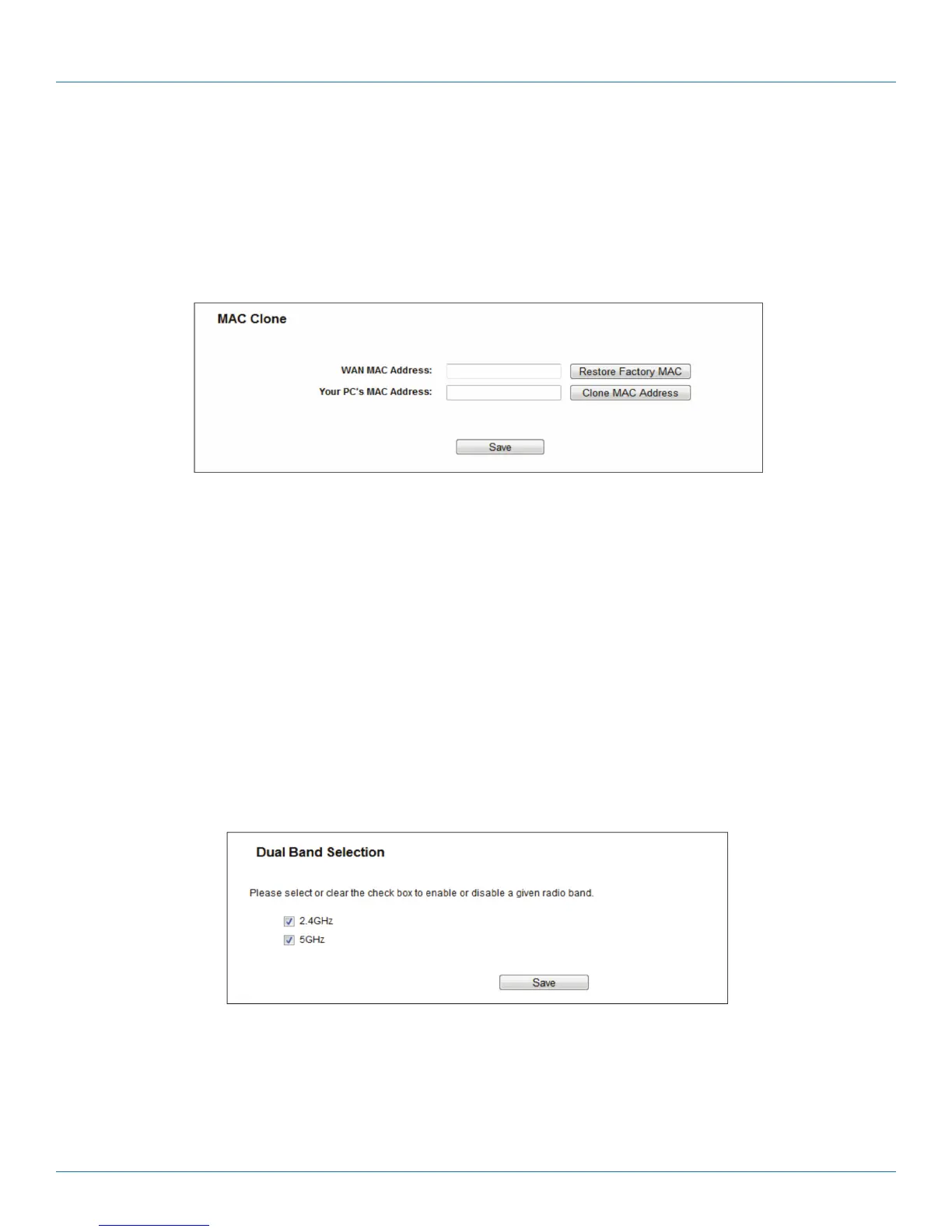
Choose menu “Network —> MAC Clone”, then you can configure the MAC address of the WAN on the screen below.
Figure 5-11. MAC Clone.
Some ISPs require that you register the MAC Address of your adapter. Changes are rarely needed here.
• WAN MAC Address—This field displays the current MAC address of the WAN port. If your ISP requires you to register the MAC
address, enter the correct MAC address into this field in XX:XX:XX:XX:XX:XX format (X is any hexadecimal digit).
• Your PC's MAC Address—This field displays the MAC address of the PC that is managing the router. If the MAC address is
required, you can click the Clone MAC Address button and this MAC address will fill in the WAN MAC Address field.
Click Restore Factory MAC to restore the MAC address of WAN port to the factory default value.
Click the Save button to save your settings.
NOTE: Only the PC on your LAN can use the MAC Address Clone function.
5.5 Dual Band Selection
Choose the “Dual Band Selection” menu, then you can select the working frequency for your router. We recommend that your
computers and devices running video and voice applications use the 5 GHz band, while your guest access and computers that are
only browsing the web use the 2.4 GHz band.
Figure 5-12. Dual Band Selection.
• 2.4 GHz (802.11b/g/n)—Click the box, then the router will only work at 2.4 GHz frequency. You can use the 2.4 GHz band to
connect to many classic wireless devices like gaming consoles, laptops, DVRs, etc.
• 5 GHz (802.11a/n/ac)—Click the box, then the router will only work at 5 GHz frequency. This band is less crowded and is used
for time-sensitive music, video streaming or gaming. Using this band can avoid interference with 2.4 GHz networks or noisy
devices like cordless phones and microwave ovens.



 To Next Page