877-877-2269 | blackbox.com
Page 92
Chapter 5: Configuring the Router
Click Save to make the settings take effect.
• Description—This is the information about the rules such as address range.
• Priority—The priority of the rule, ranging from 1 to 8. 1 stands for the highest priority.
• Egress bandwidth—This field displays the max and mix upload bandwidth through the WAN port; the default is 0.
• Ingress bandwidth—This field displays the max and mix download bandwidth through the WAN port; the default is 0.
• Status—This displays the status of the rule.
• Edit—Click Edit to edit the rule. Click Delete to delete the rule.
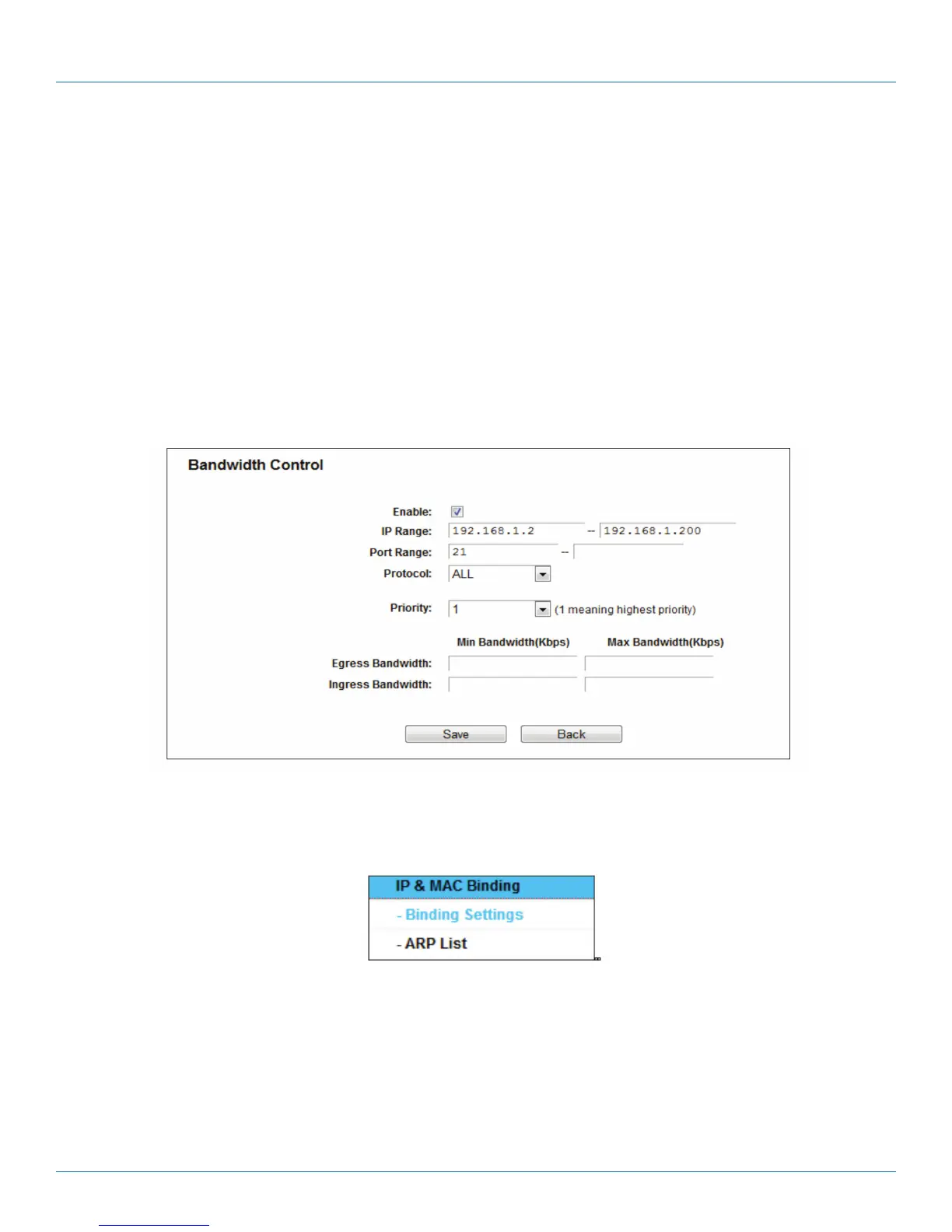
To add/modify a Bandwidth Control rule, follow the steps below.
1. Click Add New in the Bandwidth Control screen, and you will see a new screen shown next.
2. Enter the information in the screen shown below.
Figure 5-98. Bandwidth Control Rule Settings.
3. Click the Save button.
5.18 IP and MAC Binding
Figure 5-99. IP and MAC Binding menu
There are two submenus under the IP & MAC Binding menu: Binding Settings and ARP List. Click either of them, and you will be
able to scan or configure the corresponding function. Detailed explanations for each submenu are provided below.



 To Next Page