Page 37
877-877-2269 | blackbox.com
Chapter 5: Configuring the Router
CAUTION: Sometimes the connection cannot be disconnected even though you specify a Max Idle Time, because some
applications are visiting the Internet continually in the background.
Click the Save button to save your settings.
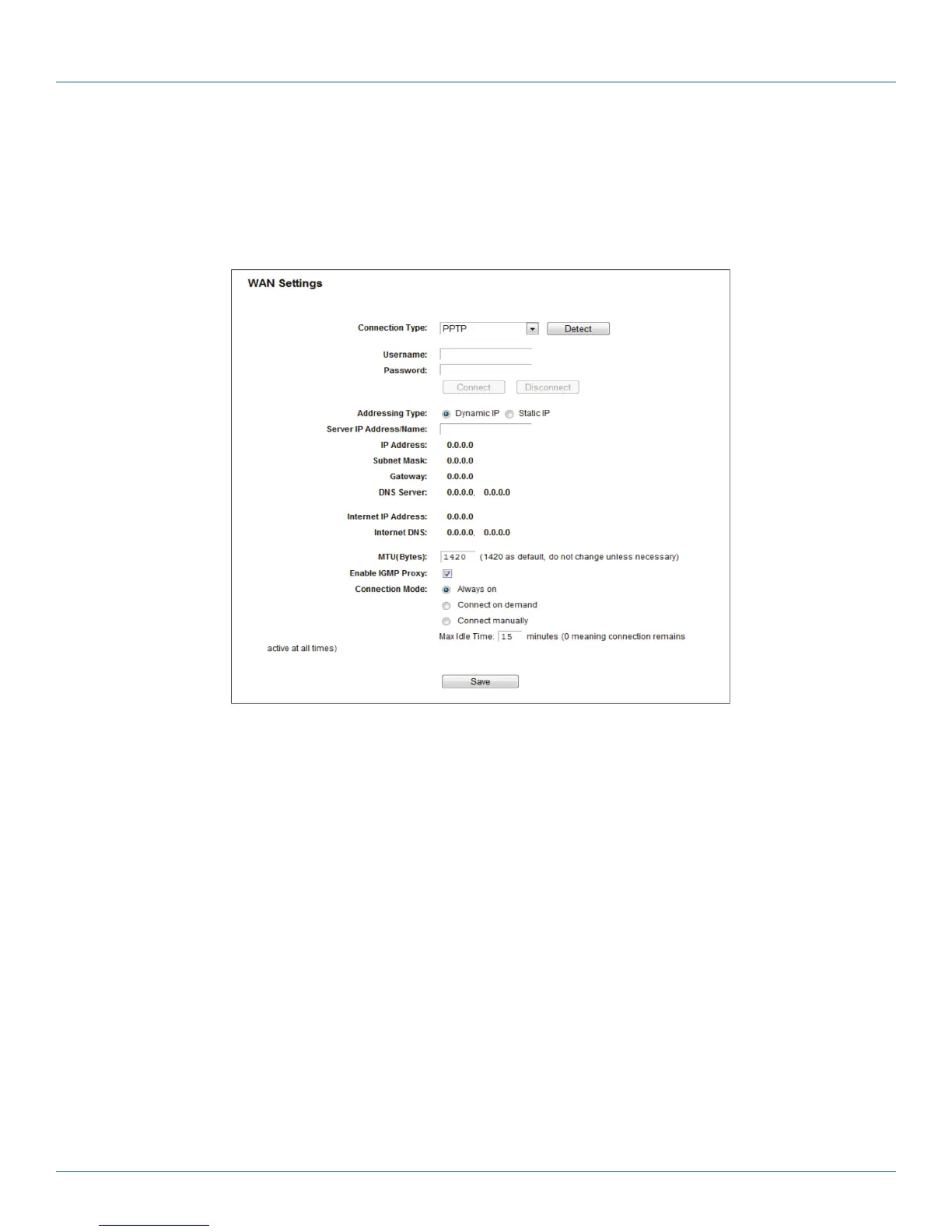
6. If your ISP provides PPTP connection, select the PPTP option. Enter the following parameters:
Figure 5-9. PPTP Settings.
• Username/Password—Enter the User Name and Password provided by your ISP. These fields are case-sensitive.
• Dynamic IP/ Static IP—Choose the addressing type given by your ISP, either Dynamic IP or Static IP, and enter the ISP’s IP address
or the domain name.
If you choose static IP and enter the domain name, you should also enter the DNS assigned by your ISP. Then click the Save
button.
Click the Connect button to connect immediately. Click the Disconnect button to disconnect immediately.
• MTU (Bytes)—The default MTU size is “1420” bytes, which is usually fine. Do not change the default MTU Size unless required
by your ISP.
• Enable IGMP Proxy—IGMP (Internet Group Management Protocol) is used to manage multicasting on TCP/IP networks. Some
ISPs use IGMP to perform remote configuration for client devices, such as the modem router. The default value is enabled, if you
are not sure, contact your ISP or just leave it.
• Connection Mode—Choose the Internet connection mode.
- Always on—In this mode, the Internet connection will be active all the time.



 To Next Page