Group 08, Section 03, Page 2 Mechanical Dock Leveler – M and FMC
Issue Date: 10/01/01, Rev, 0 (Part #038-550E)
HOLD DOWN BOX REPLACEMENT - cont’d
9)
The rewind spring in the new hold
down box is under tension and is
locked in position with a cable clamp
positioned on the cable at the point
the cable exists the hold down box.
Do not remove this clamp at this
time.
10) Unwind the loose cable from around
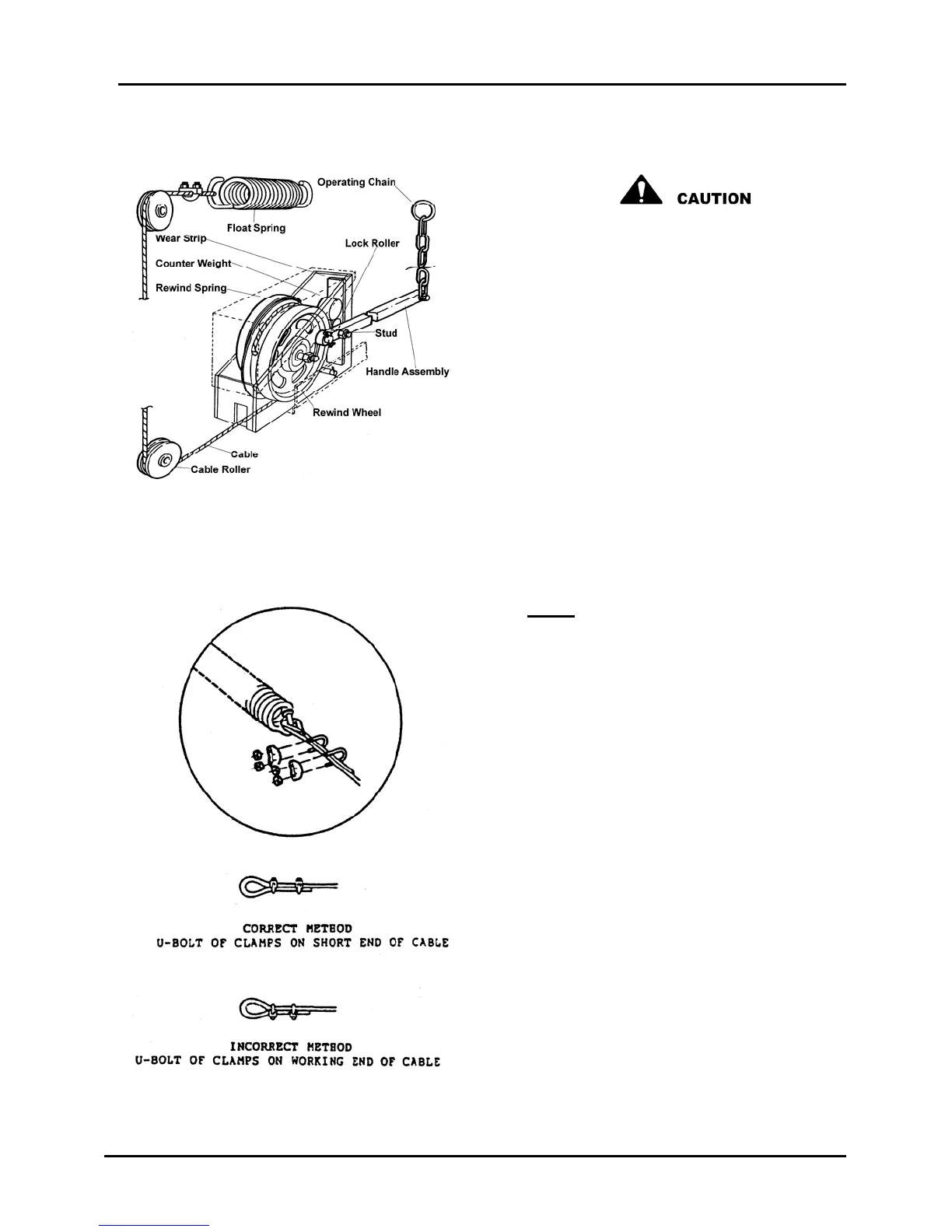
the new hold down box and place
the box in position in the platform
channel. Secure in place with the
retaining pin. Ensure that both
locking cotter pins are in place and
secure.
11) Attach release chain to release
handle, tighten securely.
Note: If a new bolt and nut are
used, the new nut must be of self-
locking type. If in doubt, use lock-tite
or similar locking fluid on the threads
of the bolt and nut.
12) Feed loose cable end through lower
and upper cable rollers and through
float spring eye. Loop cable back
and install cable clamp loosely.
Apply tension to loose end of cable,
removing all slack between hold
down box and float spring. Position
cable clamp as close as possible to
the float spring while maintaining
tension on cable and tighten
securely. See Figure 11.
13) Cut off excess cable approximately
2” from cable clamp.
Figure 10
Figure 11



 To Next Page