Mechanical Dock Leveler – M and FMC Group 08, Section 03, Page 1
Issue Date: 10/01/01, Rev. 0 (Part #038-550E)
HOLD DOWN BOX REPLACEMENT
1) Raise the dock leveler and position
maintenance strut and traffic barriers as
required for safety. Place a safety stand
between the deck assembly and the
lower frame to assure the deck cannot
be lowered. Deck must be fully raised.
2) Wire wound cables become frayed with
use and must be handled with care.
Use leather gloves or similar protection.
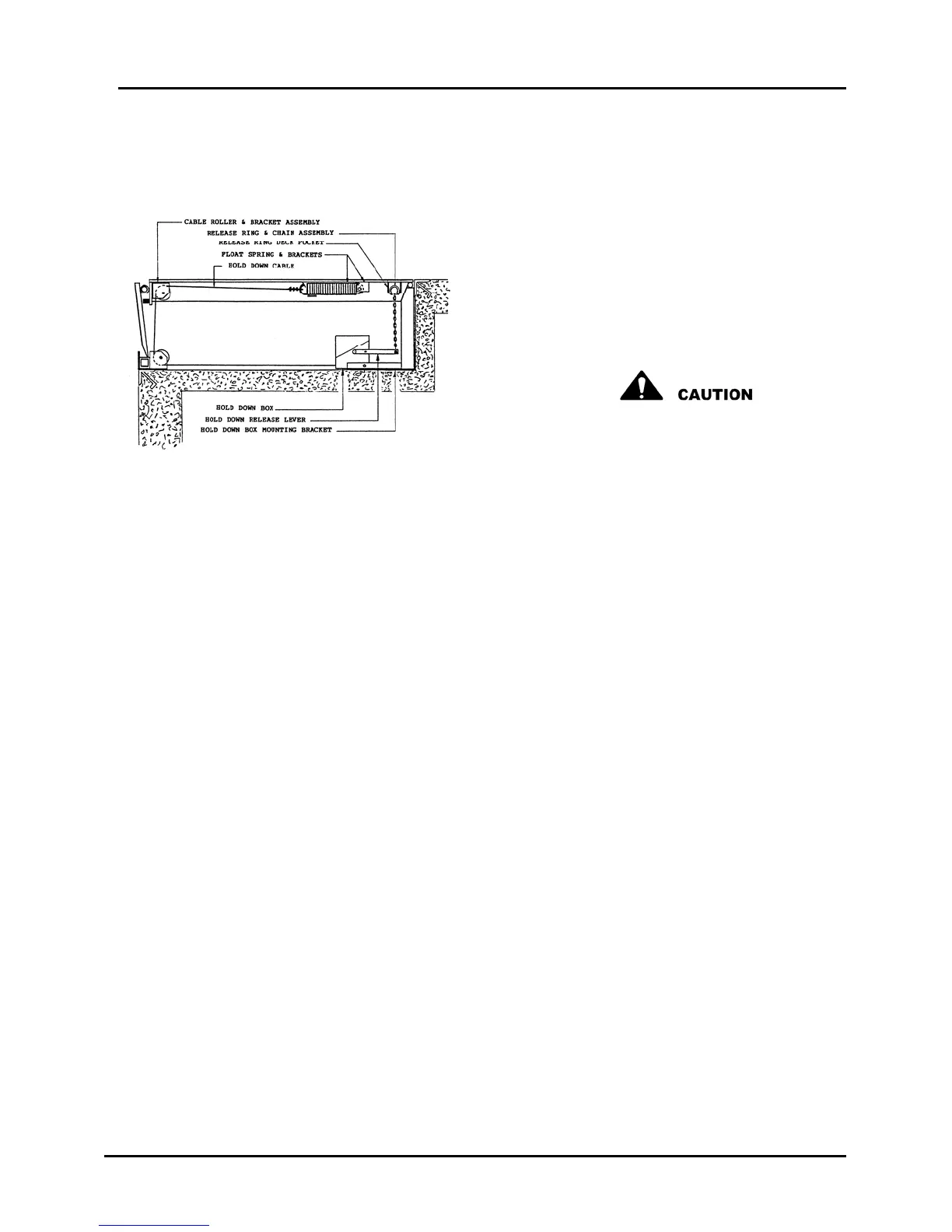
Figure 9
3) Enter pit area and clamp vice-grips on the old hold down cable at the point the cable
enters the hold down box, to lock the cable in position.
4) Remove the release chain from release handle. Retain fasteners for re-assembly.
5) Remove the cable clamp that retains the old hold down cable to the float spring.
Retain clamp for re-assembly
6) Pull cable down through upper roller and back through lower roller.
7) Remove the retaining pin that passes through the lower, rear position of the hold
down box. Retain for re-assembly.
8) Lift the old hold down box from the platform channel mounting bracket and remove
it from the pit area. Do not remove the vice-grip clamp from the cable.



 To Next Page