45
4.8.2. SNMPtrapConguration
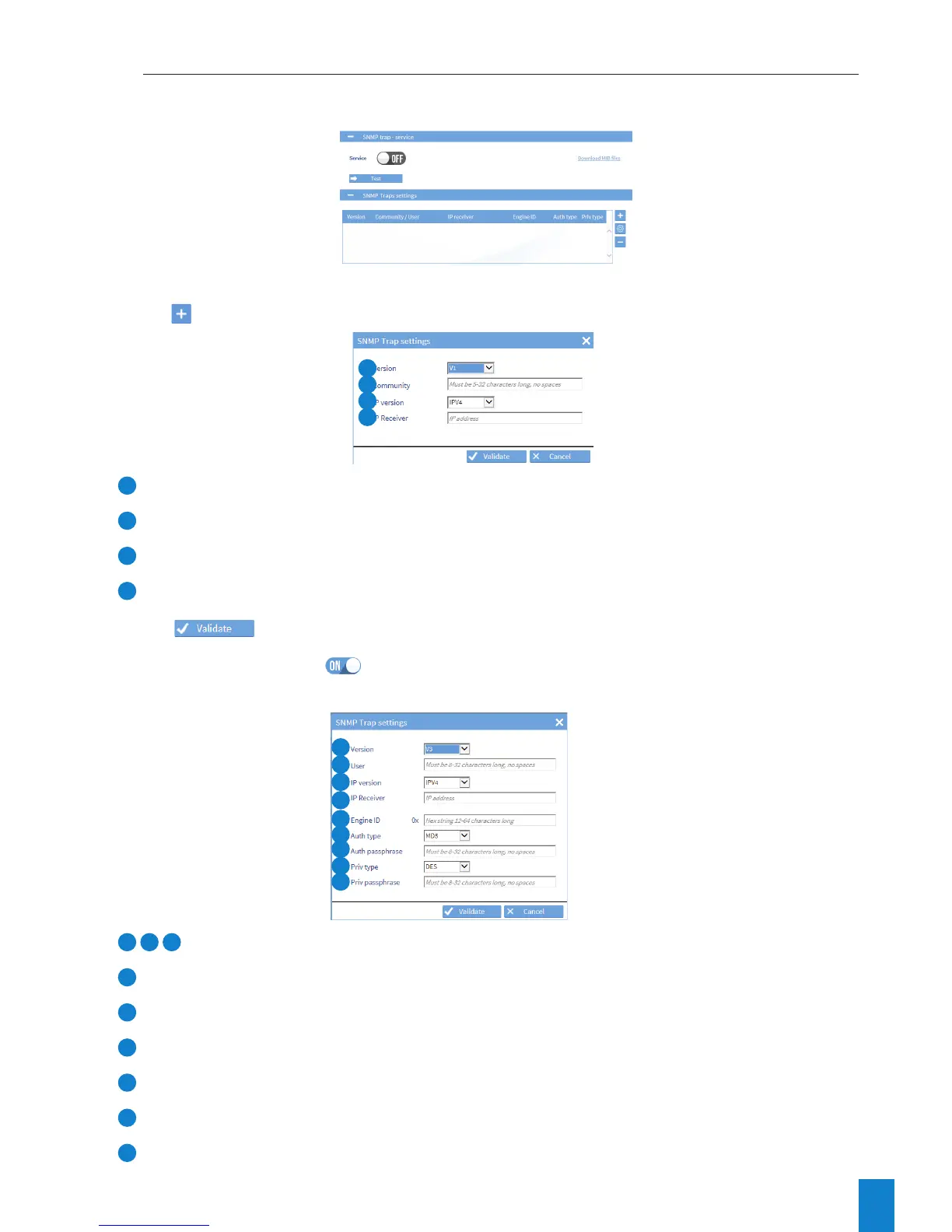
To configure trap receipt, follow these steps:
1) NOTIFICATION menu > SNMP trap:
VersionV1orV2C:
2) Click , and the following window will appear:
1
Select the supported SNMP version: V1, V2C or V3.
2
Enter a community name of between 5 and 32 characters, without spaces.
3
Select the IP communication version: IPV4.
4
Enter the IP address of the trap destination server.
3) Click
.
4) Enable the service using the button, then save.
VersionV3:
1
3
4
See above.
2
Enter the name of the user.
5
Enter the ID of the SNMP engine.
6
Select the type of authentication (MD5 or SHA).
7
Enter the authentication passphrase.
8
Select the encryption type (DES or AES128).
9
Enter the encryption passphrase.
1
2
3
4
1
2
3
4
5
6
7
8
9



 To Next Page