Cleaning and maintenance
EN
bora.com 107
The activated charcoal filter must be replaced
when the fan indicator is shown
(filter service
display). You can obtain activated charcoal
filters from your specialist supplier or from the
BORA Shop via the website at
http://www.mybora.com.
Removing the activated charcoal filter
u
Remove the air inlet nozzle and stainless steel grease
filter.
u
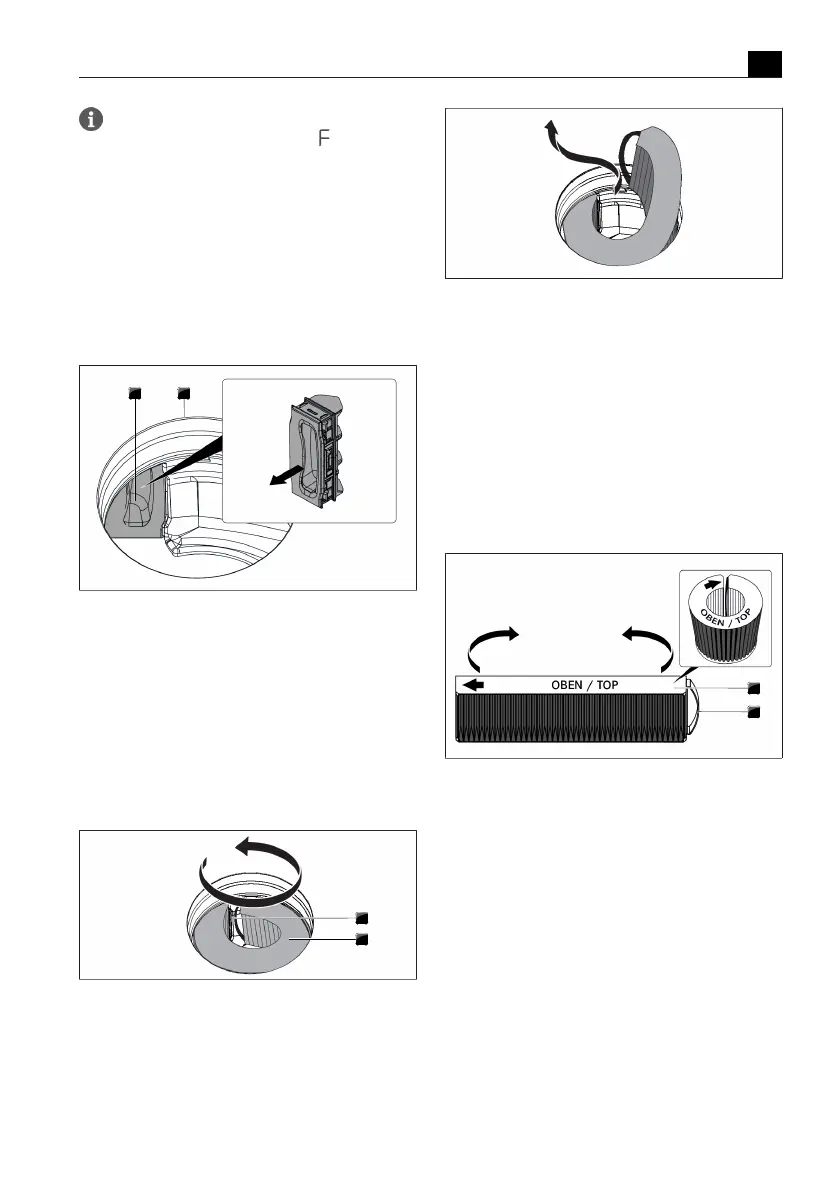
Inside the inlet opening pull the filter replacement
cover out through the opening in the filter housing.
Fig.7.4
Removing the filter replacement cover
[1] Filter replacement cover
[2] Inlet opening
u
Take hold of the activated charcoal filter by the grip
strap and pull it out as far as possible through the
filter housing opening.
u
Take hold of the end of the activated charcoal filter
and pull upwards and towards the left until it is
completely out of the inlet opening.
Fig.7.5
Turning the activated charcoal filter from the
filter housing
[1] Grip strap
[2] Activated charcoal filter
Fig.7.6
Removing the activated charcoal filter through
the inlet opening
Inserting the activated charcoal filter
u
Remove the packaging from the activated charcoal
filter.
u
Position the activated charcoal filter correctly with
the help of the printed symbols (arrow left, grip strap
right).
u
Hold the activated charcoal filter at both ends.
u
Bend the activated charcoal filter into a cylindrical
shape so that both ends of the filter are opposite
each other.
Fig.7.7
Activated charcoal filter
[1] Activated charcoal filter
[2] Grip strap
u
Tilt the activated charcoal filter slightly and insert it
through the inlet opening.



 To Next Page