3
2
1
6
4
5
7 7
8
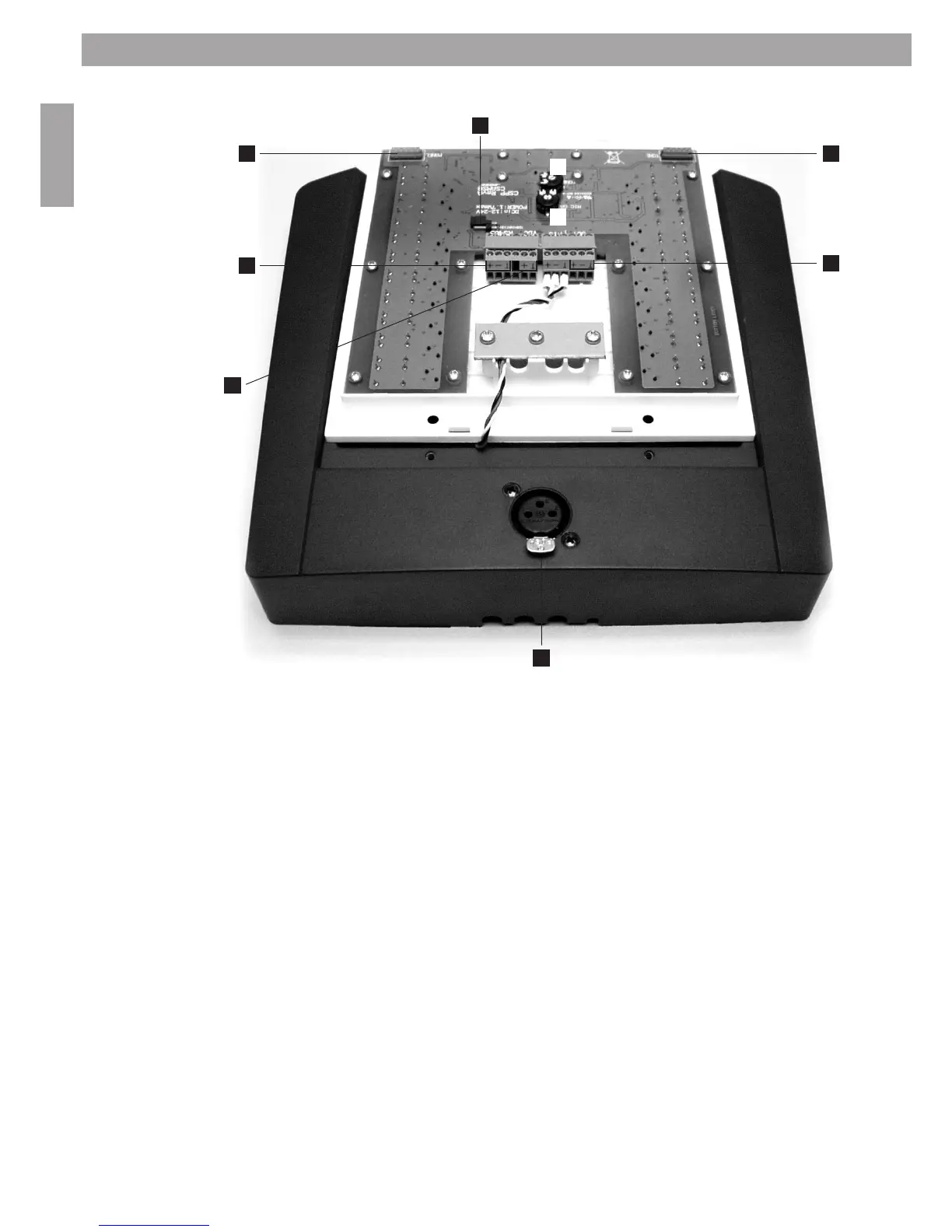
3.8 CS-PP connections and settings
3. System Installation
TheCS-PPisequippedwithvoiceEQ,amicrophonegainadjusterandachime(attentionsignal)gainadjuster.
In order to be able to adjust both gains, and to connect the CS-PP, one needs to remove the plastic inlay (on top
of the frontplate of the CS-PP), then remove the 4 screws and lift the front panel out of the housing. The two
adjusters are located at the bottom of the panel.
NOTE: Ensure not to short any connections or electronic components
1. Microphone gain: turn the adjuster anti clockwise to decrease the gain with a minimum of 32.6 dB. Turn the
adjuster clockwise to increase the gain to a max of 60.1 dB. The factory gain setting is 38 dB.
2. Chime gain: use the adjuster to increase or decrease the level of the chime signal.
3. Termination jumper, see NOTE in chapter 3.5.
4. RS485 connector.
5. Power supply connector, 12-24Vdc (only 2 of the 3 pins are used!).
6. Balanced line output connector.
7. Firmware update connector.
8. XLR-connector for microphone with 22Vdc phantom power


 To Next Page
 Loading...