3-7
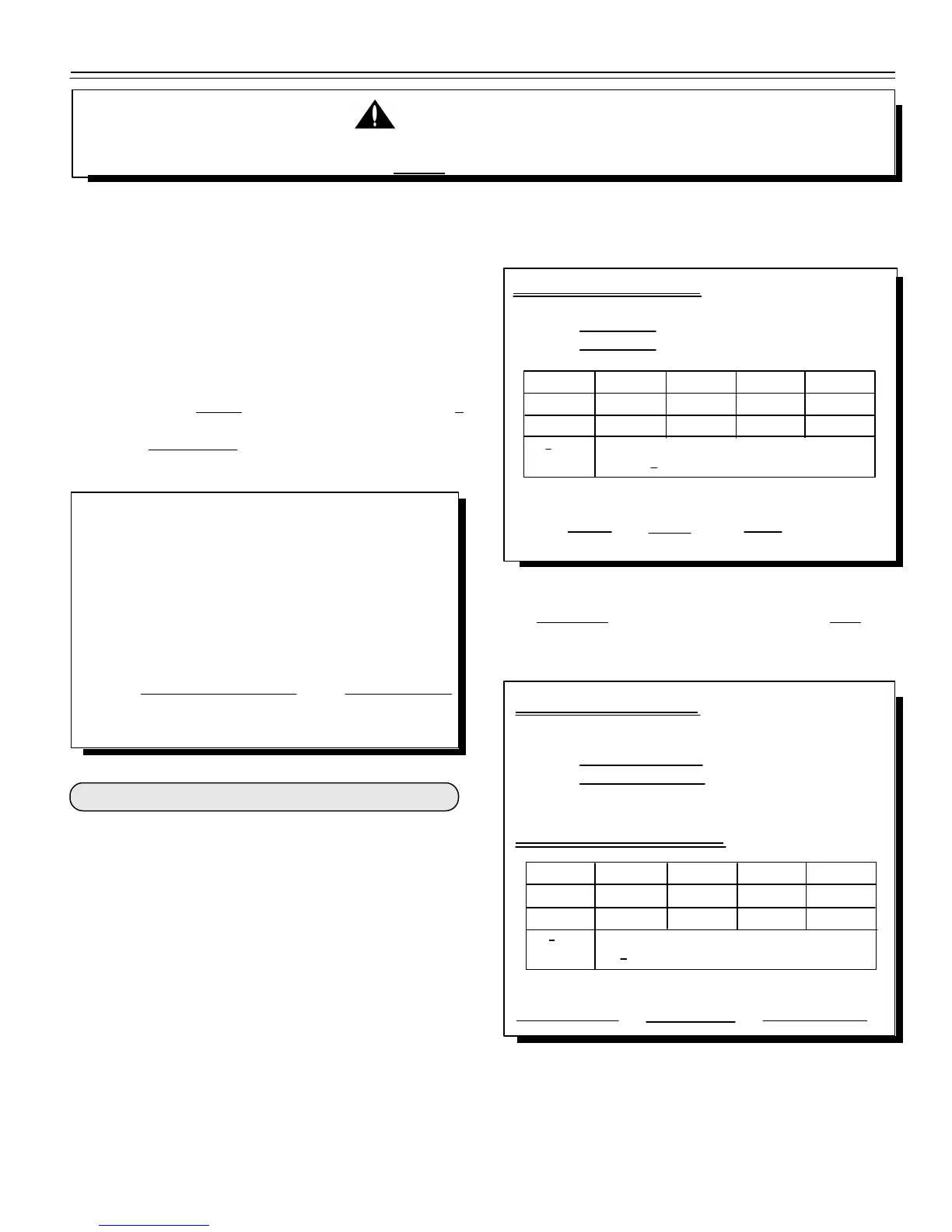
Scale Matching Example:
Original
SETUP# 127070
CAL # 23980
1 trial 2 trial 3 trial
Scale B 30,000 30,580 28,000
Scale A 29,440 29,800 27,500
B : A 1.020 + 1.026 + 1.018 = 3.064
3.064 : 3 trials = 1.021 Cal. Multiplier
New EZ CAL# = Orig. EZ CAL# x Cal Multiplier
24484 = 23980 x 1.021
1: Adjust EZ Indicator to Match Another Scale:
Scale Information Sheet:
Original
SETUP#
CAL#
Scale Matching Work Sheet:
1 trial 2 trial 3 trial
Scale B
Scale A
B : A + + = "x"
"x" : 3 trials = Cal. Multiplier
New EZ CAL# = Orig. EZ CAL# x Cal Multiplier
= x
Before continuing, first write down the current
"SETUP" and "CAL" numbers of your EZ indicator.
These numbers are displayed during the "Self Test".
To run the Self Test:
With the indicator already ON, press the [ON] key to
start the Self Test. Press the [ON] key to "pause" the
Self Test while numbers are displayed. Press [ON]
again to "resume".
SETUP# CAL#
Keep this information for future reference.
The Short Form Setup & Calibration procedure allows
you to change the "SETUP" and "CAL" numbers of the
indicator. You may want to perform this procedure if;
1): The indicator is being connected to different load
cells.
or
2): You want to adjust the calibration to match
another scale system.
PLEASE NOTE: Do not attempt to calibrate the scale if
the indicator is not reading stable weights. The calibration
procedure will not fix instability, inconsistencies, or
flashing "RANGE" messages.
THIS INDICATOR WAS CALIBRATED AT THE FACTORY TO WEIGH ACCURATELY WITH YOUR SYSTEM.
ADDITIONAL CALIBRATION IS NOT NECESSARY UNDER NORMAL CONDITIONS.
WARNING!
It is important to use an average of several weights before
calibrating the scale.
Follow the instructions "To change the Setup /
Calibration Numbers" shown on the next page.
You should not modify your "SETUP" number. Only your
"CAL" number.
Sometimes two different scales are used to weigh the
same load. When this is done, the weight
measured by each scale may not be the same. This can
be caused by one or both of the two scales being slightly
out of calibration. This indicator has the ability to match
any other scale, even if that scale is uncalibrated.
To match your EZ scale (Scale A) to another scale
(Scale B) you must determine the Calibration
Multiplier. To do this, place a load on Scale A
(feed wagon, etc...) and write down the weight displayed.
Repeat several times to determine the average weight.
Next, place the same load on Scale B and again write down
the weight displayed. Again, repeat several times to
determine the average weight. Then, use this formula to
determine the Calibration Multiplier for the EZ's
"CAL" number:
"Short Form" Setup & Calibration:
• 06-30-00


 To Next Page