Installation and Operation Manual
X-VA-MT3809G-MT3810G-eng
Part Number: 541B182AAG
July, 2018
Models MT3809G & MT3810G
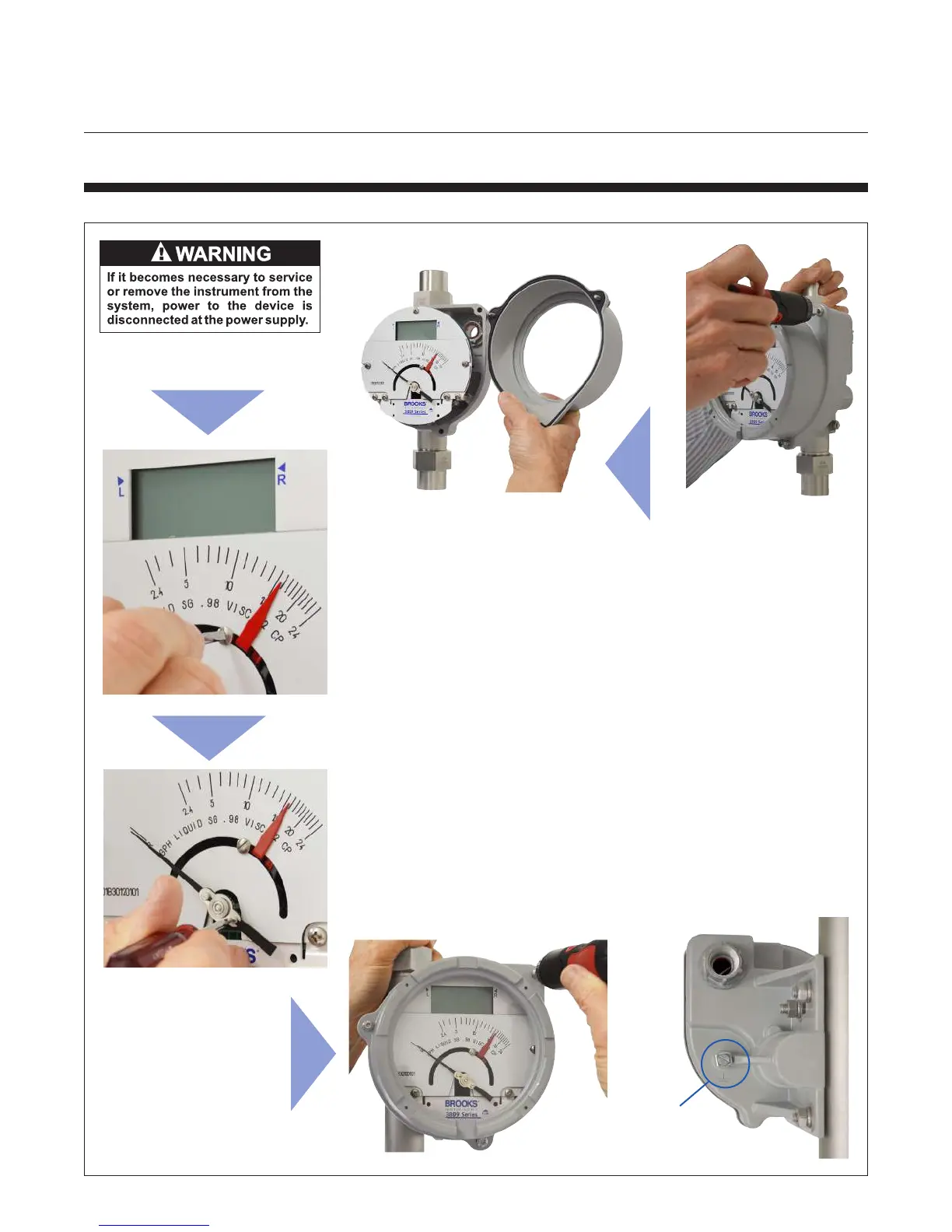
Directions to remove and reinstall the IS Housing Indicator Cover,
adjust Alarms and the Pointer:
1. To begin make sure the oat is at rest and there isn’t ow going
through the meter.
2. Using a T20 TORX tool loosen the 3 cover screws. Note, the screws
will stay attached to the cover.
3. Remove the cover from the housing. The gasket should still be
attached to the cover in the gasket groove. If not place the gasket into
the groove of the cover.
4. Using a at blade screwdriver with a 1/8" blade, hold the red alarm
pointer and turn the screw counterclockwise to loosen the pointer, slide it
to desired position on scale and tighten screw.
5. Using a at blade screwdriver with a 1/8" blade, hold the pointer
and turn the screw to align with the “R” on the scale. It may take a few
adjustments to get the pointer on the “R”.
6. To replace the cover, place the cover against the housing and tighten
the 3 screws using a T20 TORX tool. Tighten to 45 in-lbs or 5.08 N-m to
keep a watertight seal.
2-5-2 How to Remove and Reinstall IS Housing Indicator Covers
Grounding
Screw
(accessed at
rear of meter)



 To Next Page