Installation and Operation Manual
X-VA-MT3809G-MT3810G-eng
Part Number: 541B182AAG
July, 2018
Models MT3809G & MT3810G
f) Common transmitter parameters are set during manufacturing at
Brooks Instrument based on order information, meter conguration or
defaults inherent to the transmitter. Further detailed congurations as
well as on-line monitoring can be done through the Foundation Fieldbus
communication protocol.See Foundation Fieldbus supplemental manual
(X-DPT-FF-MT3809G-Alarms-eng).
g) After installation and power up of the transmitter, the transmitter
must be zeroed, both electrically and mechanically. This operation
will compensate for any stray magnetic effects in the vicinity of the
transmitter.
Important: The zero adjusting of the pointer inuences the transmitter
indication, but not the other way around. Therefore, rst adjust the pointer
at the zero ow position, then the transmitter must be zeroed.
i. Flow must be veried to be zero during the entire zeroing.
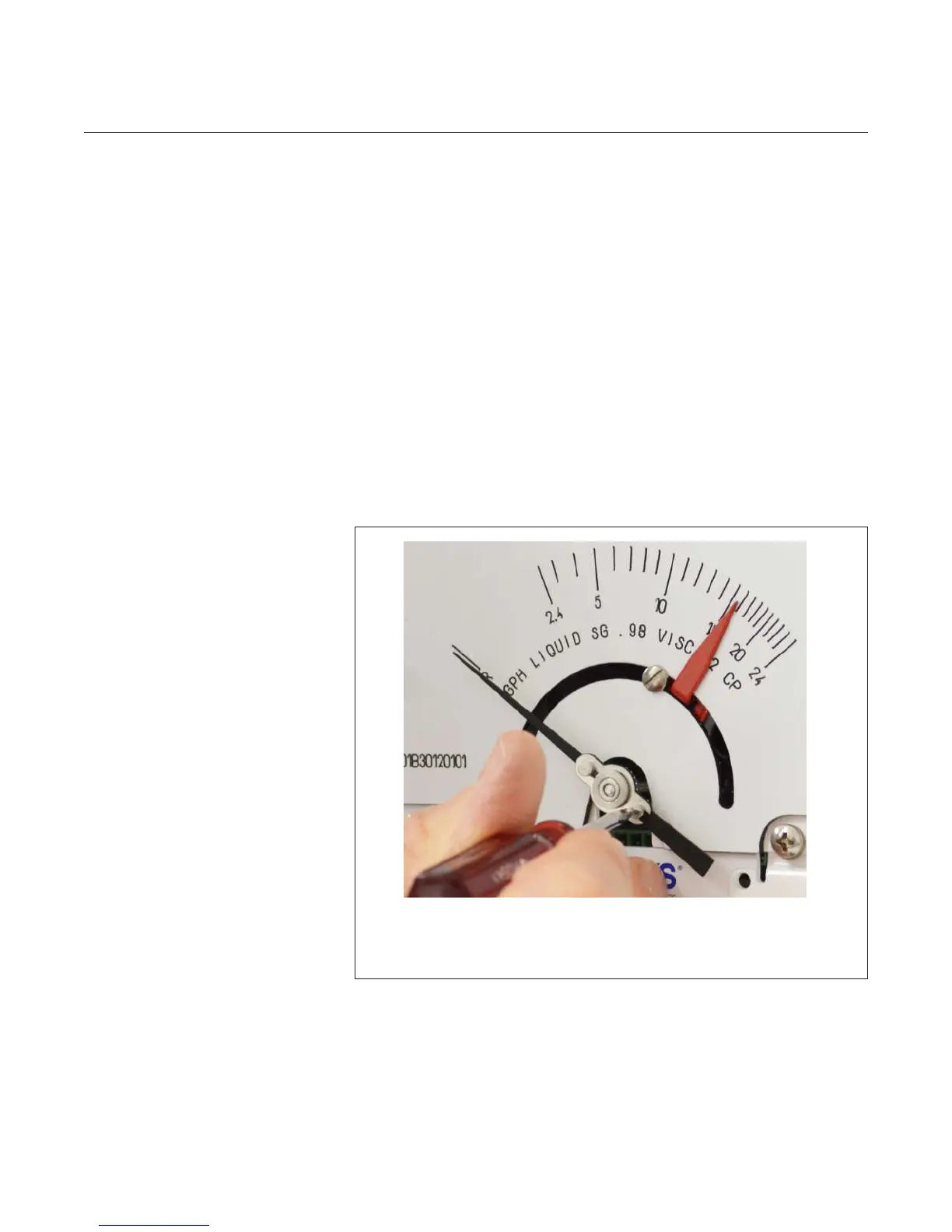
ii. With the ow at zero and the oat at the zero ow position, adjust the
mechanical indicator to point to the ‘R’ (reference line) using the
adjustment screw on the face of the pointer, next to the hub.
See Figure 2-10.
Figure 2-10 Mechanical Indicator Zero
Using a at blade screwdriver with a 1/8" blade, hold the pointer and
turn the screw to align with the “R” on the scale.
It may take a few adjustments to get the pointer on the “R”.



 To Next Page