6. Panel operation
bfottler
BAS-300E
series
7D?7L>.
NO
.
----
PROGRAM
NO
.
D
DO
~7'tllf:
R/ W
D
;<=~-
---
.flifi~
0 X-SCALE
~ifi~
0 Y-SCALE
.At:
•-
~-=·
0 SPEED
MENU
~
T*iJ'7/~
B.T.
COUNTER
IDO
k1
1
h
~NO.
SPLIT
NO.
0
•
0
~
ibi!
POWER
"f
*~:if:
"f
*=>c:m
---
----
B.T.
SET B.
T.
CHANGE
I
.-ID
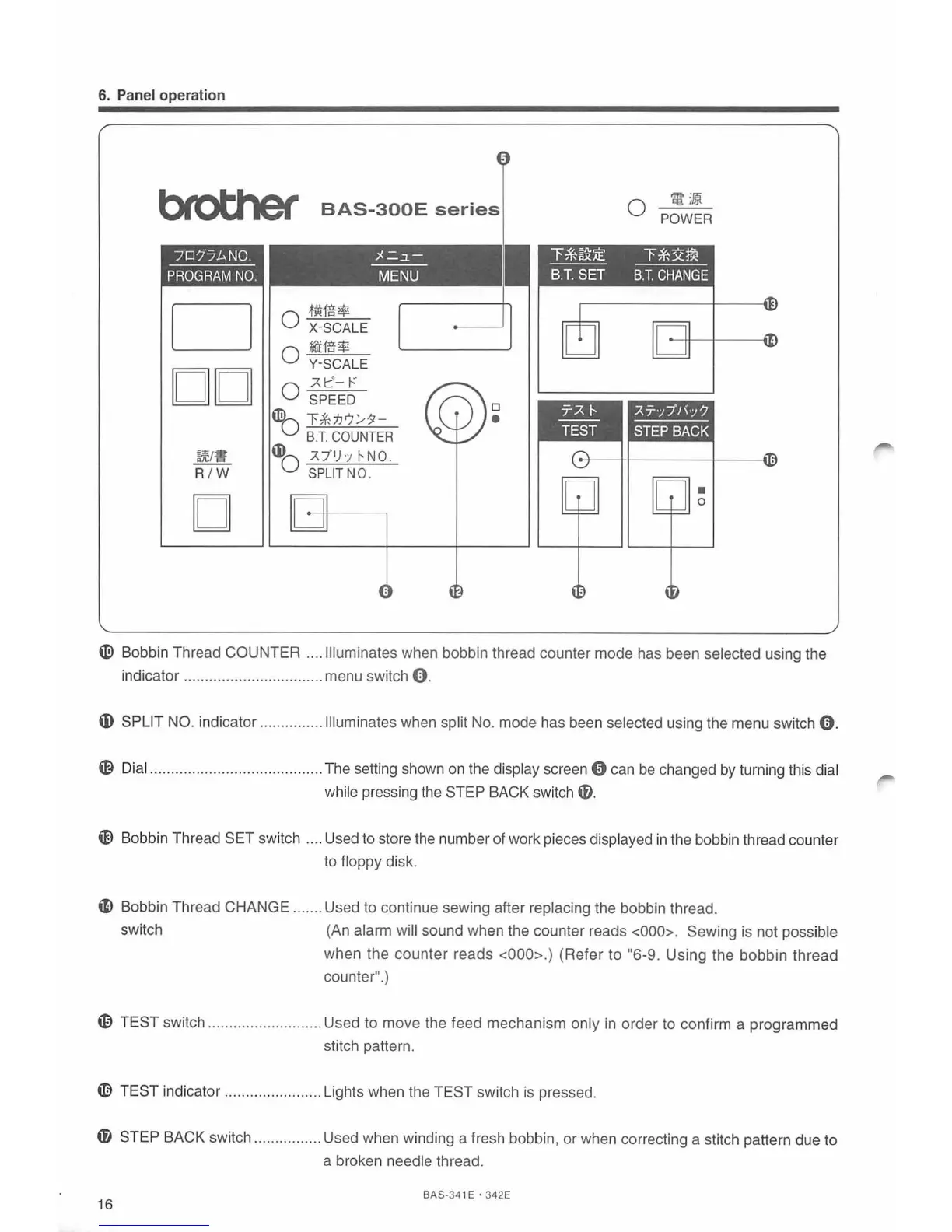
Bobbin Thread COUNTER .... Illuminates when bobbin thread counter mode has been selected using the
indicator ................................. menu switch
0.
ID
SPLIT NO. indicator ......
..
....... Illuminates when split No. mode has been selected using the menu switch
0.
~ Dial ............................
...
.......... The setting shown on the display screen 0 can
be
changed by turning this dial
wh
il
e press
in
g the STEP BACK switch
fl.
e Bobbin Thread SET switch .... Used to store the number of work pieces displayed
in
the bobbin thread counter
to floppy disk.
~ Bobbin Thread CHANGE ....... Used to continue sewing after replacing the bobbin thread.
switch
(An alarm will sound when the counter reads <000>. Sewing is not possible
when the
counter
reads <000>.) (Refer to "6-9. Using the bobbin thread
counter".)
~ TEST switch ........................... Used to move the feed mechanism only in order to confirm a programmed
stitch pattern.
[)
TEST indicator ....................... Lights when the TEST switch is pressed.
f)
STEP BACK switch ................ Used wh
en
winding a fresh bobbin, or when correcting a stitch pattern due to
a broken needle thread.
16
BAS-34 1 E · 342E



 To Next Page