EasyManua.ls Logo

Brother BAS-341E - 10 DIP Switch; Panel DIP Switch Functions

Brother BAS-341E
67 pages
Print Icon
To Next Page IconTo Next Page
To Previous Page IconTo Previous Page
Loading...
10.
DIP
switch
10. DIP switch
NOTE
When
changing
DIP
switch,
the
power
must
be
off.
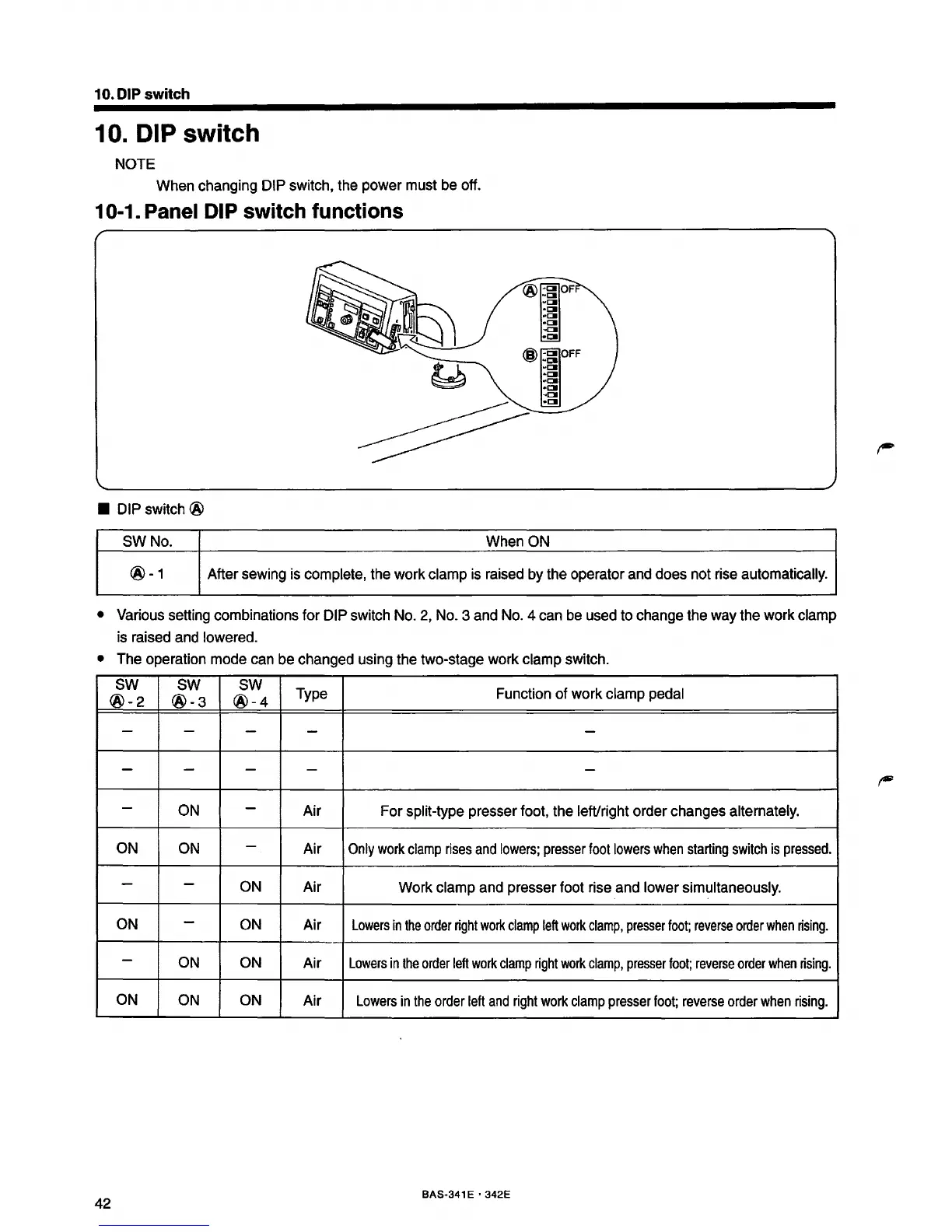
10-1. Panel DIP switch functions
DIP
switch @
SWNo.
When
ON
®-1
After sewing
is
complete,
the
work clamp
is
raised
by
the
operator
and
does
not
rise
automatically.
Various
setting combinations for
DIP
switch
No.
2,
No.
3
and
No.
4
can
be
used
to
change the
way
the
work clamp
is
raised
and
towered.
The
operation mode
can
be
changed using the two-stage work clamp switch.
sw
sw sw
Type
Function
of
work clamp
pedal
®-2
®-3
®-4
- -
-
- -
-
-
-
-
-
-
ON
-
Air
For split-type presser foot,
the
left/right order changes alternately.
ON
ON
-
Air
Only
work
clamp
rises
and
lowers;
presser
foot
towers
when
starting
switch
is
pressed.
- -
ON
Air
Work
clamp
and
presser foot
rise
and
tower
simultaneously.
ON
-
ON
Air
Lowers
in
the
order
right
work
clamp
left
work
clamp,
presser
foot;
reverse
order
when
rising.
-
ON
ON
Air
Lowers
in
the
order
left
work
clamp
right
work
clamp,
presser
foot;
reverse
order
when
rising.
ON
ON
ON
Air
Lowers
in
the
order
left
and
right
work
clamp
presser
foot;
reverse
order
when
rising.
42
BAS-341 E 342E
From the library of: Superior Sewing Machine & Supply LLC

Table of Contents

Related product manuals