11. Changing special functions using
the
memory
switches
11. Changing special functions using the memory switches
The functions of the switches
on
the operation panel can be changed to carry out special functions.
• All of the memory switches are set to
OF
F at the time of shipment.
NOTE
The following are special uses. All of the memory switch is usually set
to
OFF.
brotller
BAS-300E
series
;1..::..3.-
I
MENU i
7D77L...NO.
----
PROGRAM
NO
.
I
I
.fli{i$
I
e
• 0 X-SCA
LE
i!$t
i{i$
0 Y-SCALE
o---8E]
.AI::·- F
o~
0 SPEED
0
~*:tJ')/9-
B.T.
COUN
TER
~~
~
-
0
7-.
1'
1)
-'J
I-NO.
R / W
SPLIT
NO.
D
D
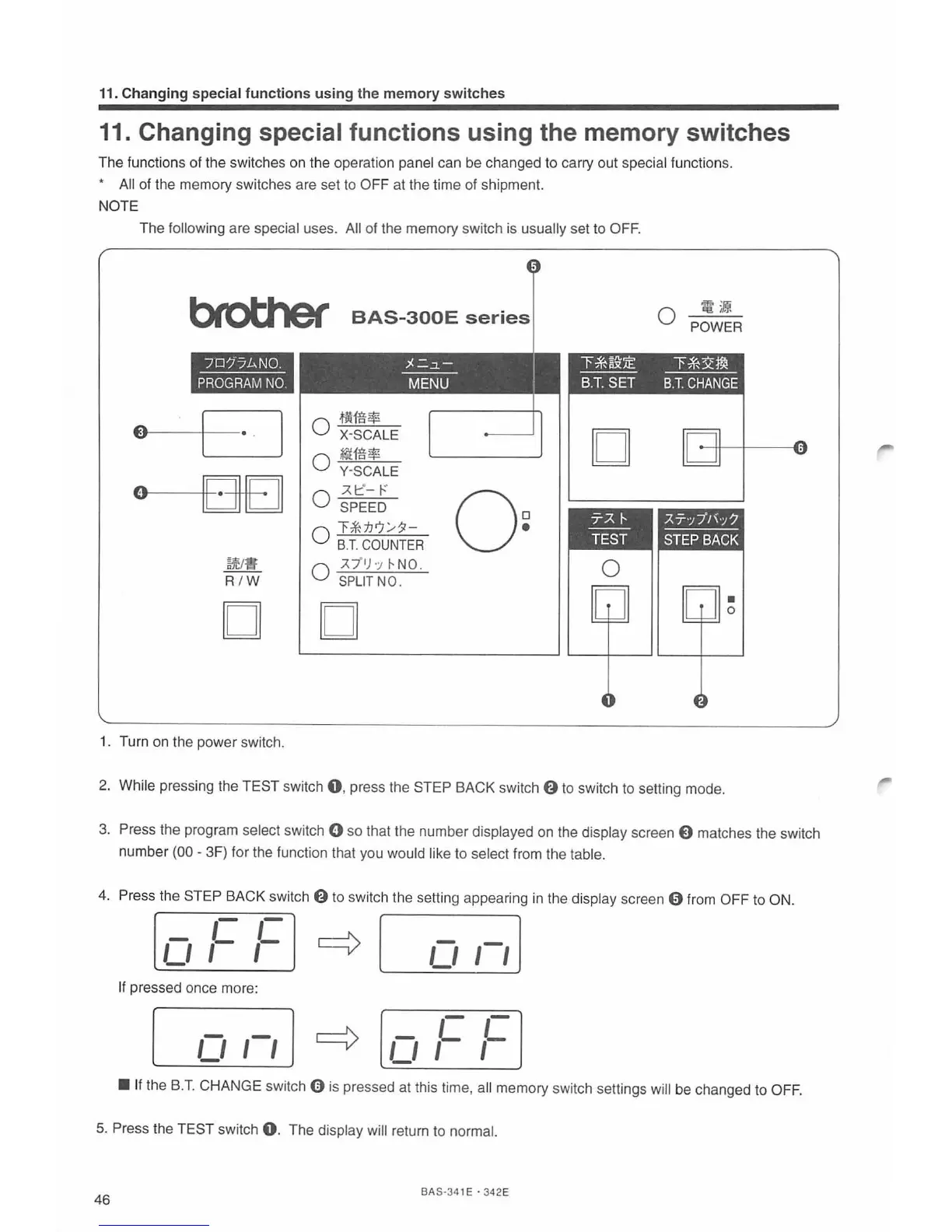
1. Turn on the power switch.
~
i!
0 POWER
""F-*~~:!E
T*~m
---
----
B.T.
SET
B.T.
CHANGE
D
0
•
0
2.
While pres
si
ng the TEST switch
0,
press the STEP BACK switch
f)
to switch to setting mode.
3.
Press the program select switch 0 so that the number displayed
on
the display screen 0 matches the switch
number
(00 - 3F) f
or
the function that you would like to select from the table.
4.
Press the STEP BACK switch
f)
to switch the setting appearing
in
the display screen 0
fr
om OFF
to
ON.
-
,-
,-
~
-
,-,J
Ll
1-
1-
Ll
If
pressed once more:
-
-
~
-
1- 1-
Ll
I
I
Ll
1-
1-
• If the
B.T.
CHANGE switch 0 is pressed at this time, all memory switch settings will be changed to OFF.
5.
Press the TEST switch
0.
The display will return to normal.
46
BA S
·34
1E · 342E



 To Next Page