6.
Panel operation
6-9. Using production counter
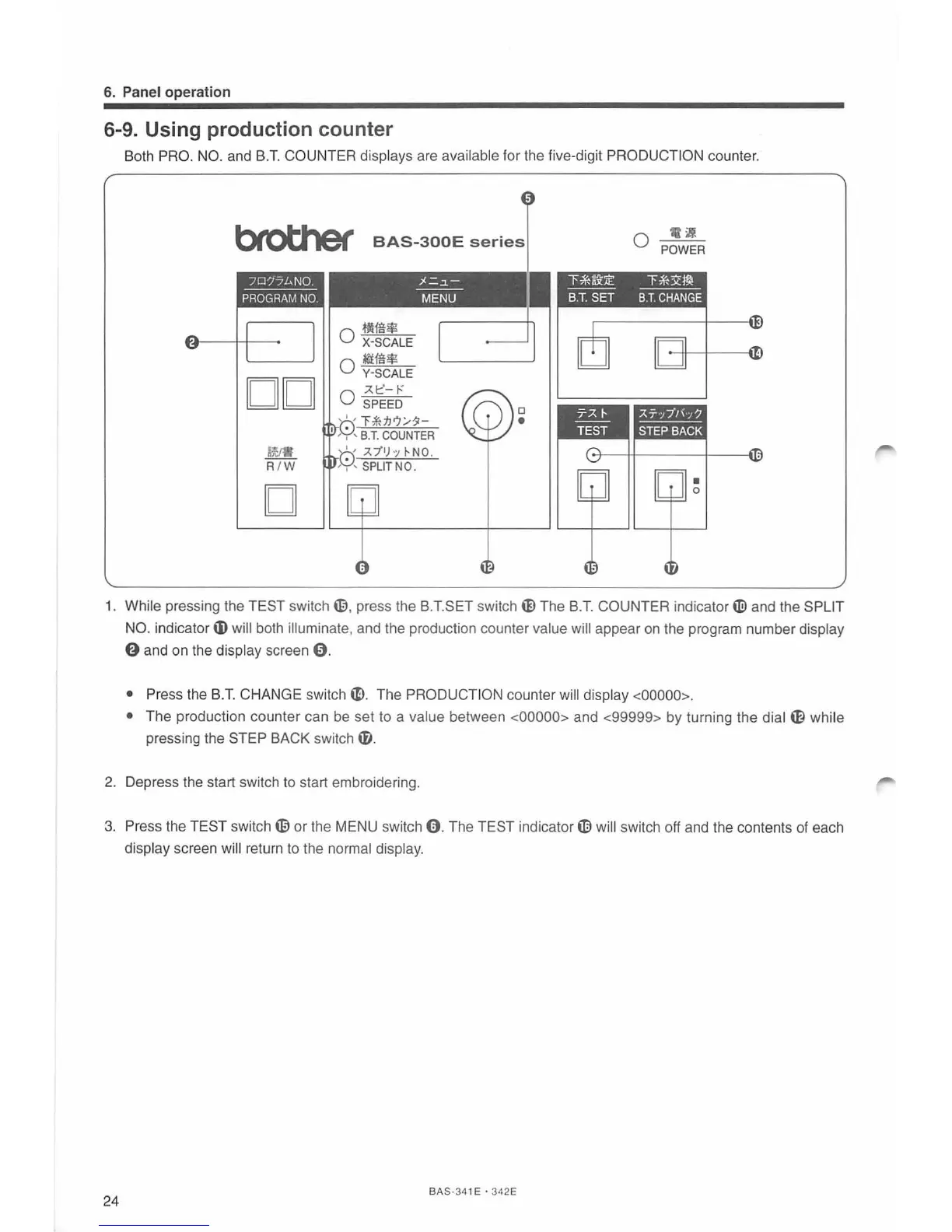
Both PRO.
NO.
and
B.T.
COUNTER displays are available for the five-digit PRODUCTION counter.
bfottler
BAS-300E
series
i~
R / W
D
0
~~*
X-SCALE
~ig$
0 Y-SCALE
.A
1:::'-
I-'
0 SPEED
.)(.=.~-
---
MENU
0
•
.i!
0 POWER
"f>%~:lE
"f>%3!~
---
----
B.
T.
SET
B.
T.
CHANGE
1.
While pressing the TEST
switch~
.
press the B.T.SET
switch
~
The
B.T.
COUNTER indicator
Wand
the SPLIT
NO.
indicator
tD
will both illuminate, and the production counter value will appear on the program number display
0 and
on
the display screen
0.
• Press the
B.T.
CHANGE
switch~-
The PRODUCTION counter will display <00000>.
•
The production counter can be set to a value between <00000> and <99999> by turning the dial
ffi
while
pressing the STEP BACK switch ti).
2.
Depress the start switch
to
start embroidering.
3.
Press the TEST
switch~
or the MENU switch
0.
The TEST indicator
tD
will switch off and the contents
of
each
display screen will return
to
the normal display.
24
BAS-341 E · 342E



 To Next Page