6. Panel operation
6-8. Using the bobbin thread counter
Set the bobbin thread counter to display the number of pieces
of
the selected pattern which can be sewn with the
amount of thread on the bobbin to avoid running out of bobbin thread
in
the middle
of
a patern.
bfottler
BAS-300E
series
c=J
DO
~~!lt
R / W
D
~ffl$
0 X-SCALE
£E1:g$
0 Y·SCALE
Al::"
-t-:
0 SPEED
;;£=-~-
---
MENU
'I'
"f"*:f.JrJ
/)l-
,~
,-
B.
T.
COUNTER
0
7./'h
I-NO .
SP
LI
T NO.
~;w.
0 POWER
1'*-~:iE
Tif-'X~
---
----
B.T.
SET
B.T.
CHANGE
1.
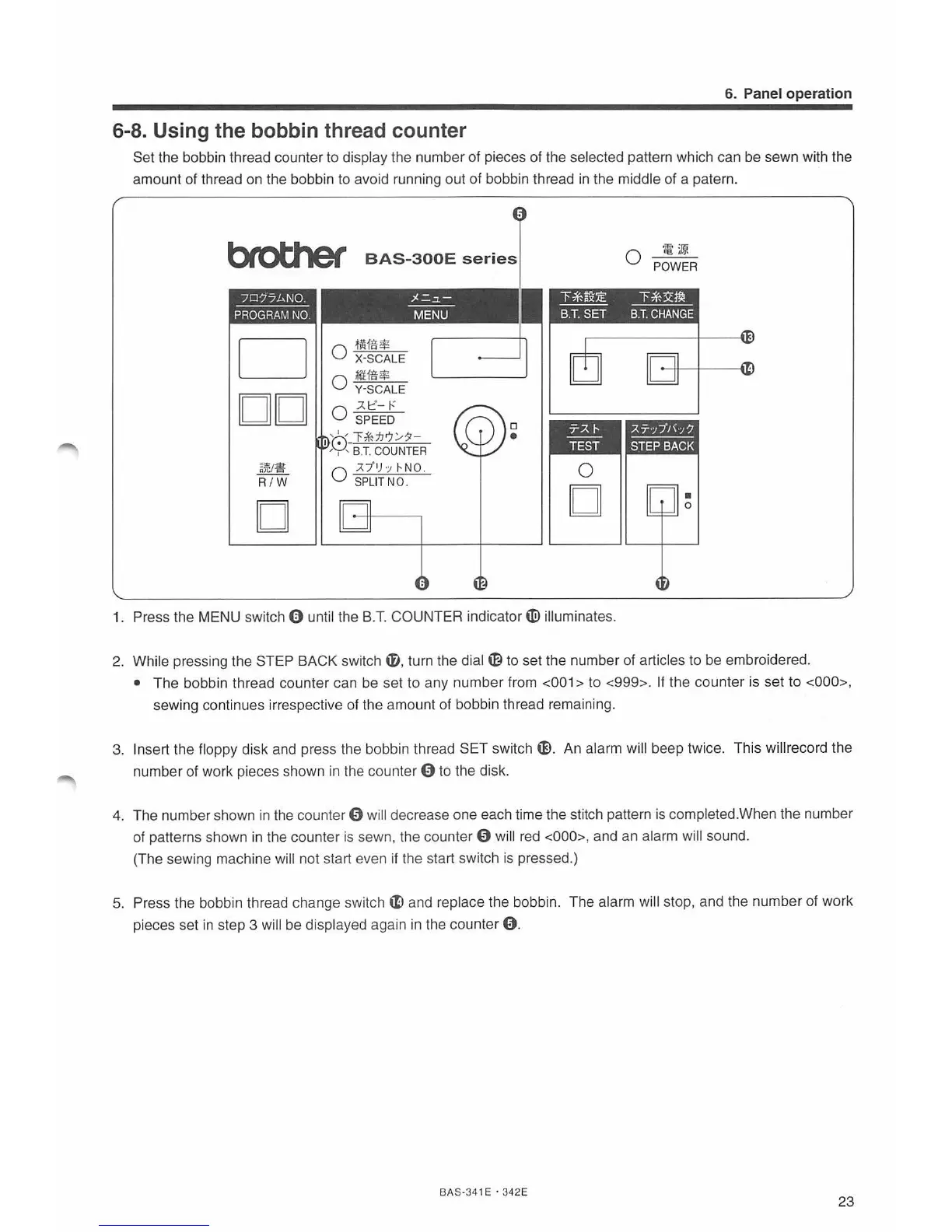
Press the MENU switch 0 until the
B.T.
COUNTER
ind
i
ca
tor~
illuminates.
2.
While pressing the STEP BACK switch
i#
, turn the dial
~to
set the n
um
ber of articles to be embroidere
d.
• The bobbin thread counter can be set to any numb
er
from <
00
1 > to <999>. If the counter is set to <
000
>,
sewing continues irrespective of the amount of bobbin thread remainin
g.
3.
Insert the floppy disk and press the bobbin thread S
ET
switch
G).
An al
ar
m will beep twice. This willrecord the
number of work pieces shown in the counter
9 to the disk.
4.
The number shown
in
the counter 9 will decrease one each time the stitch pattern
is
completed. When the number
of patterns shown
in
the counter is sewn, the counter 9 will red <000>, and an alarm will sound.
(The sewing machine will not start even
if
the start switch
is
pressed.)
5.
Press the bobbin thread change switch
~
and replace the bobbin. The alarm will stop, and the number of
wo
rk
pieces set
in
step 3 will be displayed again in the counter 9 .
BA
S-34 1 E · 342E
23



 To Next Page