6. Panel operation
6-11. Shifting a stitch pattern
• Programs which have already been programmed can be moved up, down and to the left and right.
(However, such patterns will be reset if the power supply
is
turned off or the program number is changed.)
• The feed position can be set
to
the any position desired.
~
R / W
0
{~ig$
'
,"
, X-SCALE
.
''
/
~ig$
. ,Q-Y-SCALE
.At:•-t:
0 SPEED
;(.=..:1.-
---
MENU
I '
1
'
""f-*:!J~/)1-
,
cp
,-
B.T.
COUNTER
0
7../
1
)
·:~
I-NO.
SP
LIT
NO.
1_1
II
0
•
ti.t.
0 POWER
""F
*'~~:it
""F
*'
31:
~
---
----
B.T.
SET
B.
T.
CHANGE
D
D
1\\l_
J
_ili_
- L
_.I.)
t
r--':.
--
,
.-.~:
l
···
L
____
_ J
i.
l
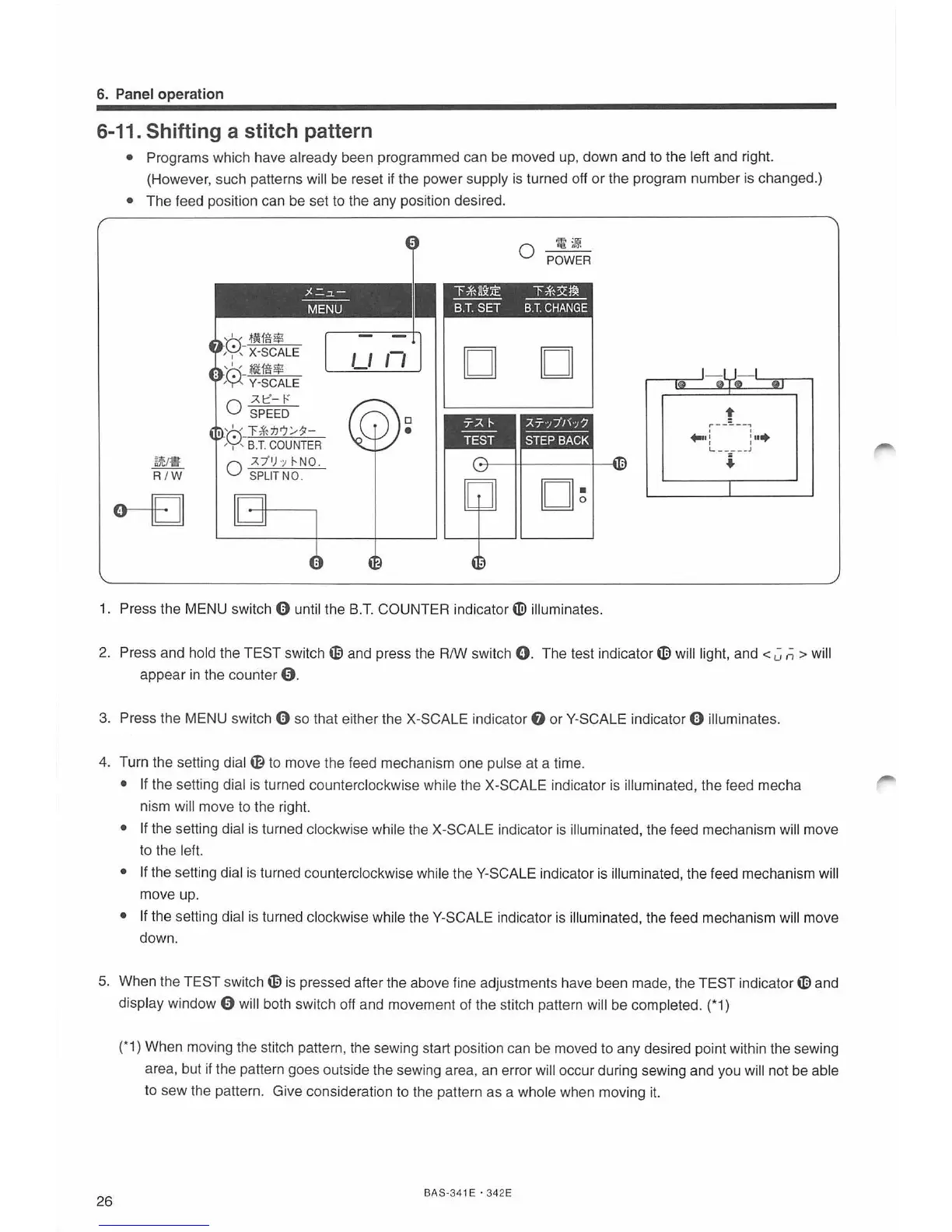
1. Press the MENU switch 0 unt
il
the B
.T.
COUNT
ER
indicator
tiD
i
ll
uminates.
2.
Press and hold the TEST switch
~
and press the R/W switch
0.
The test
ind
i
cato
r
~
wi
ll
light, and < C
ii
> will
appear
in
the counter
0.
3.
Press the MENU switch 0 so that either the X-SCALE indicator
f)
or Y-SCA
LE
indicator 0 illuminates.
4. Turn the setting dial
~
to move the feed mechanism one pulse at a time.
• If the setting dial is turned counterclockwise while the
X-
SCALE indicator
is
illuminated, the feed mecha
nism will move to the right.
• If the sett
in
g dial
is
turned clockwise while the X-SCA
LE
indicator
is
illuminated, the feed mechanism will move
to the left.
• If the setting dial is turned counterclockwise
whi
le theY-SCALE indicator
is
illuminated, the feed mechanism will
move up.
• If the setti
ng
di
al
is
turned clockwise while t
he
Y-SCALE indicator is illuminated, the feed mechanism
wi
ll
move
down.
5.
When the TEST switch
~
is pressed after the above fine adjustments have been made, the TEST indicator
~
an
d
display window 0 will both switch o
ff
and movement of the stitch pattern will be completed. (*1)
26
(*
1) When moving the stitch pattern, the sewing start position can be moved to any desired point within the sewing
area, but if the pattern goes outside the sewing area, an error will occur dur
in
g sewing and you wi
ll
not be able
to sew the patte
rn
. Give consideration to t
he
pattern as a whole when moving
it.
BAS-
34
1 E ·
342E



 To Next Page