6. Panel operation
-;:%:
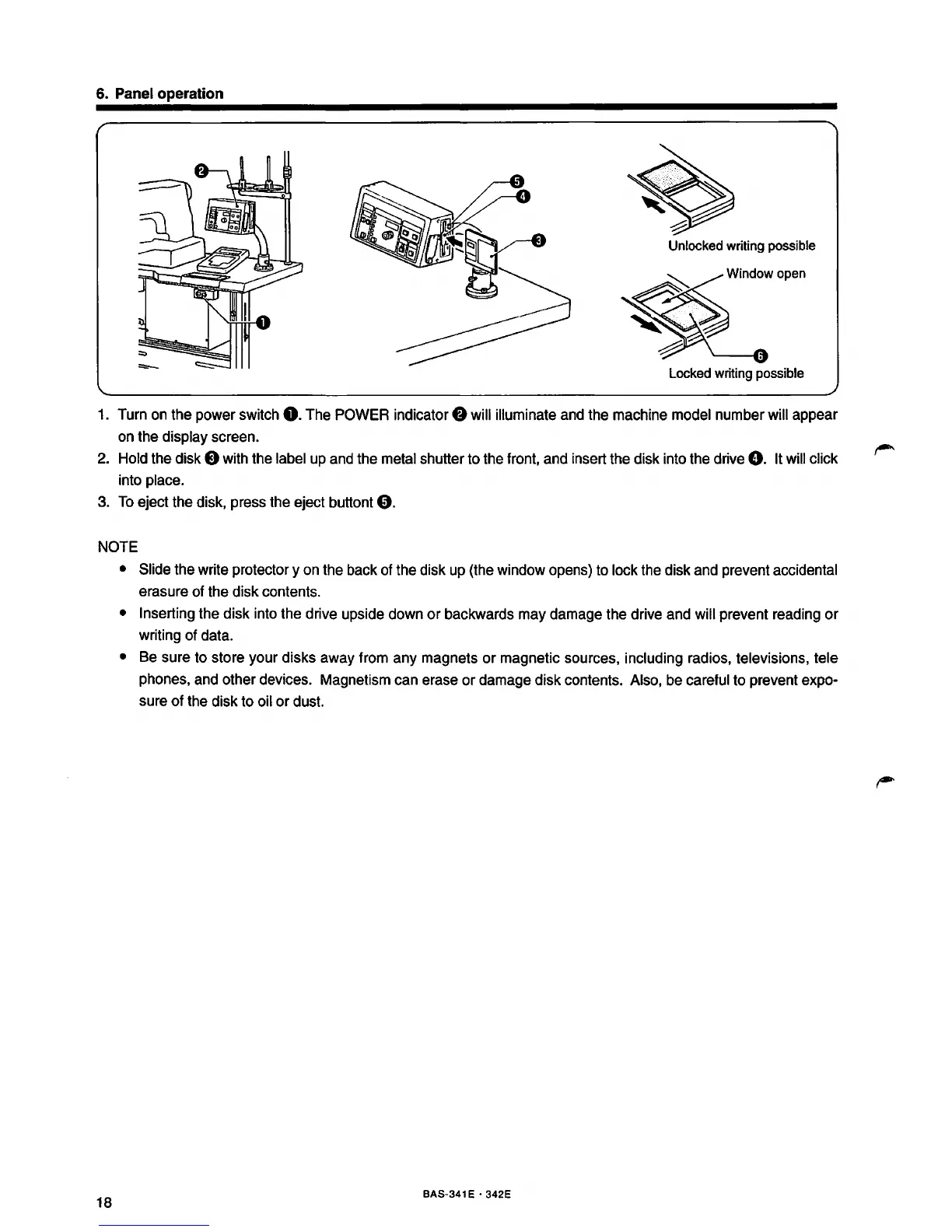
Unlocked
writing possible
Locked
writing possible
1. Turn on the power switch
0.
The POWER indicator 8 will illuminate and the machine model number will appear
on the display screen.
2.
Hold the disk 8 with the label up and the metal shutter to the front, and insert the disk into the drive
0.
It will click
into place.
3.
To
eject the disk, press the eject buttont
0.
NOTE
18
• Slide the write protectory on the back of the disk up (the window opens) to lock the disk and prevent accidental
erasure of the disk contents.
• Inserting the disk into the drive upside down
or
backwards may damage the drive and will prevent reading
or
writing of data.
• Be sure to store your disks away from any magnets
or
magnetic sources, including radios, televisions, tele
phones, and other devices. Magnetism can erase
or
damage disk contents. Also, be careful to prevent expo-
sure of the disk to oil
or
dust.
BAS-341 E • 342E



 To Next Page