12.
Error
codes
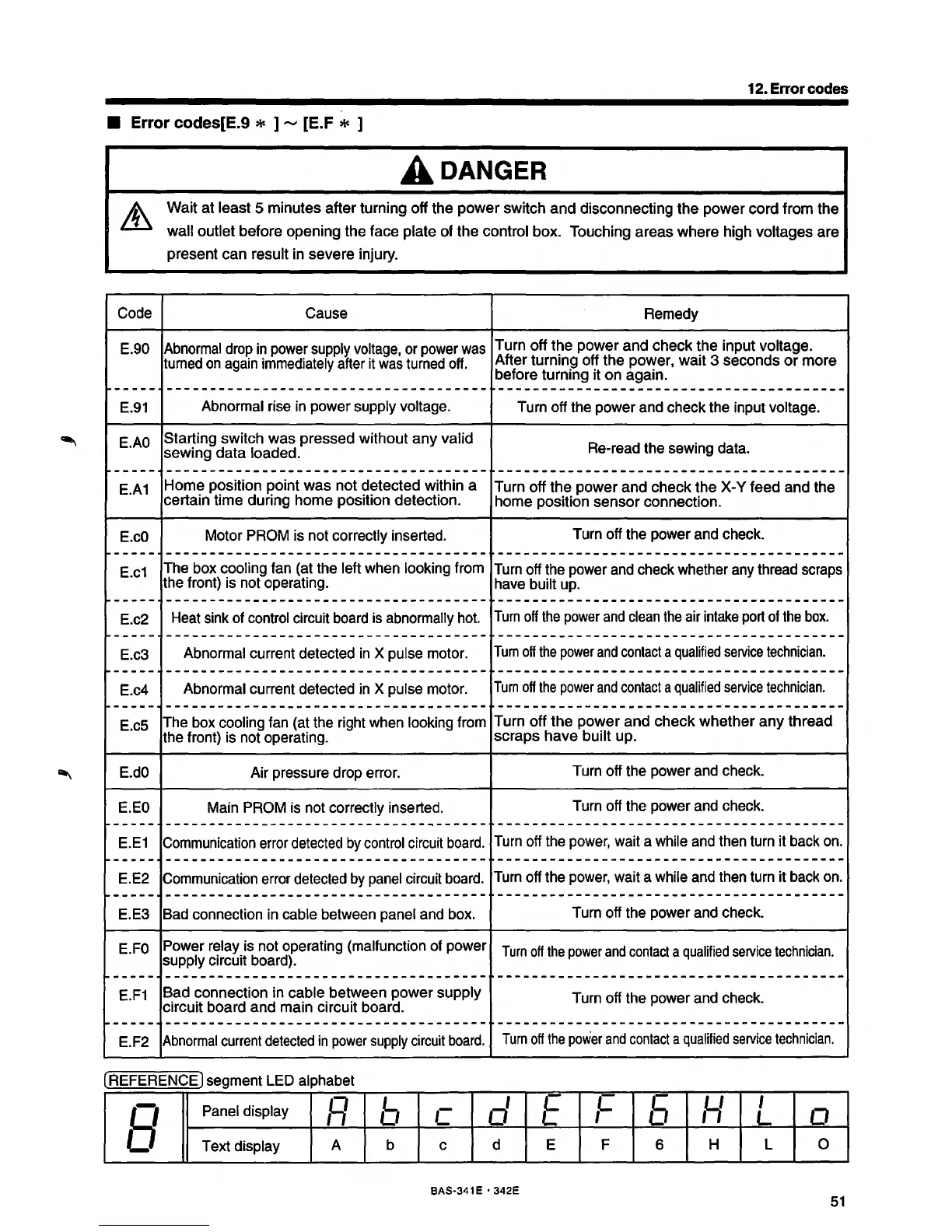
• Error codes[E.9 * ]
_,
[E.F * ]
Code
E.90
f------
E.91
E.AO
------
E.A1
E.
cO
-----
E.c1
f------·
E.c2
-----
E.c3
..
______
E.c4
-----
E.cs
E.dO
E.EO
-----
E.E1
------
E.E2
~-----
E.E3
E.FO
~-----
E.F1
~-----
E.F2
A DANGER
Wait at least 5 minutes after turning off the power switch and disconnecting the power cord from the
wall outlet before opening the face plate of the control box. Touching areas where high voltages are
present can result in severe injury.
Cause
Remedy
Abnormal
drop
in
power
supply
voltage,
or
power
was
Turn off the power and check the input voltage.
turned
on
again
immediately
after
it
was
turned
off.
After turning off the power, wait 3 seconds or more
before turning it
on
again.
-------------------------------------
----------------------------------------
Abnormal
rise
in
power supply voltage.
Turn
off the power
and
check the input voltage.
Starting switch was pressed without any valid
Re-read
the sewing
data.
sewing data loaded.
-------------------------------------
~----------------------------------------
Home position point was not detected within a
Turn off the power and check the X-Y feed and the
certain time during home position detection.
home position sensor connection.
Motor
PROM
is
not
correctly inserted.
Turn
off the power
and
check.
-------------------------------------
----------------------------------------
The
box
cooling
fan
(at
the
left
when
looking from
Turn
off
the
power
and
check
whether
any
thread
scraps
the
front)
is
not
operating.
have
built
up.
-------------------------------------
----------------------------------------
Heat
sink
of
control
circuit
board
is
abnormally
hot.
Turn
off
the
power
and
clean
the
air
intake
port
of
the
box.
-------------------------------------
----------------------------------------
Abnormal
current detected
in
X pulse
motor.
Tum
off
the
power
and
contact
a
qualified
service
technician.
-------------------------------------
----------------------------------------
Abnormal
current detected
in
X
pulse
motor.
Tum
off
the
power
and
contact
a
qualified
service
technician.
-------------------------------------
----------------------------------------
The
box
cooling
fan
(at
the
right
when
looking
from
Turn off the power and check whether any thread
the front)
is
not operating.
scraps have built up.
Air pressure drop
error.
Turn
off the power
and
check.
Main
PROM
is
not
correctly inserted.
Turn
off the power
and
check.
------------------------------------- ----------------------------------------
Communication
error
detected
by
control
circuit
board.
Turn
off
the
power,
wait
a
while
and
then
turn
it
back
on.
-------------------------------------
----------------------------------------
Communication
error
detected
by
panel
circuit
board.
Turn
off
the
power,
wait
a
while
and
then
turn
it
back
on.
-------------------------------------
----------------------------------------
Bad
connection
in
cable
between
panel
and
box.
Turn
off the power
and
check.
Power
relay
is
not operating (malfunction
of
power
supply circuit
board).
Turn
off
the
power
and
contact
a
qualified
service
technician.
------------------------------------- ----------------------------------------
Bad connection
in
cable between power supply
Turn
off
the
power
and
check.
circuit board and main circuit board.
------------------------------------- ----------------------------------------
Abnormal
current
detected
in
power
supply
circuit
board.
Turn
off
the
power
and
contact
a
qualified
service
technician.
(REFERENCE) segment
LED
alphabet
8
Panel
display
R
b
c
d E
,c
5
,y
I
0
L
Text display
A
b c d
E F 6
H L 0
BAS·341 E • 342E
51



 To Next Page