BTL-5000 SERIES
USER'S MANUAL
page 10 of 56
Connection of accessories:
Connect the accessories to the output connectors (1) - (6) on the rear panel according to the Tab. 2.1. The unit will
automatically detect their type and display them on the screen. If the wrong device is connected, the equipment will
not operate and the screen will display a warning and a help where to connect which accessory.
Note:
After switching on, the unit tests for about 10 - 15 secs all internal functions. If any fault exists the screen will display a
warning. If any fault exists that compromises patient safety, the system will 'lock' itself into ‘secure’ mode. If this
situation occurs, please call your local distributor for service advice.
2.4 OPERATING THE UNIT
2.4.1 Touch Screen
The touch screen may be operated by finger touch or use of special soft tip stylus that is supplied with the unit. DO
NOT TOUCH THE SCREEN WITH ANY SHARP OBJECT OR PEN, AS THIS MAY CAUSE PERMANENT DAMAGE.
Select required parameters by pressing:
1. 3D buttons
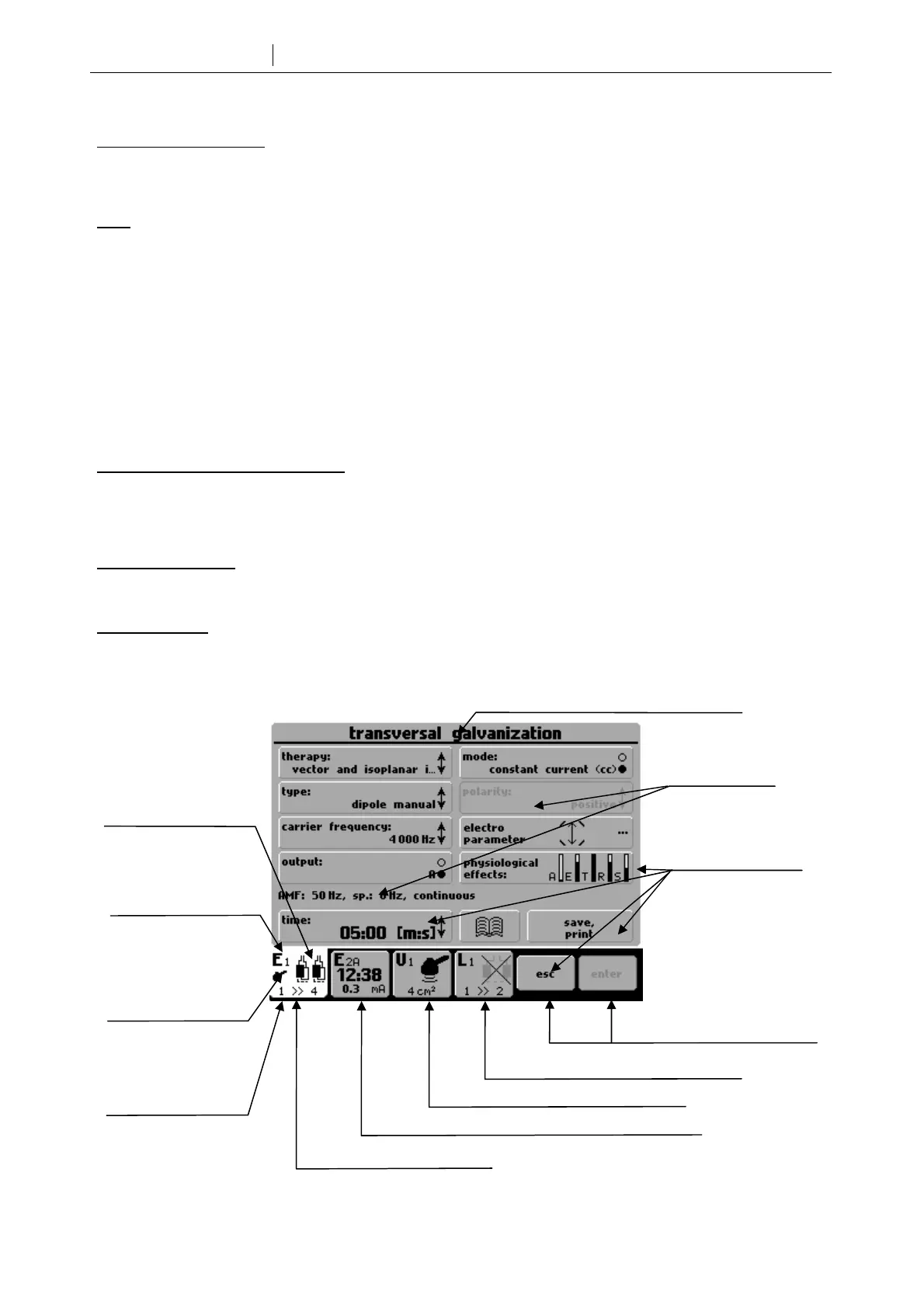
2. Bright tabs of the selected channel (in the lower left corner of the screen) to switch between connected
accessories, such as ultrasound heads
3. The dark tab of the required channel (in the lower left corner of the screen) to switch between channels
Touch screen buttons:
The touch screen buttons have three dimensional (3D) shading and may be pressed with the finger or special stylus.
To confirm requested changes or values, press enter. To cancel changes, press escape.
Selected channel:
Although most of the configurations allow running of several therapies at a time, only one channel can be controlled at
once. The tab of this selected channel is shaded light. All information on the screen and all controls relate to this
channel. The most important information about the therapies on the other channels is visible on their tabs.
3D buttons
(for therapy on the selected
channel)
Channel marking:
E – electrotherapy
1 – number of E
generator
Information
Tab with running therapy of the unselected channel
Buttons with the same
function as (15) and (16)
Indication of
connected accessory
Tab of the selected channel
Name of screen for the selected channel
Information about other
generator possibilities:
combined therapies,
HVT etc...
Tab of the unselected channel
Tab of the channel with wrong accessory
Information about
connected accessories
(e.g.): 1 – one cable
4 – 4 electrodes









 To Next Page