Home
Buffalo
Network Storage Server
LS210D
Page 76
Buffalo LS210D - Page 76
104 pages
Manual
Save Page as PDF
To Next Page
To Next Page
To Previous Page
To Previous Page
Loading...
75
2
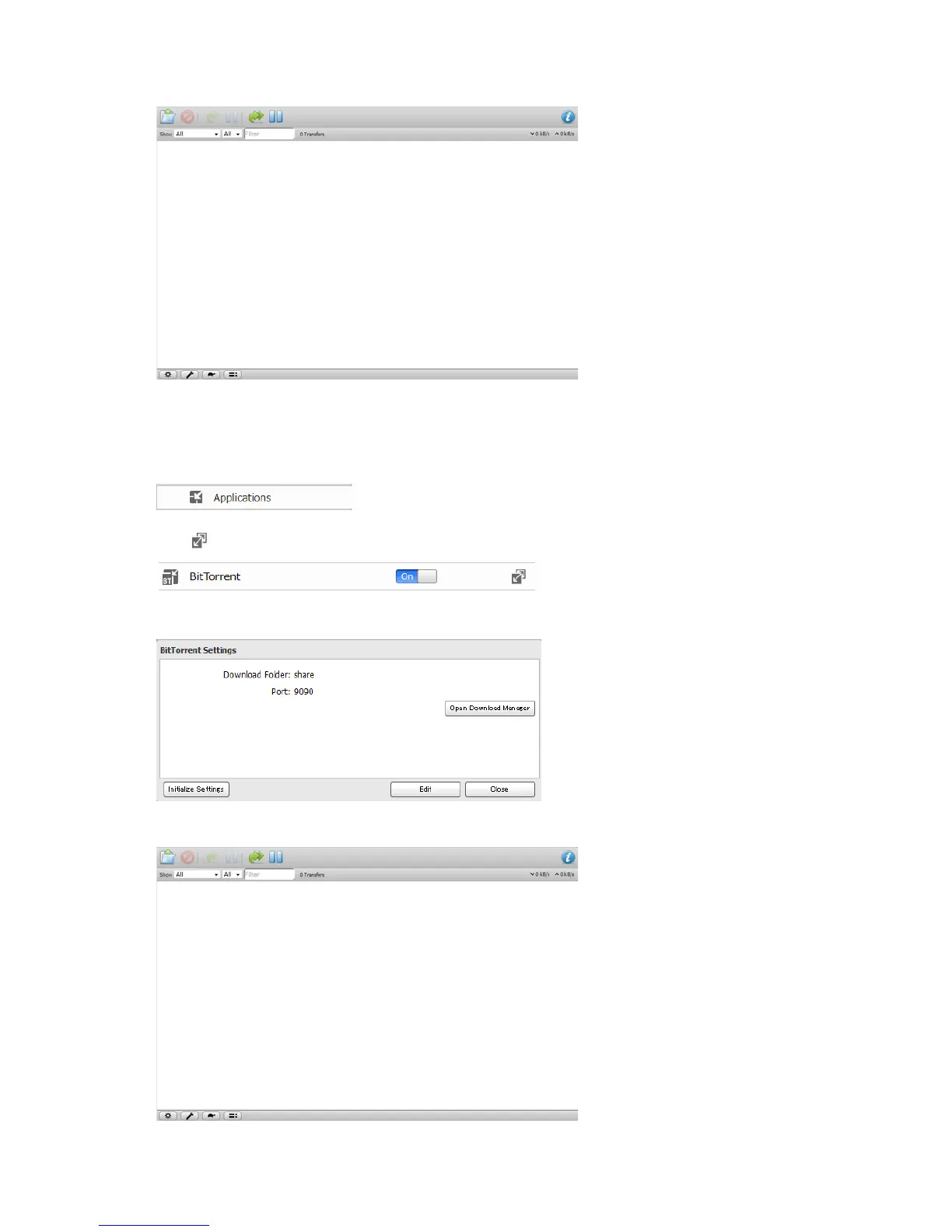
The download manager will open.
Opening from Adv
anced Settings
1
In Advanced Settings, click
Applications
.
2
Click
to the right of "BitT
orrent"
.
3
Click
Open Download Manager
.
4
The download manager will open.
75
77
Table of Contents
Main Page
Default Chapter
2
Table of Contents
2
Chapter 1 Getting Started
7
Diagrams
7
Changing Admin Password and Adding a Shared Folder
8
Installing Applications
10
NAS Navigator2
10
Smartphone Navigator
10
Webaccess
10
Accessing Shared Folders
10
Accessing from a Computer
10
Accessing from a Mobile Device
11
Turning the Linkstation on and off
11
Chapter 2 Configuration
12
Opening Settings from a Computer
12
Opening Advanced Settings
15
Opening Settings from a Mobile Device
16
Settings that Can be Changed from Your Mobile Device
18
Chapter 3 Sharing Files
19
Adding Shared Folders
19
Configuration from a Computer
19
Configuration from a Mobile Device
20
Adding Users
21
Configuration from a Computer
21
Configuration from a Mobile Device
23
Adding Groups
24
Access Restrictions
25
Local Users/Groups
25
Active Directory
27
NT Domain
29
User Authentication with an External SMB Server
31
Chapter 4 Managing Storage
34
RAID Arrays
34
Working with RAID Arrays
34
Using JBOD
34
Changing RAID Mode
35
RMM (RAID Mode Manager)
36
RAID Scanning
37
Adding an External Hard Drive
38
Connect an External Drive
38
Compatibility
38
Dismounting Drives
38
Dismounting with the Function Button
38
Dismounting from Settings on a Computer
38
Dismounting from Settings on a Mobile Device
39
Checking Drives
40
Formatting Drives
41
Erase Data on the Linkstation Completely
42
Disk Quotas
43
Quotas for Users
43
Quotas for Groups
44
Hard Drive Replacement
45
Rebuilding the RAID Array from a Computer
45
Rebuilding the RAID Array from a Mobile Device
48
Chapter 5 Remote Access
51
Webaccess
51
Configuring from a Computer
51
Configuring from a Mobile Device
54
Ftp
58
Chapter 6 Backup
60
Back up from the Linkstation
60
Preparing a Backup Destination
60
Configuring a Backup Job
61
Backing up Your Mac with Time Machine
63
Copying from a USB Device
66
Configuring Direct Copy from a Computer
66
Configuring Direct Copy from a Mobile Device
67
Starting Direct Copy
67
Chapter 7 Multimedia
69
Dlna
69
Configuration from a Computer
69
Configuration from a Mobile Device
71
Playing Files
71
Connected DLNA-Compatible Devices
71
Streaming to DLNA-Compatible Devices
72
Disabling Playback from Specific Devices
72
Itunes Server
73
Bittorrent
74
Opening Download Manager
75
Downloading Files
77
Connecting a Printer
77
Setting up a Printer from a Computer
77
Setting up a Printer from a Mobile Device
79
Chapter 8 Advanced Features
81
Email Notification
81
Sleep Mode
82
Encrypting Data Transmission
83
Encrypting Settings Data
83
Encrypting FTP Transfer Data
83
SSL Encryption
83
Restoring Factory Defaults
84
Initializing from Settings
84
Initializing with the Function Button
84
Online Update
84
Name, Date, Time, and Language
85
Jumbo Frames
87
Changing the IP Address
88
Chapter 9 Utilities
90
NAS Navigator2 for Windows
90
Mount as Network Drive
92
Changing the IP Address
93
NAS Navigator2 for Mac os
93
Mount as Network Drive
94
Changing the IP Address
95
Chapter 10 Appendix
97
When the Power LED Blinks
97
Default Settings
99
Specifications
99
Models
100
Chapter 11 Regulatory Compliance Information
102
For Customers in the United States
102
For Customers in Europe
102
Related product manuals
Buffalo LinkStation LS210D0101
97 pages
Buffalo LS220D0802-EU
132 pages
Buffalo LS-WVL
2 pages
Buffalo LS520D Series
2 pages
Buffalo LinkStation LS-VL
196 pages
Buffalo LinkStation LS-WXL
196 pages
Buffalo LinkStation Live
76 pages
Buffalo LS210D Series
2 pages
Buffalo TS3210DN
272 pages
Buffalo HS-DGL Series
80 pages
Buffalo CloudStation CS-X
51 pages
iSCSI Rackmount TeraStation Pro
114 pages












 To Next Page