3. Select Count.
a. A 6 second cine will be captured. A countdown timer will appear in the lower left hand side of the screen.
Do not move the probe during the cine recording.
b. After capturing the cine, the device will prepare the cine and indicate whether automated B-line count is
successful.
4. Auto B-line Counter successfully calculates B-line count
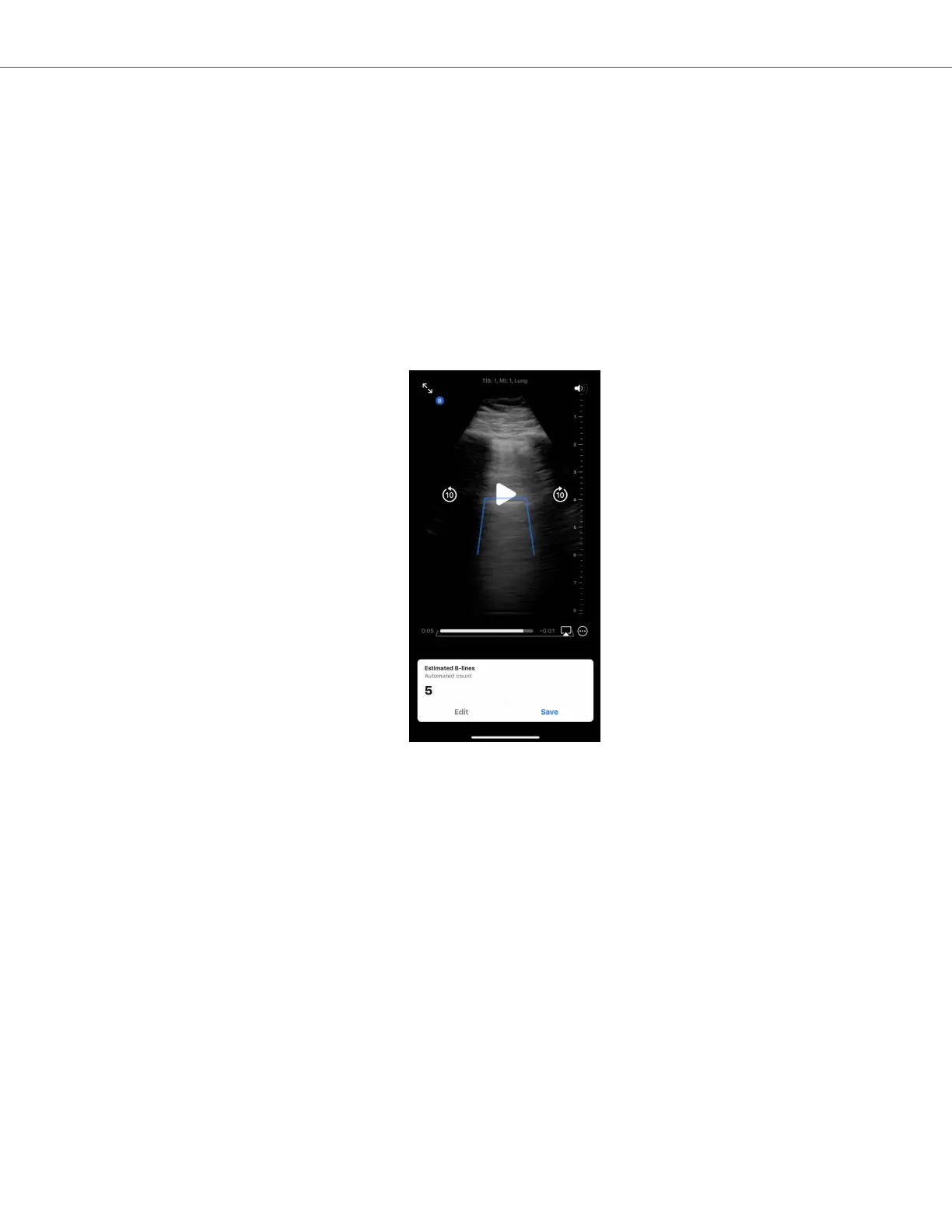
a. An automated B-line count is displayed at the bottom of the screen.
i. The B-line count represents the maximum number of B-lines present within a single frame within the
cine. The Auto B-Line Counter looks across all of the frames in the cine to determine this maximum
count. (Note: multiple frames can have the maximum B-line count).
ii. The count displayed will be 0, 1, 2, 3, 4, or >5.
b. The cine above the B-line count displays the images and the B-lines that were identified.
i. The captured cine will play on a loop. The cine can be paused and frames manually reviewed by
tapping the screen and using the playback controls on the screen.
ii. Identified B-lines will be highlighted by blue lines on the corresponding captured cine. A single line
represents a discrete B-line and a bracket will highlight areas of confluent B-lines. B-Line locations are
provided as visualization to the user to show how B-Line counts were derived and should not be used
for clinical decision-making.
Butterfly Auto B-line Counter
AI-Assisted Tools 53


 To Next Page