PMW20
101
PMW20
100
SM-PMW202020001-EN
SM-PMW202020001-EN
Parameter Description of SET OPTIONS
This part of the parameter is subject to the modified type and no change is required.
PARAMETER NAME PARAMETER DESCRIPTION
MENU
TILLER SWITCH
TYPE OF LIMIT SWITCH ON THE HANDLE
SET OPTIONS
EB ON TILLER BRK
ELECTRIC BRAKE CLOSES WHEN THE
LIMIT SWITCH ON THE HANDLE CLOSES
SET OPTIONS
HOUR COUNTER
WORKING WAY OF HOUR COUNTER (TIMING
AFTER OPENING KEY OR CONTROLLER)
SET OPTIONS
EVP TYPE TYPE OF THE LOWERING VALVE SET OPTIONS
BATTERY CHECK TYPE OF BATTERY SET OPTIONS
STOP ON RAMP
ELECTRIC PARKING SYSTEM
SET OPTIONS
QUICK INVERSION
TYPE OF QUICK INVERSION
SET OPTIONS
SET MOT.TEMPERAT SET TYPE OF THE TEMPERATURE SENSOR
SET OPTIONS
EPS
OPEN OR CLOSE STEERING SWITCH
SET OPTIONS
MC HSD ON EPS
OPEN OR CLOSE STEERING SWITCH
SET OPTIONS
DEBUG ON CAN
/
SET OPTIONS
EV1
TYPE 1 LOWERING VALVE
SET OPTIONS
EV2
TYPE 2 LOWERING VALVE
SET OPTIONS
EV3
TYPE 3 LOWERING VALVE
SET OPTIONS
HORN
TYPE OF THE HORN
SET OPTIONS
HYDRO FUNCTION
/
SET OPTIONS
AUX OUT FUNCTION
CONTROL THE OPENING WAY OF MAGNETIC BRAKE SET OPTIONS
DISPLAY TYPE
TYPE OF THE INSTRUMENT
SET OPTIONS
REMA TILLER CAN
USE REMACAN HANDLE
SET OPTIONS
LIFT MODE
LIFT MODE
SET OPTIONS
BMS SET OPTIONS
THE TYPE OF BATTERY, IT DEPENDS ON WHETHER
IT IS NECESSARY TO CHOOSE BMS
SPEED ON MDI SET OPTIONS
CHECK WHETHER THE INSTRUMENT DISPLAYS
THE SPEED
M.C. FUNCTION SET OPTIONS
CONTROL THE OPENING WAY OF THE MAIN
CONTACTOR
M.C. FUNCTION SET OPTIONS
OPEN THE QUICK INVERSION MODE AND
PRESS “OFF”
BATT.LOW TRESHLD SET OPTIONS
LIFT WHEN THE BATTERY POWER IS LOWER
THAN THE VALUE AND LOWER DOWN SPEED
BATT.LOW LED TSH SET OPTIONS
ALARM WHEN THE BATTERY POWER IS LOWER
THAN THE VALUE
EVP OPEN DELAY
OPEN DELAY OF LOWERING VALVE PORT PARAMETER CHANGE
EVP CLOSE DELAY CLOSE DELAY OF LOWERING VALVE PORT PARAMETER CHANGE
SPEED RED 1
LOGIC SPEED REDUCTION 1 PARAMETER CHANGE
SPEED RED 2
LOGIC SPEED REDUCTION 2 PARAMETER CHANGE
ACC DELAY BELLY
ACCELERATION RATE OF EMERGENCY REVERSE PARAMETER CHANGE
DEC DELAY BELLY
DECELERATION RATE OF EMERGENCY REVERSE PARAMETER CHANGE
TILLER DELAY
INTERLOCK DELAY
PARAMETER CHANGE
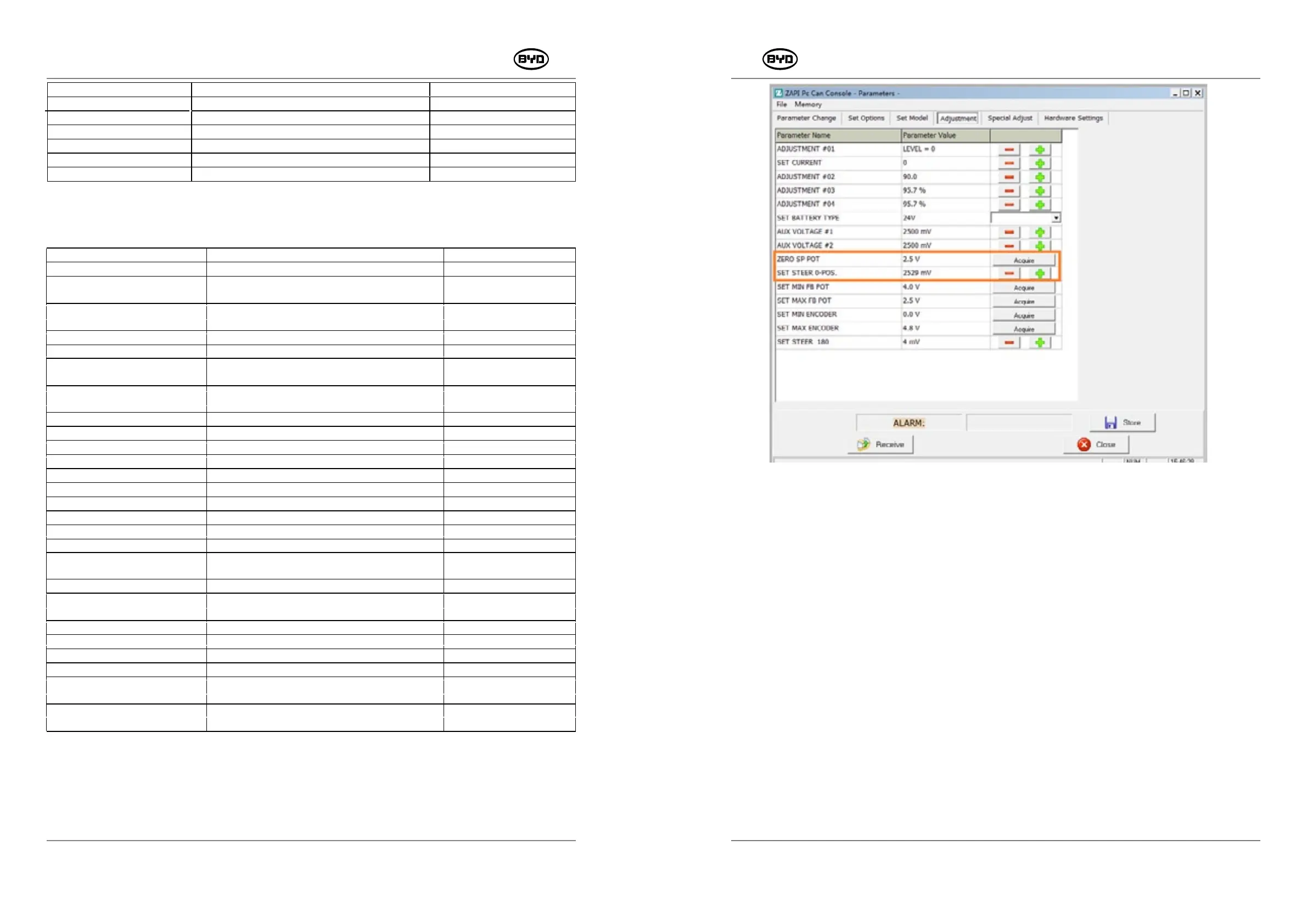
2.2 Median Adjustment Of Drive Wheels
Except that it is necessary to adjust the 0-position for steering potentiometer, other
parameters of NODE 6.0 steering controller are set by the default system and are
needless to be changed.
1. Set the median value of ZERO SP POT first: turn the handle to the median position,
click Acquire to learn current voltage, and the click Store. If the median value on the
Acquire is quite different from 2.5V, you need to manually remove the gear plate fixed
by the potentiometer so that there is no friction between the plate and the gear when
rotating manually. Then turn the potentiometer manually and then adjust its median
value as 2.5V (the value has to be displayed on the Acquire). Besides, the gear where
the potentiometer is located is engaged and fixed with the gear posited in the middle
of the handle position.
2. If the forklift moves towards the right side, the actual voltage vale will exceed the
current median value where you should decrease the value of SET STEER 0-POS
(The specific adjustment value is subject to the actual performance). Otherwise,
increase the value.
ZERO SP POT: The handle is turned to the middle where the driver wheel is also in the
middle of the median voltage (with a default value 2.5V). The voltage increases gradually
from left to right with the direction of the stroke while the range is subject to the
specification of the potentiometer used. SET STEER 0-POS: Adjust the middle position to
the left or right.
The two sets of values can be modified and thereby solving vehicle deviation problem
caused by the steering potentiometer or other causes. Specific operation procedures are
as follows :
Fig.2.2.1


 To Next Page