48
Con guring Scan Settings Using the MF Toolbox
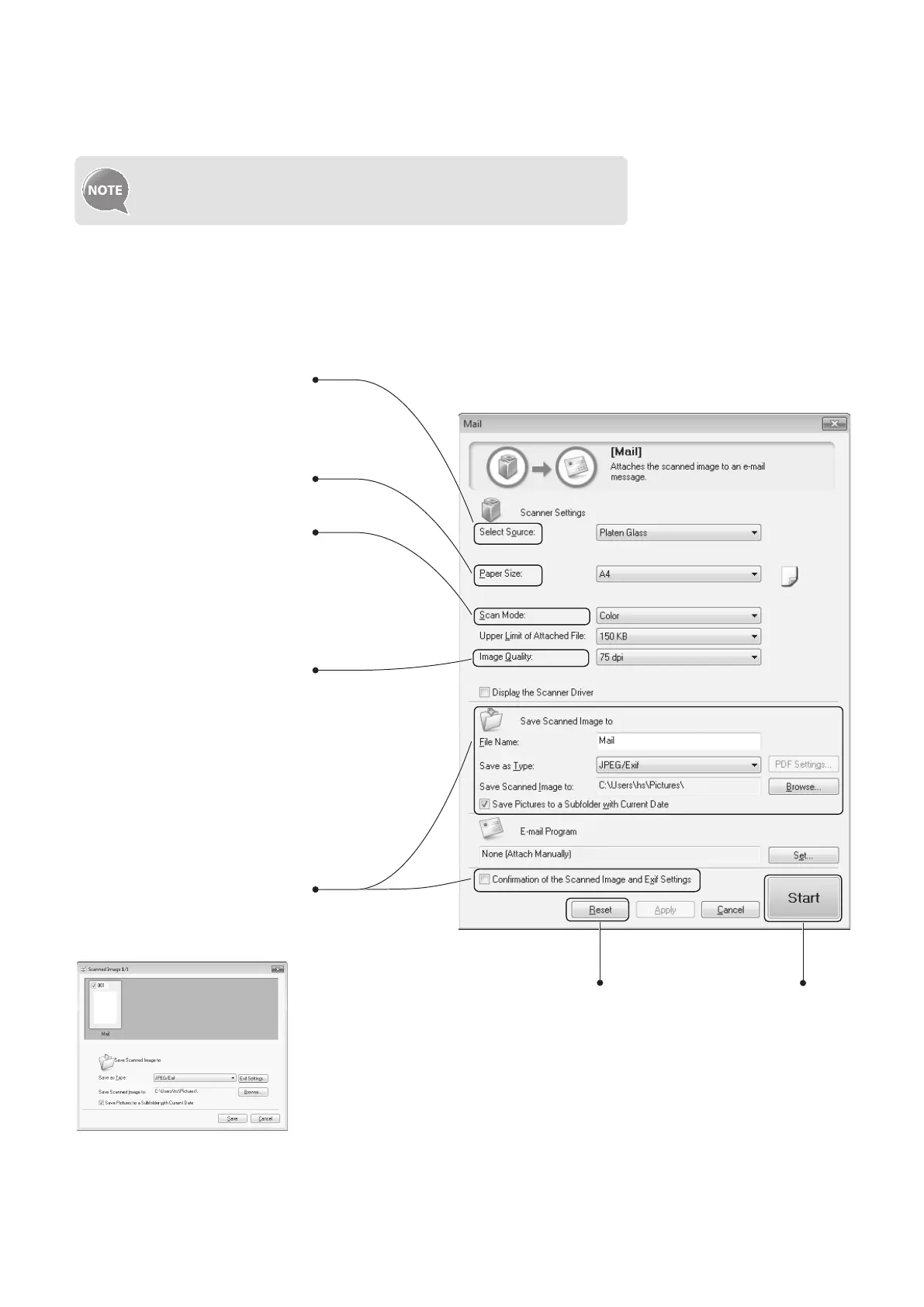
This section describes the layout and features of each setting dialog box of the MF Toolbox.
For more details, see [Scanning] → [Using the MF Toolbox] in the
e-Manual.
• Set the location of a document to
be scanned.
• [Auto Mode] that detects
the source automatically is
recommended.
Set the size of the document to
be scanned.
• Set the color mode.
• This setting is not available when
scanning using the [Color Scan]
or [B&W Scan] button.
• Set the scanning resolution.
• If you select a higher resolution,
the image quality becomes higher,
and the le size becomes bigger.
• Set the le name, le type, and
location to be saved for the
scanned image.
• Manually set the location to save
the scanned image by clicking
[Browse].
• Select to specify the format or
location to save the scanned
image after scanning.
Scanning
starts.
Reset the con gured settings to the
default values.
Example: When [Mail] or [PDF] menu is selected in MF Toolbox















 To Next Page