If you are using the Media Configuration Tool, the Media Information File is downloaded automatically.
To download it manually, access the Canon website. The Canon website can be accessed from the link in the installed
software.
•
Windows
The basic instructions for accessing the Canon website from the printer driver are as follows.
1.
Open the printer driver.
(See "Accessing the Printer Driver Dialog Box from Applications (Windows).") ➔ P.162
(See "Accessing the Printer Driver Dialog Box from the Operating System Menu (Windows).") ➔ P.163
2.
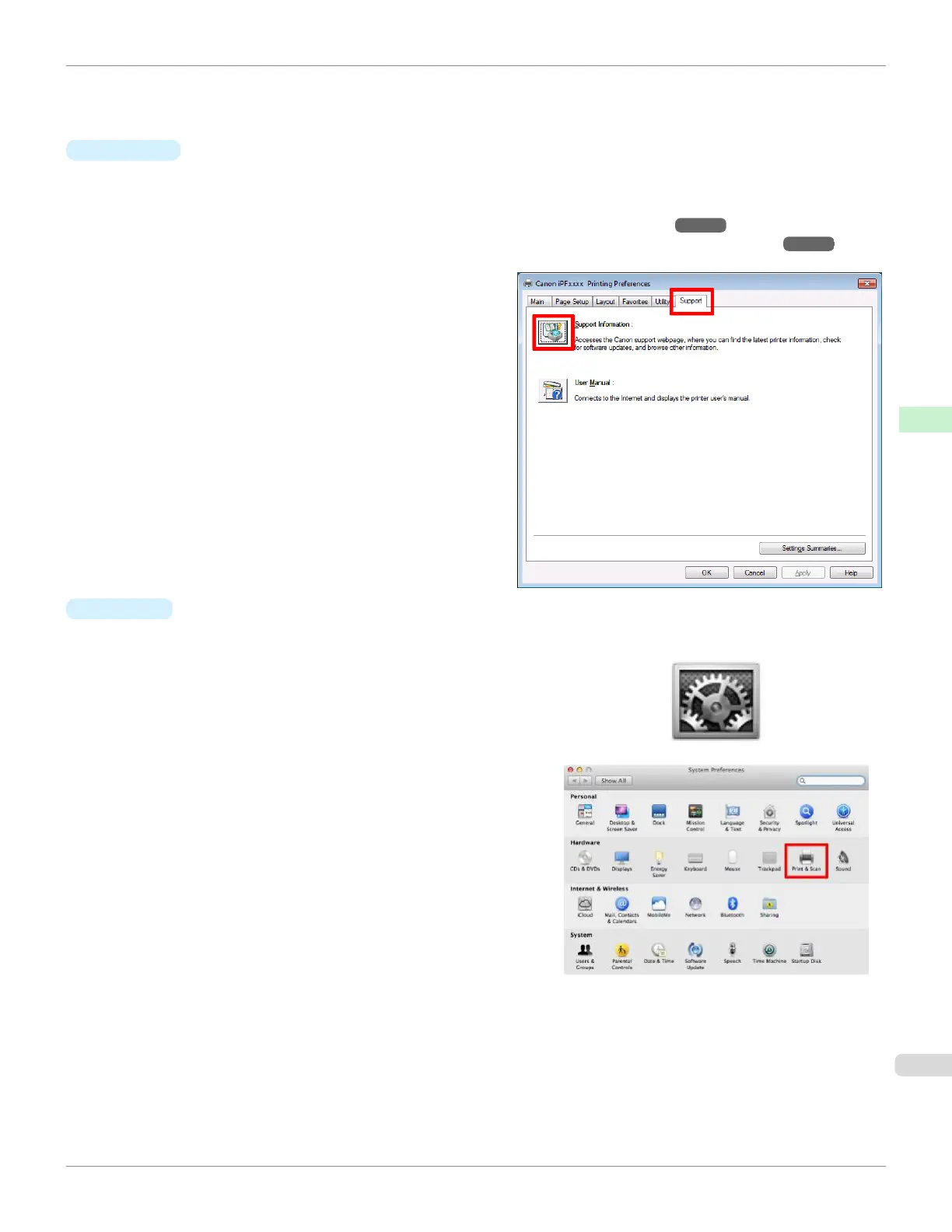
Select the Support sheet and click the Support In-
formation button.
The default browser on your computer is started and
the Canon website is displayed.
•
Mac OS
The basic instructions for accessing the Canon website from imagePROGRAF Printmonitor are as follows.
1.
Click the System Preferences icon in the Dock.
2.
Click Print & Scan. (This is identified as Printers & Scan-
ners or Print & Fax in other versions of Mac OS X.)
iPF670
Updating paper information
User's Guide
Handling and Use of Paper Paper
351













 To Next Page