Printer parts
Printer parts
Front .................................................................................................................................................................... 476
Side ...................................................................................................................................................................... 478
Top Cover (Inside) ................................................................................................................................................. 479
Roll Cover (Inside) ................................................................................................................................................. 480
Carriage ............................................................................................................................................................... 480
Ink Tank Cover (Inside) .......................................................................................................................................... 481
Stand ................................................................................................................................................................... 483
Control Panel ........................................................................................................................................................ 438
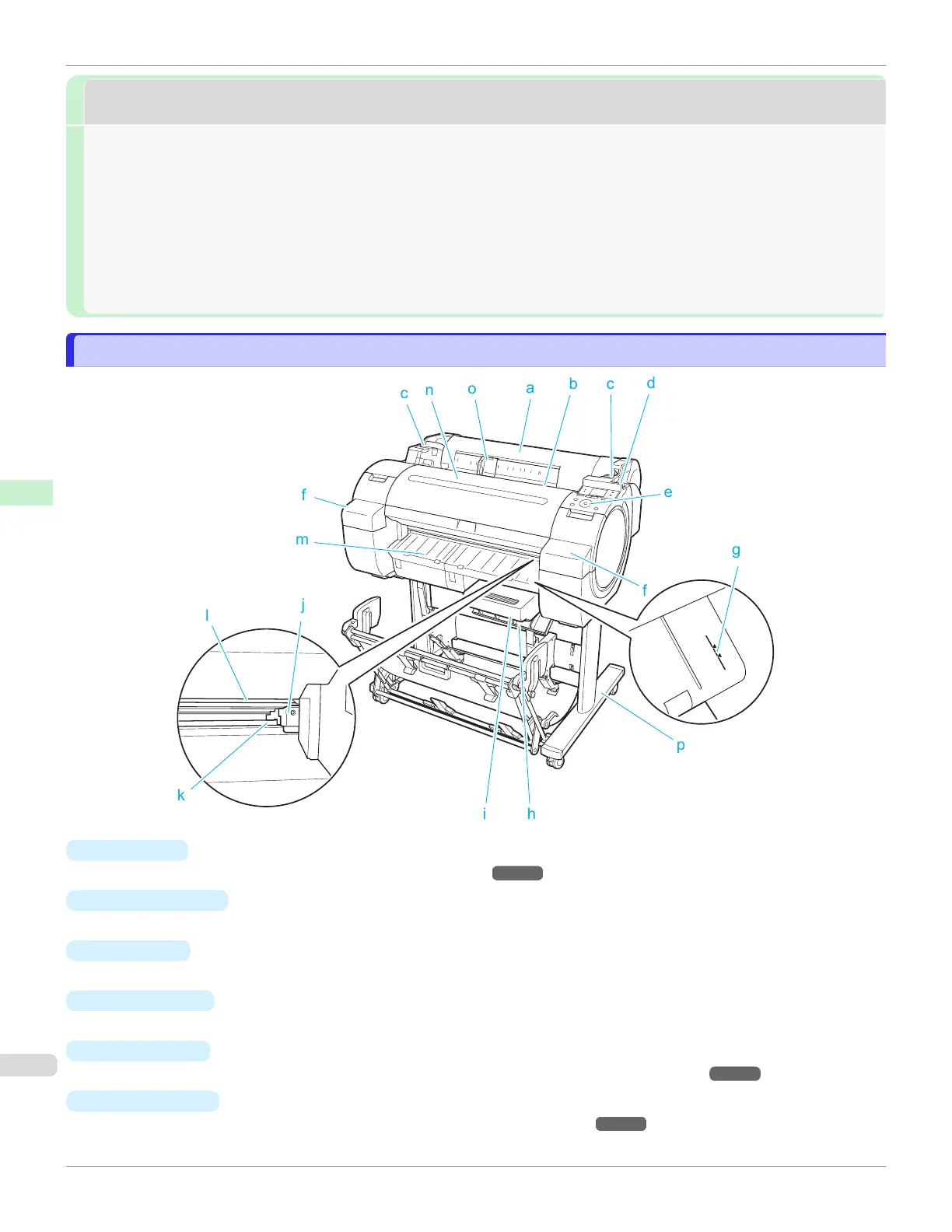
Front
Front
a
Roll Cover
Open this cover to load rolls. (See "Roll Cover (Inside).") ➔P.480
b
Paper Feed Slot
When loading paper, insert it here.
c
Roll Ledge
When loading rolls, rest the Roll Holder here before loading it in the Roll Holder Slot.
d
Release Lever
When releasing the Paper Retainer, push this lever back.
e
Control Panel
Use this panel to operate the printer and check the printer status. (See "Control Panel.") ➔P.438
f
Ink Tank Cover
Open this cover to replace an Ink Tank. (See "Ink Tank Cover (Inside).") ➔P.481
Front
iPF670
User's Guide
Printer Parts Printer parts
476













 To Next Page