8
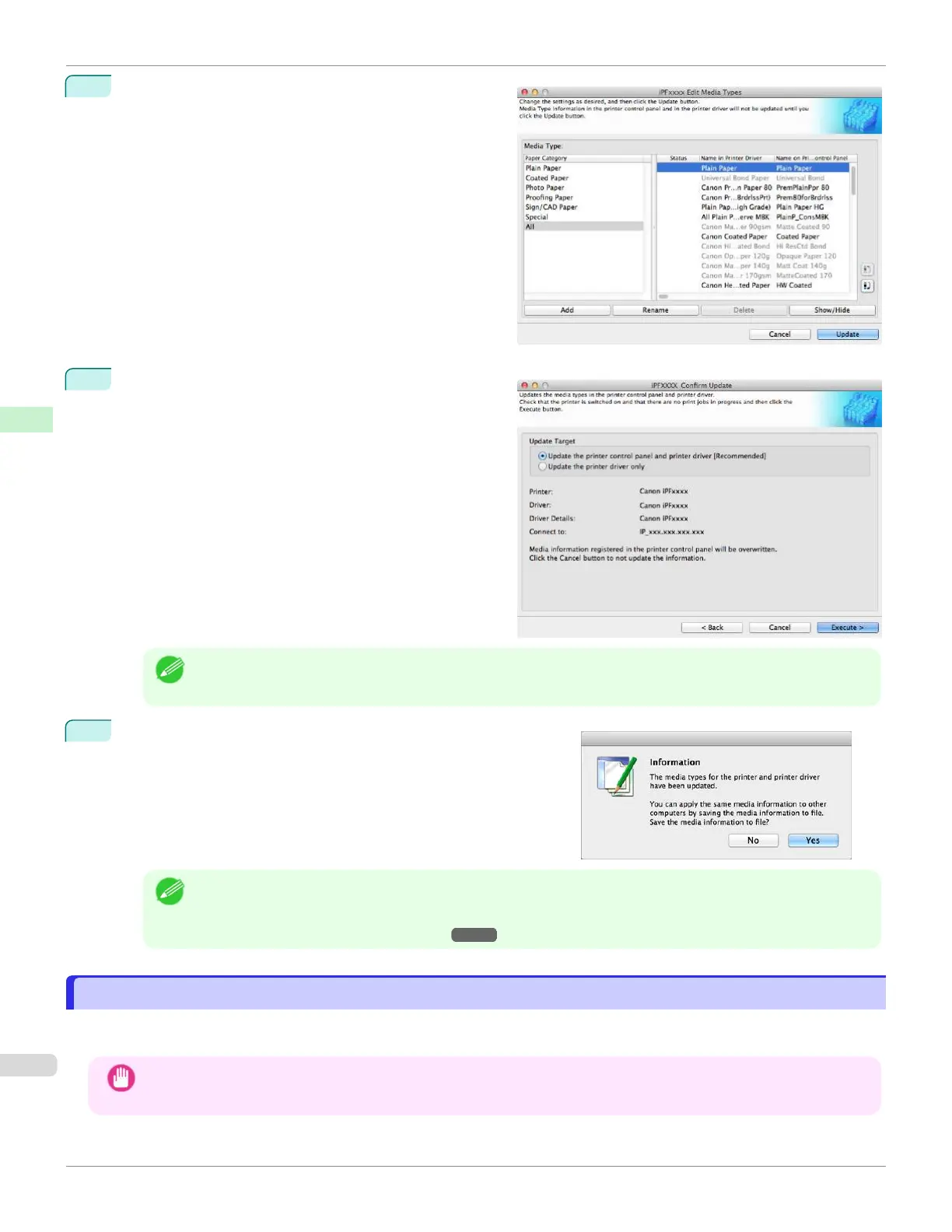
In the Edit Media Types dialog box, click the Update
button.
9
The Confirm Update dialog box is displayed.
Configure Update Target and click the Execute button.
The printer control panel and printer driver media infor-
mation is updated.
Note
•
You should normally select Update the printer control panel and printer driver.
10
The message on the right is displayed.
If you want to save the current media information in a file, click
the Yes button. If you do not want to save it, click the No button.
Note
•
The media information is saved as a media information file (.amx file).
•
For the method for loading a saved media information file in another computer, see "Applying a Saved Media
Information File on Another Computer." ➔P.434
Media Configuration Tool Main Window
Media Configuration Tool Main Window
The explanation below is on the Media Configuration Tool main window.
Use the following procedure to open Media Configuration Tool main window.
Important
•
Do not attempt to print or turn the printer off while the program is communicating with the printer.
Media Configuration Tool Main Window
iPF670
User's Guide
Handling and Use of Paper Media Configuration Tool (Mac OS)
418













 To Next Page