Problems Regarding Paper
Problems Regarding Paper
Clearing Jammed Roll Paper ................................................................................................................................ 577
Clearing a Jammed Sheet .................................................................................................................................... 580
Clearing Jammed Paper (Paper Feed Slot) ........................................................................................................... 583
Roll paper cannot be inserted into the Paper Feed Slot ........................................................................................ 585
Cannot load sheets .............................................................................................................................................. 585
Paper is not cut neatly .......................................................................................................................................... 585
Paper is not cut .................................................................................................................................................... 585
Depression on the leading edge is left .................................................................................................................. 586
The size of clear film cannot be detected .............................................................................................................. 586
Roll Paper is Continuously Ejected ....................................................................................................................... 586
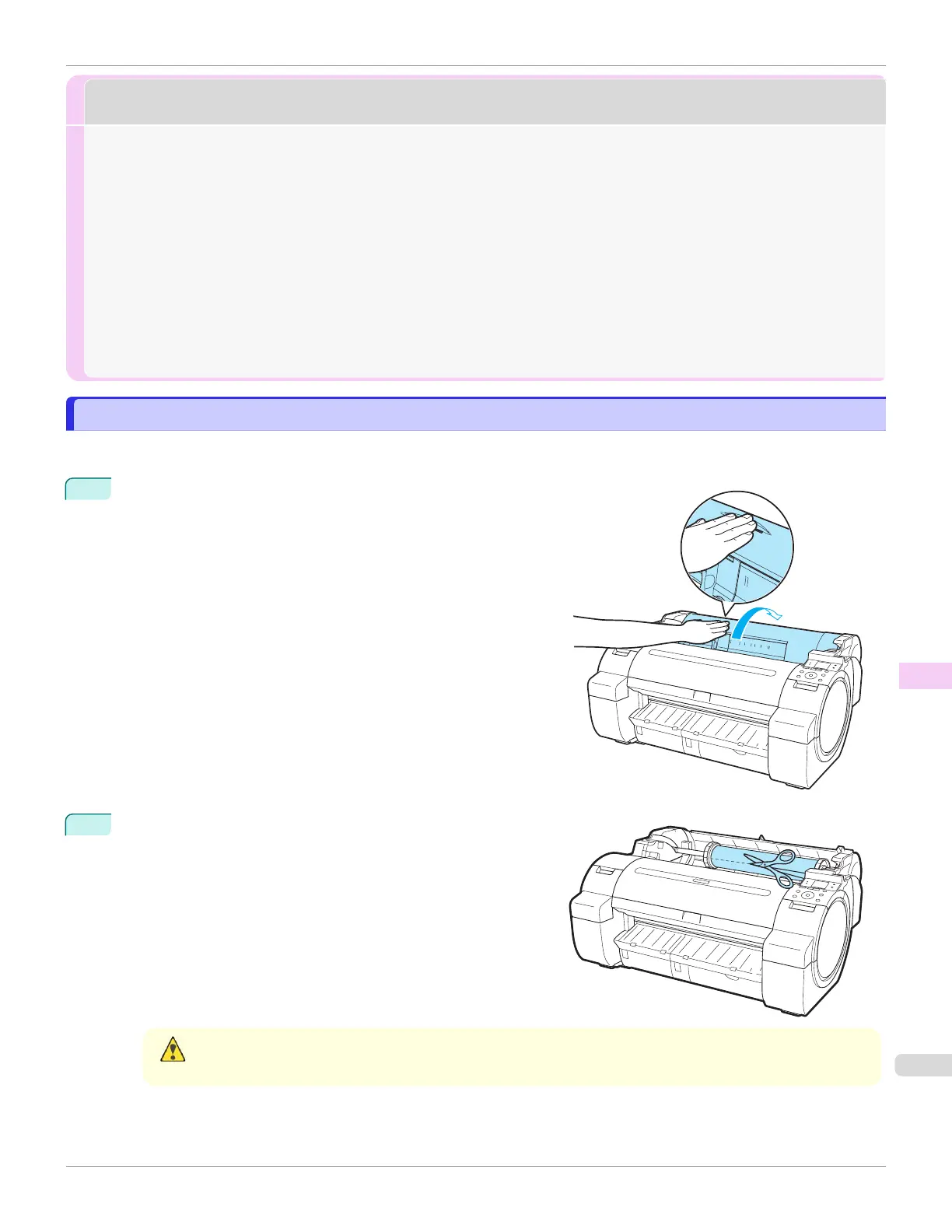
Clearing Jammed Roll Paper
Clearing Jammed Roll Paper
If paper from a roll becomes jammed, "Paper jam." is shown on the Display Screen of the Control Panel. Remove the
jammed paper as follows.
1
Positioning your hands as shown, open the Roll Cover.
2
Cut the loaded roll paper with regular scissors or the like.
Caution
•
When cutting paper, be careful to avoid injury or damage to the printer.
iPF670
Clearing Jammed Roll Paper
User's Guide
Troubleshooting Problems Regarding Paper
577













 To Next Page