•
Page size: A4 (210.0 × 297.0 mm [8.3 × 11.7 in])
•
Paper: Roll paper
•
Paper type: Plain Paper
•
Roll paper width: A2/A3 roll (420.0 mm [16.5 in])
1
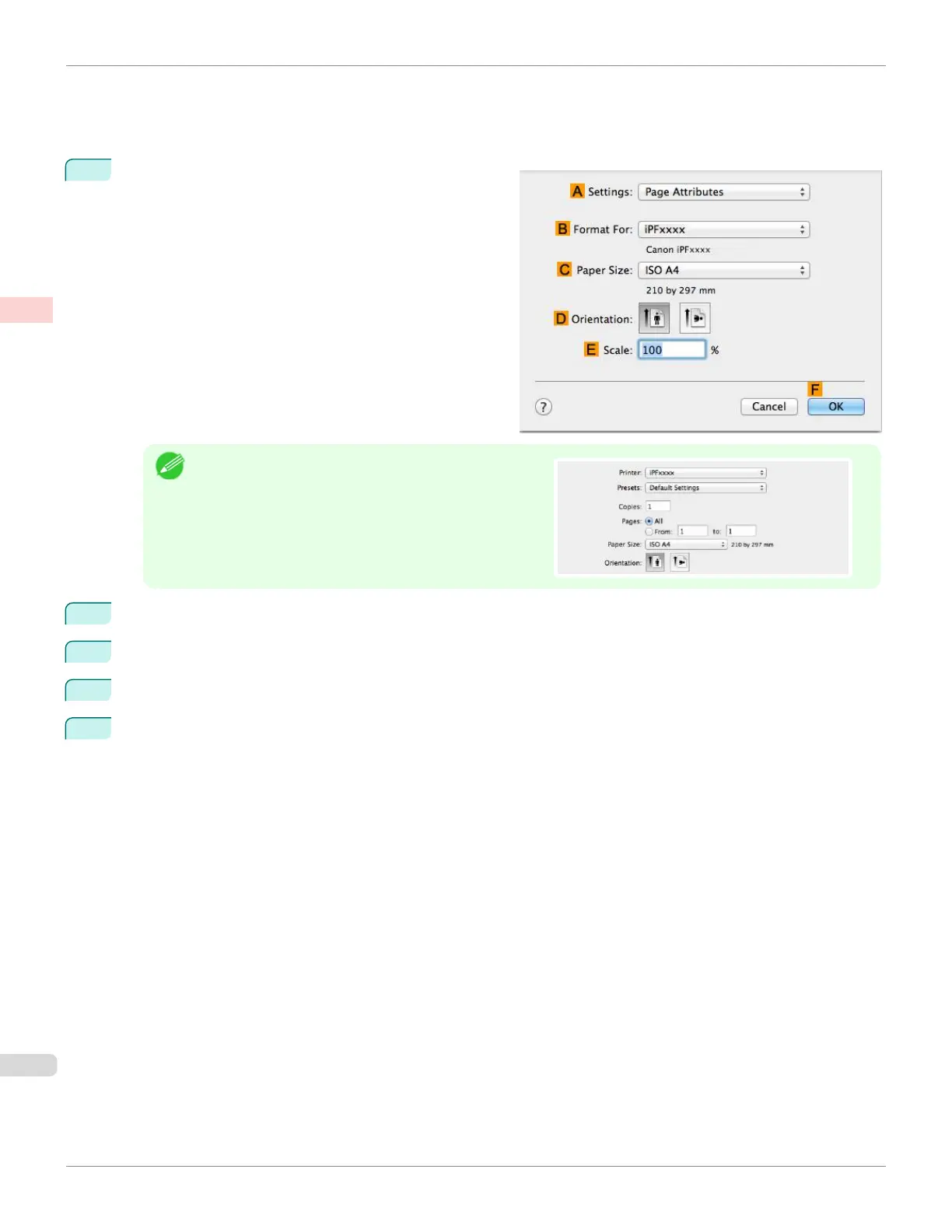
Choose Page Setup from the application menu to dis-
play the Page Attributes dialog box.
Note
•
Page Setup might not be displayed in the menu de-
pending on the OS you are using and the application
software.
In this case, select Print from the menu in the applica-
tion software, and configure the settings in the upper
part of the printer driver screen that is displayed.
2
Select the printer in the B Format for list.
3
In C Paper Size, click the size of the original. In this case, click ISO A4.
4
Click F OK to close the dialog box.
5
Choose Print in the application menu.
Resizing Originals by Entering a Scaling Value (Mac OS)
iPF670
User's Guide
Enhanced Printing Options Printing enlargements or reductions
72













 To Next Page