Chapter 6 Miscellaneous Information
5-15
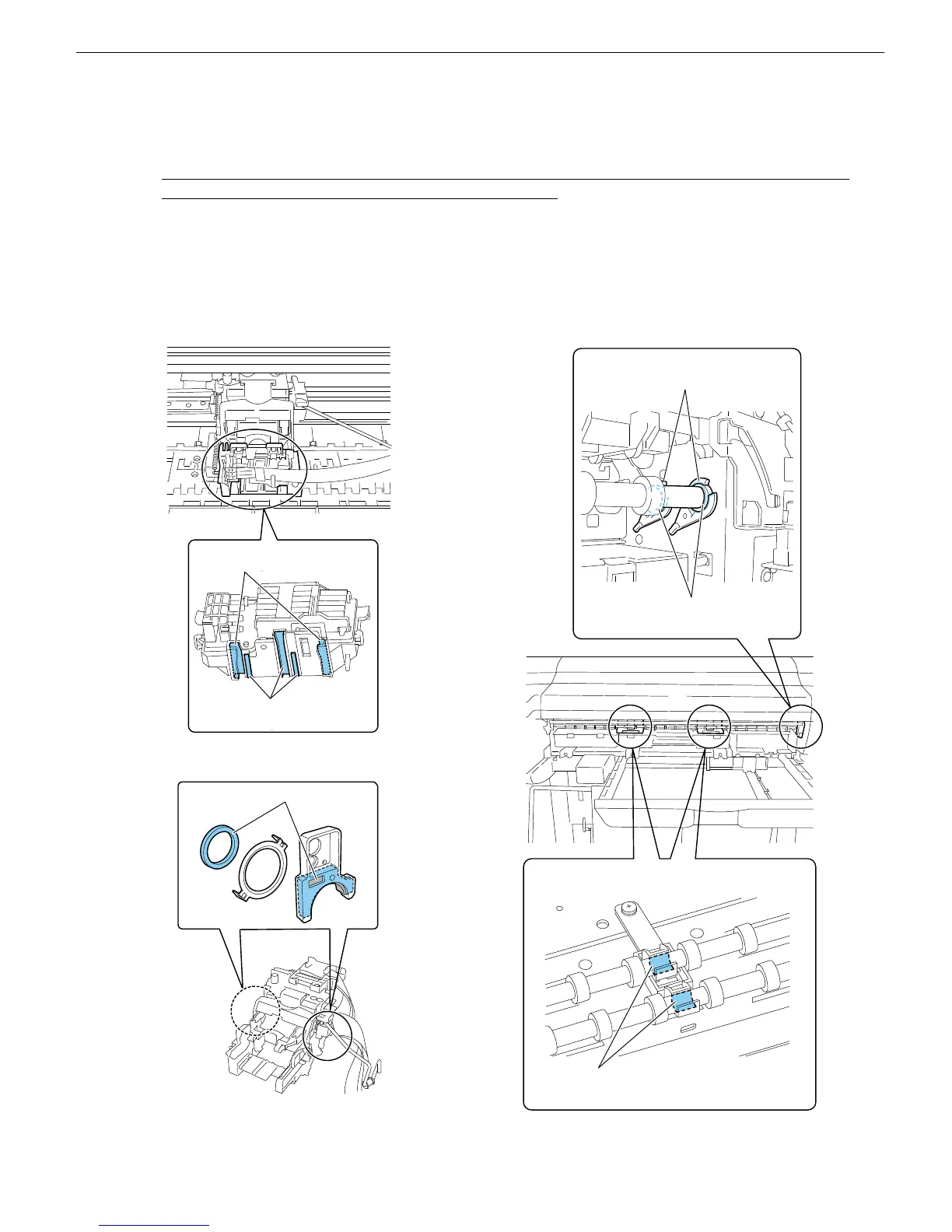
5. Greasing
※ Using a flat brush or the like, spread the dedicated part grease evenly to form a thin coat.
※ Be careful not to apply the grease to any part other than specified parts. Grease adhering to the wiper, cap
and linear scale, in particular, could result in defective print.
※ The main rail does not require greasing. Be careful not to grease it directly. Problems, such as unusual
noises, imaging failures and shorter head lives, might result.
If the carriage is overloaded because it is stained by ink or as a result of any other condition, clean the rail
and then move the carriage fully in both directions about 10 times. This action will allow the lubricant to
transfer from the carriage shaft cleaning part to the rail.
■iPF610 example
・ Joint base
・ Shaft cleaner/oil pad
・ Eject roller bearing/Eject roller middle bearing
モリコート PG-641
約12mg
モリコート
PG-641
約12mg
A2(17”)モデルは1カ所、A1(17”)モデルは2カ所
モリコート PG-641
約12mg
Molycote PG-641
About 12 mg
Molycote PG-641
About 12 mg
Molycote PG-641
About 12 mg
One position on the A2 (17”) model and two on the
A1 (24”) model
EU-1 含浸
Impregnation
モリコート PG-641
約12mg
モリコート
PG-641
約6mg
Molycote PG-641
About 12 mg
Molycote PG-641
About 6 mg














 To Next Page