Troubleshooting Guide
2-58
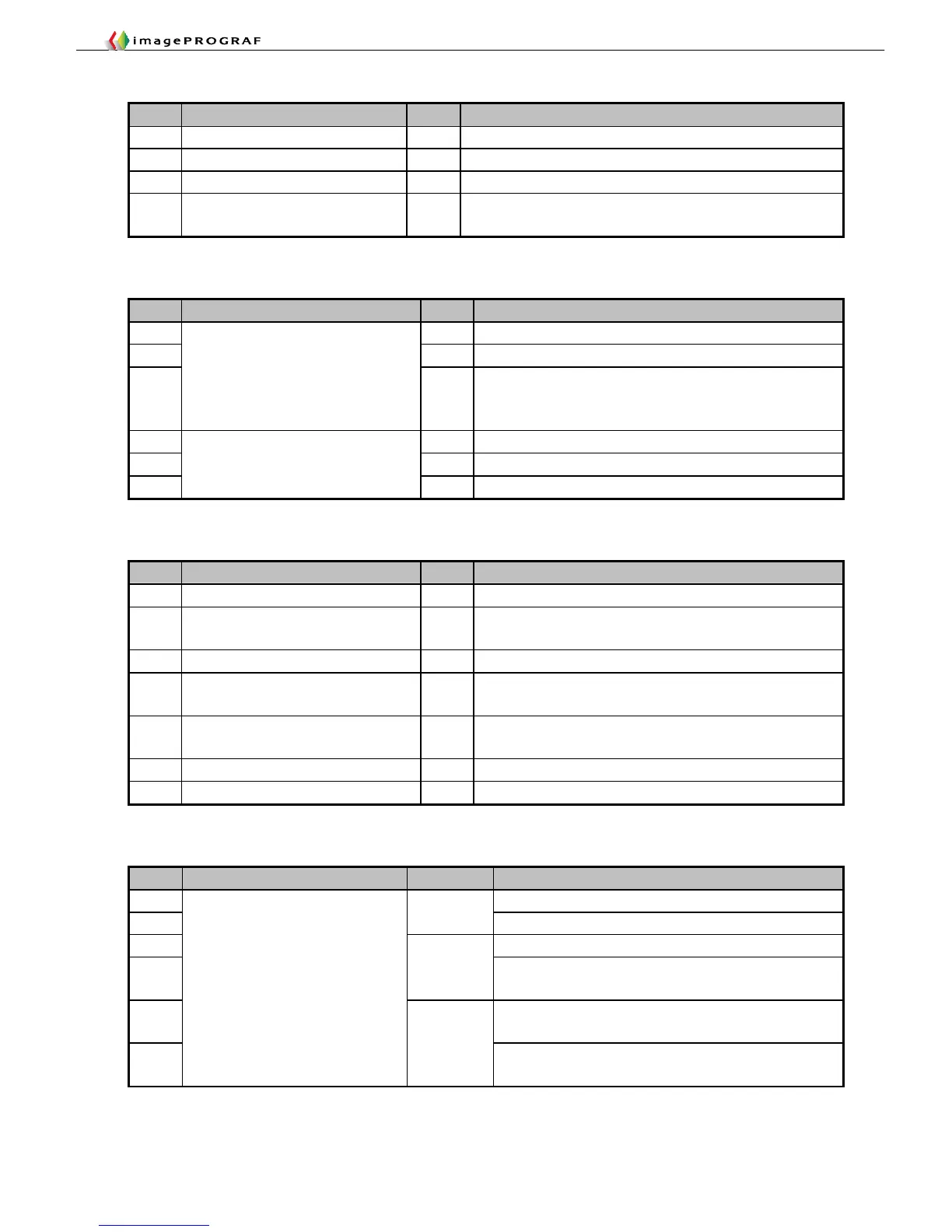
B. Operational Failures
Category
Item Subitem Remedial Action (tool)
B PosterArtist won’t launch Chapter 4: Operational Failures ①
B The main unit won’t start Chapter 4: Operational Failures ②
B Power turns off automatically Chapter 4: Operational Failures ②
B Network-connected printer, once
visible, out of sight
If “Automatic” is selected for the IP address of the printer, assign
a fixed IP address to it.
C. Functional Failures
Category
Item Subitem Remedial Action (tool)
C Restart the printer.
C Upgrade the firmware.
C
Freezing/slow
If paper has been added, initialize the Paper preferences and
update additional Paper from System Settings (user settings
will be lost).
C Underpowered host PC
C Check the network environment.
C
No printing
Bug in AutoCAD high-speed rendering/Ver.3.00 or later
D. Cutting Failures
Category
Item Subitem Remedial Action (tool)
D Wavy cut surface Chapter 4: Cutting failures without error indications
D Residual cutting chips on the reference
side
Chapter 4: Cutting failures without error indications
D Normally ended without cutting Chapter 4: Cutting failures without error indications
D Line printed at the cutting position, but
without actual cutting
Chapter 4: Cutting failures without error indications
D Line printed at the cutting position on
printing
Chapter 4: Cutting failures without error indications
D Cut automatically Chapter 4: Cutting failures without error indications
D Images cut halfway Chapter 4: Cutting failures without error indications
E. Unusual Noises
Category
Item Subitem Remedial Action (tool)
E After checking the idler pulley, go to 2F26.
E
Rasping
Check the carriage tension unit.
E The tube has hit the exterior to generate unusual noises.
E
Chattering
Open and close the platen suction path selection valve
(normal).
E Soiled carriage rail/Clean dry (never apply oil)/replace the
rail cleaner/replace the carriage bearing.
E
Carriage drive
Creaky
Broken head open/close lever
Replace the lever.














 To Next Page