Troubleshooting Guide
3-18
Cause Point to check Action
C1, C2, C3 Check the cutter position at an error stop.
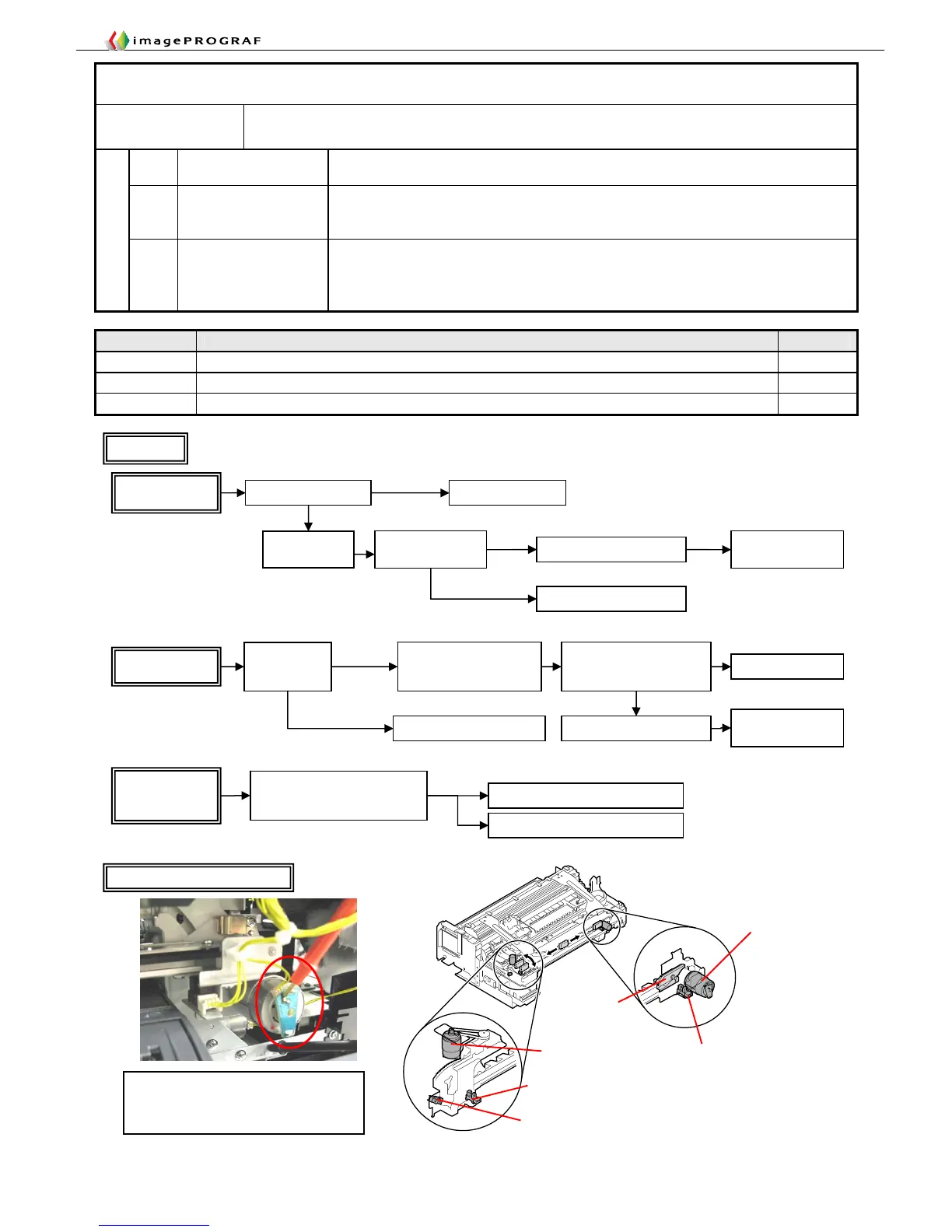
C1, C2, C3 iPF5000/iPF800 Series Flow 1
C1, C2, C3 iPF700/iPF8000 Series Flow 2
11. 【2F24】Cutter shift timeout error
Occurrence
condition
The cutter wont’ move to the home position or the position opposite to the home position in
time.
C1 Cannot cut sheet
Worn cutter
Special paper
C2
Faulty cutter drive
unit
Worn/broken drive gear (iPF5000 Series)
Faulty cutter motor (iPF5000 Series)
Carriage malfunction (iPF700, iPF8000 Series)
Failure causes
C3
Faulty cutter
electrical equipment
Bitten wires (iPF5000 Series)
Faulty sensor
Faulty cutter driver PCB (iPF5000, iPF500, iPF600 only)
Faulty main controller (iPF5000 Series)
Cutter Motor Drive Volta
e Check
Evaluation method
The drive voltage is normal if the voltage
appears to vary by a margin of several volts
while the cutter is driven.
Cutter moto
Cutter positioned
at the left end
iPF5000/iPF800 Series
Cutter positioned
at the right end
Cutter anywhere
other than the left
and right ends
Check the
right-side
sensor visually
Remove the foreign matter
Foreign matter
present
No foreign
matter
A sensor fault has been
identified by replacing with
a lift detection sensor
Replace the cuter driver
Replace the sensor
For the iPF5000, iPF500 and iPF600 onl
Replace the main
controller
-Check for bitten wires
-Check for successful
operation in IO mode
Is the motor rotating?
Yes
Check the gear/belt
No
Replace the cutter driver
For the iPF5000, iPF500 and
iPF600 only
Replace the main
controller
Replace the motor
Is the drive voltage
available (*) ?
*See “Cutter Motor Drive Voltage Check” for the subsequent action to take.
Remove foreign matter
from the sensor if any
Check for bitten
wires
Yes
No
Replace the cutter
If non-recommended paper has
been used, check with a
recommended paper equivalent
Replace with recommended paper
Flow 1














 To Next Page