Troubleshooting Guide
2-8
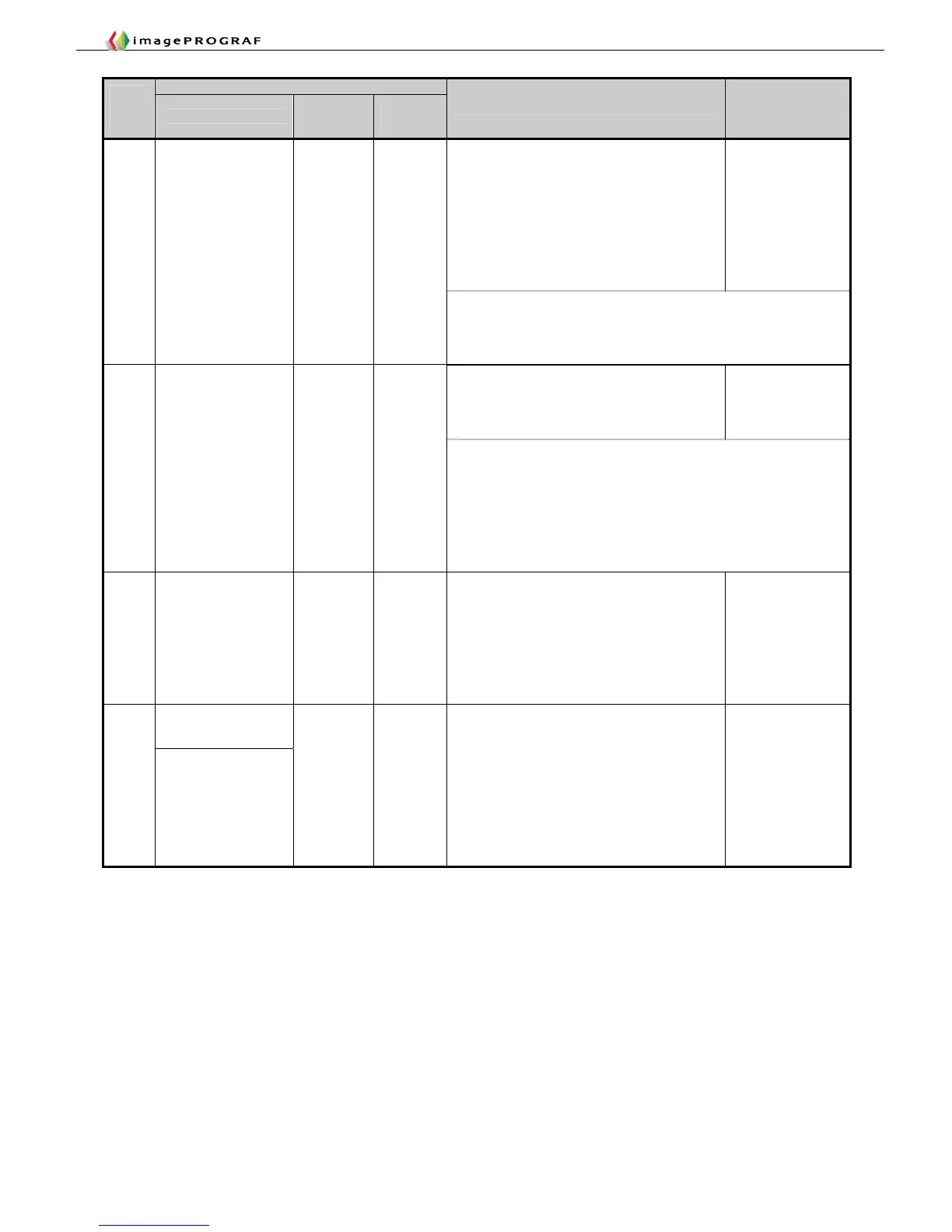
Panel display
Code
(last 4
digits)
Large LCD
Small
LCD 1
Small
LCD 2
Explanation/Detection sequence
Remedial Action
(★: Reference fault
isolation procedure
or tool)
The multisensor detected that the platen
shutter used for pre-ejection was closed.
Detection timing:
・At paper loading
・At start of first printing (after upper cover is
opened and closed, or recovery from sleep
mode, or the power is turned on with paper
loaded)
Move the platen
shutter relevant to
the message to
the right, to open
it.
1056
to
1062
Move the blue
platen switch No.XX
to the right.
The following list shows the last 2 digits of error codes and the
corresponding messages.
56:No.2, 57:No.3, 58:No.459:No.5, 5A:No.6, 5B:No.75C:No.8,
5D:No.9, 5E:No.105F:No.11, 60:No.12, 61:No.1362:No.14
Maintenance cartridge near-full (continued
usage allowed)
Near-full has been detected from the dot
count and the usage period (drying time).
Prepare a
maintenance
cartridge.
1100 Prepare for
maint cart
replacement.
MTCart
Full Soon
<Maintenance cartridge detection timings>
The presence of a maintenance cartridge is detected at the
following timings:
①Before printing/during printing (twice per second)/at the end of
printing/ between pages
②Before a recovery operation/during a recovery operation (twice
per second)/before opening of the ink supply valve
③ When the cartridge is removed and inserted following the
occurrence of an error or warning.
1101 Replace part soon. Mist Full
Soon
Mist count near-full
Waste ink near-full has been detected from
the dot count.
Check the parts
counter and
replace the target
unit or Refresh
Service Kit.
Initialize the parts
counter for the
target unit after
the replacement.
No ink left.
Press OK and
replace ink tank.
1400
to
140C
Ink tank is empty.
Replace the ink
tank.
Ink tank empty (continued use allowed)
The ink tank has run out of ink, but a certain
volume of ink is reserved in the subtank.
(The reserved volume of ink is put to use
after the remaining ink falls below the pin
check level.)
Displayed only on models having a subtank.
(XX: Display applicable colors)
Last 2 digits: 00:Bk, 01:Y, 02:M, 03:C, 04:PM,
05:PC, 06:MBk1, 07:MBk2, 08:GY, 09:PGY,
0A:R, 0B:V, 0C:GR
①Replace the
tank.
②Failure of
remaining ink
detection
system.
(Replace the
supply unit
/check the
bundled wires.)














 To Next Page