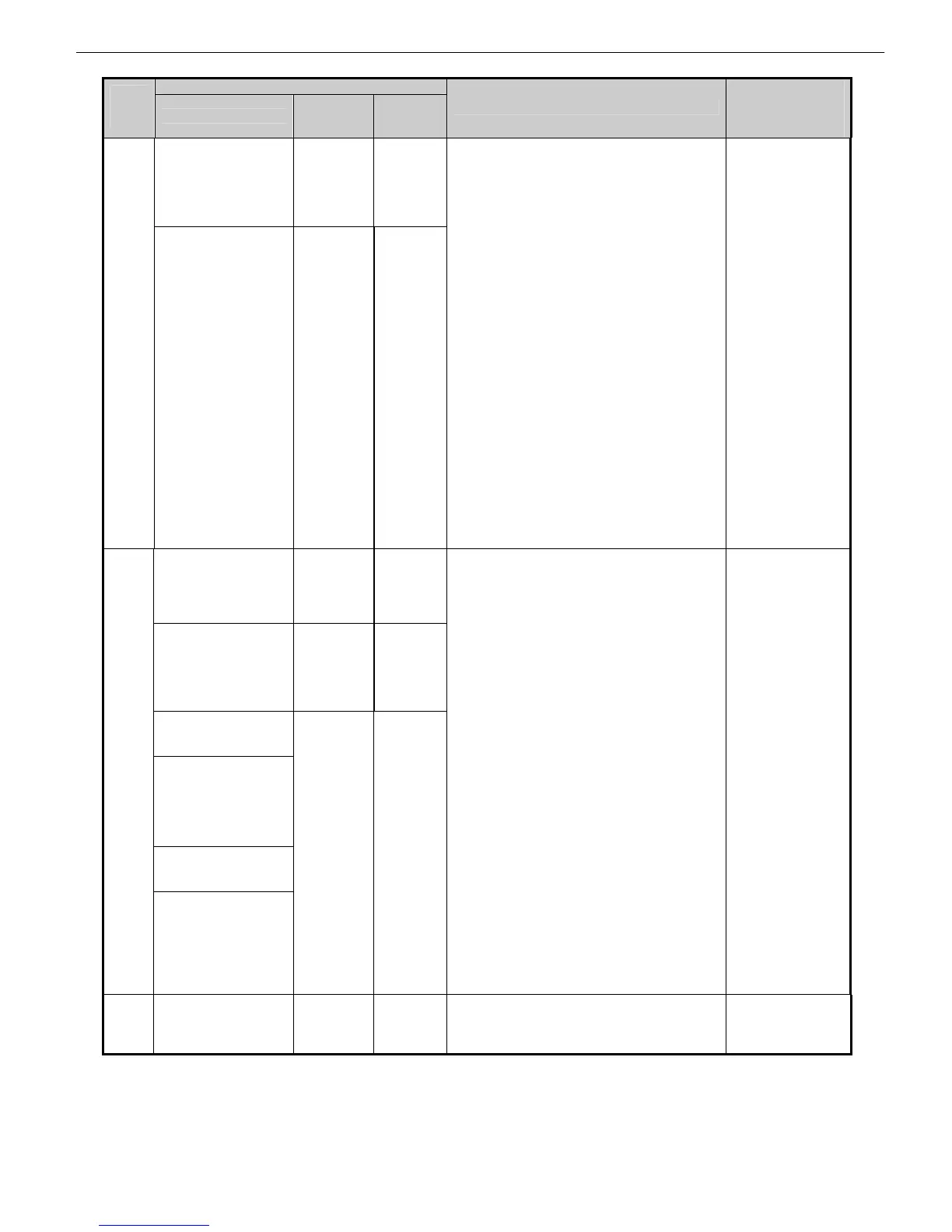
Chapter 2 Indexes by Case
2-11
Panel display
Code
(last 4
digits)
Large LCD
Small
LCD 1
Small
LCD 2
Explanation/Detection sequence
Remedial Action
(★: Reference fault
isolation procedure
or tool)
This paper
cannot be used.
Check supported
paper sizes.
Paper
Size
Please
Check
Paper
Too
Large
Press
↑ Key
200F
This paper
cannot be used.
Check supported
paper sizes.
Load/Eject: Change
Paper
Paper Too
Large
Please
Check
Press
Online
Key
and
Reload
Paper mismatch (size)
Paper is too large
・The width and length of paper detected are
longer than the supported size (1.5%
margin).
・Cannot detect the leading edge of paper
even when the paper has been fed by 1300
mm for roll paper and by the size
mentioned above for cut sheet.
・Cannot detect the width of paper even when
the paper is fed by the size mentioned above.
①Check paper
conditions
(soiling,
tear-offs,
residual paper
chips, residual
trimming cuts,
folds)/size.
②Has the paper
been fed
successfully
(without
slippage under
a load or any
influence)?
③Has the LF
adjustment
value set
correctly?
④Hasn’t the
loaded paper
shrunk to
below its
margin in the
particular
environment?
Go to ★2010
(P3-12).
Paper loaded askew.
Press Load/Eject
and reload the
paper.
Paper
Askew
Please
Reload
Paper
Skew
Press
↑ Key
Paper loaded askew.
Reload the paper.
Paper
Loaded
Crooked
Press
Online
Key
and
Reload
Paper loaded askew.
Lift the
release lever.
Paper loaded askew.
Lift the release
lever and reload
the paper.
Paper loaded askew.
Press OK and
reload the paper.
2010
Paper loaded askew
Lift the release lever.
Paper
loaded
askew.
Remove
paper
Skew (skewed right)
Paper is determined skewed as its edge is
read by the multisensor.
Reload the
paper.
Go to ★2010
(P3-12).
2014 Hardware error.
Turn the power off,
wait a moment, then
turn on again.
Power
On
Again
Cutter
Unit
Fuse
Blown
Cutter unit fuse blowout error ①Replace the
cutter driver
PCB.














 To Next Page