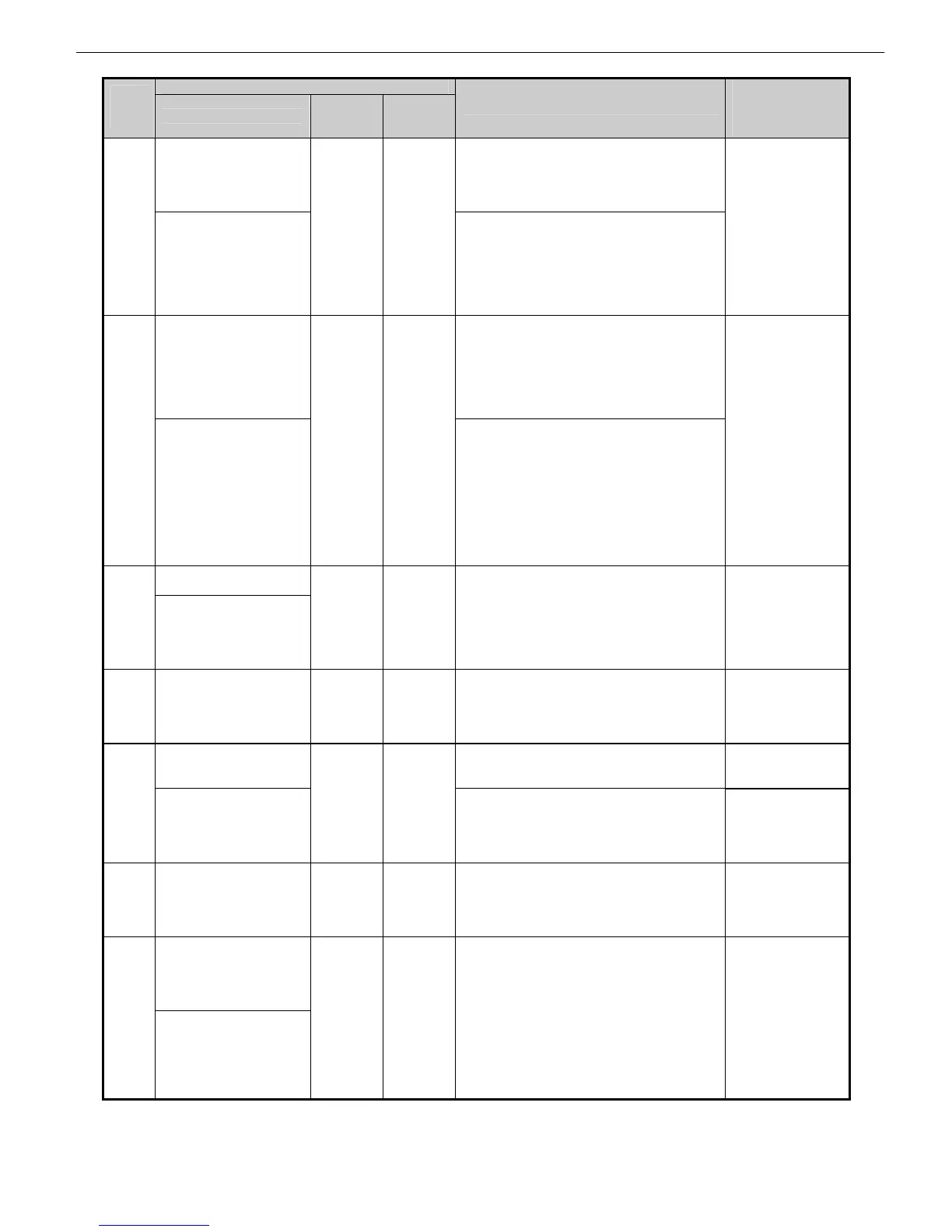
Chapter 2 Indexes by Case
2-41
Panel display
Code
(last 4
digits)
Large LCD
Small
LCD 1
Small
LCD 2
Explanation/Detection sequence
Remedial Action
(★: Reference fault
isolation procedure
or tool)
Roll Paper
(Paper type)
(Paper size)
Load Roll Paper
Stop Printing
Paper mismatch (roll paper)
No roll paper has been fed when a job with
a roll paper specification is received.
2E33
Roll 1(Upper)
(Paper type)
(Paper size)
Press Load/Eject
and load a roll.
Paper mismatch (roll paper)
No roll paper has been fed when a job with
a roll paper specification is received.
When paper has not been loaded on either
upper or lower slot, and the feeding slot is
set to [Automatic] in the job setting, an error
of upper roll occurs.
Load roll paper.
Roll 2 (Lower)
(Paper type)
(Paper size)
Press Load/Eject
and load a roll.
Paper mismatch (roll paper)
No roll paper has been fed when a job with
a roll paper specification is received.
When no paper has been loaded on either
upper or lower slot, and the feeding slot is
set to [Automatic] in the job setting, an error
of upper roll (2E33) occurs.
2E34
Roll 2 (Lower)
is selected.
Press Load/Eject
and load a roll.
Paper mismatch (roll paper)
No roll paper has been fed when a job with
a roll paper specification is received.
When no paper has been loaded on either
upper or lower slot, and the feeding slot is
set to [Automatic] in the job setting, an error
of upper roll (2E33) occurs.
* This is a message that appears when
paper type/ size specification does not exist
due to HPGL format etc.
Load roll paper.
Roll printing
is selected.
2E35
Roll printing
is selected.
Press Load/Eject
and load a roll.
Paper mismatch (roll paper)
No roll paper has been fed when performing
internal printing.
Load roll paper.
2E36 Roll printing
is selected.
Press Load/Eject
and load a roll.
Paper mismatch (roll paper)
No roll paper has been fed when internal
printing with roll paper specification is
started.
Load roll paper.
Roll printing
is selected.
Paper mismatch (roll paper)(Upper)
No roll paper has been fed when a job with
roll paper specification is received.
Load roll paper.
2E37
Roll 1 (Upper)
is selected.
Press Load/Eject
and load a roll.
Paper mismatch (roll paper)
No roll paper has been fed when a job with
upper roll paper specification is received.
Load roll paper.
2E38 Roll 2 (Lower)
is selected.
Press Load/Eject
and load a roll.
Paper mismatch (roll paper)(Lower)
No roll paper has been fed when a job with
lower roll paper specification is received.
Load roll paper.
The roll (XX) is empty.
Lift the release
lever and replace
the roll.
2E39
The roll (XX) is empty.
Press OK.
No roll paper available (trailing edge of roll
paper detected)
・Detected that cut sheet sized paper has
been fed at the roll paper feeding slot.
・The trailing edge of paper was detected
by the PE sensor during operation in
which roll paper was used.
・The spool stopped rotating during paper
loading or printing
(XX: Upper roll paper/ Lower roll paper)
①Replace the roll
paper
・Check paper
sensor R (IO
mode).
②Is the paper fed
successfully
(under a
negative load
or any other
influence)?














 To Next Page