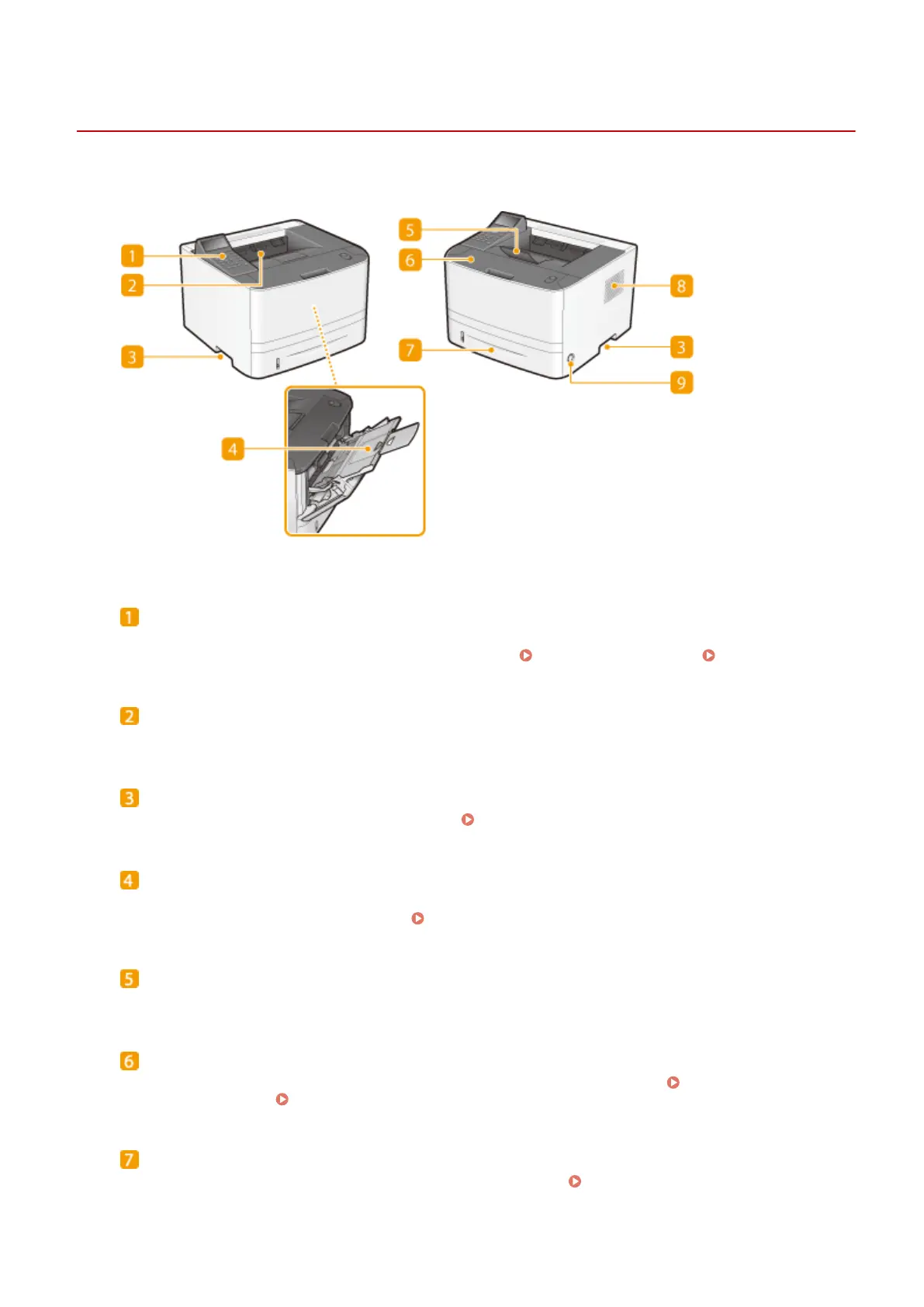
Front Side
0W20-008
Operation panel
The operation panel consists of numeric keys, a display, status indicators, etc. You can perform all the
operations and specify settings from the operation panel. Operation Panel(P. 24) Display(P. 27)
Output tray
Printed paper is output to the output tray.
Lift handles
Hold the lift handles when carrying the machine. Relocating the Machine(P. 402)
Multi-purpose tray
Load the paper into the multi-purpose tray when you want to temporarily use a type of paper different from
that which is loaded in the paper drawer. Loading Paper in the Multi-Purpose Tray(P. 41)
Paper stopper
Open the paper stopper to prevent paper in the output tray from falling.
Front cover
Open the front cover when replacing the toner cartridge or clearing paper jams.
How to Replace Toner
Cartridges(P. 400) Clearing Jams(P. 350)
Paper drawer
Load the type of paper you frequently use into the paper drawer.
Loading Paper in the Paper
Drawer(P. 37)
Basic Operations
17










 To Next Page