Registering Default Paper Settings for the Multi-
Purpose Tray
0W20-012
You can register default paper settings for the multi-purpose tray. Registering default settings can save yourself the
effort of having to specify the settings each time you load the same paper into the multi-purpose tray.
● After the default paper setting is registered, the paper setting screen is not displayed when paper is loaded,
and the same setting is always used. If you load a different paper size or type without changing the paper
settings, the machine may not print properly. To avoid this problem, select <Specify When Loading Paper> in
step 3, and then load the paper.
1
Display the <Paper Settings> screen.
LBP252dw
Press use / to select <Paper Settings> press .
LBP251dw
Press ( ).
2
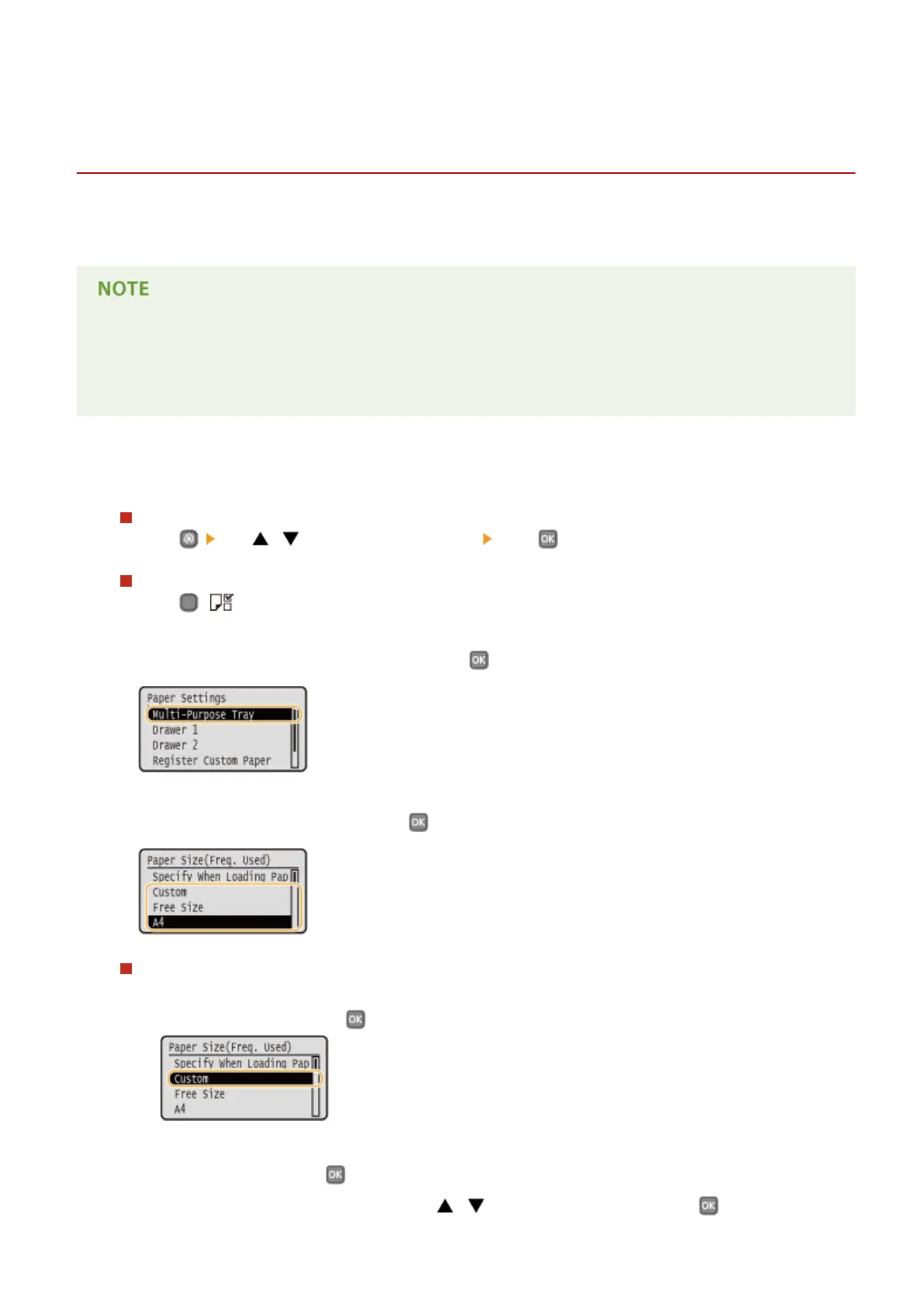
Select <Multi-Purpose Tray>, and press .
3
Select the paper size, and press .
Registering a custom paper size
1
Select <Custom>, and press .
2
Specify the length of the <X> (shorter) side.
● Select <X>, and press .
● Input the length of the <X> side using
/ or the numeric keys, and press .
Basic Operations
55










 To Next Page