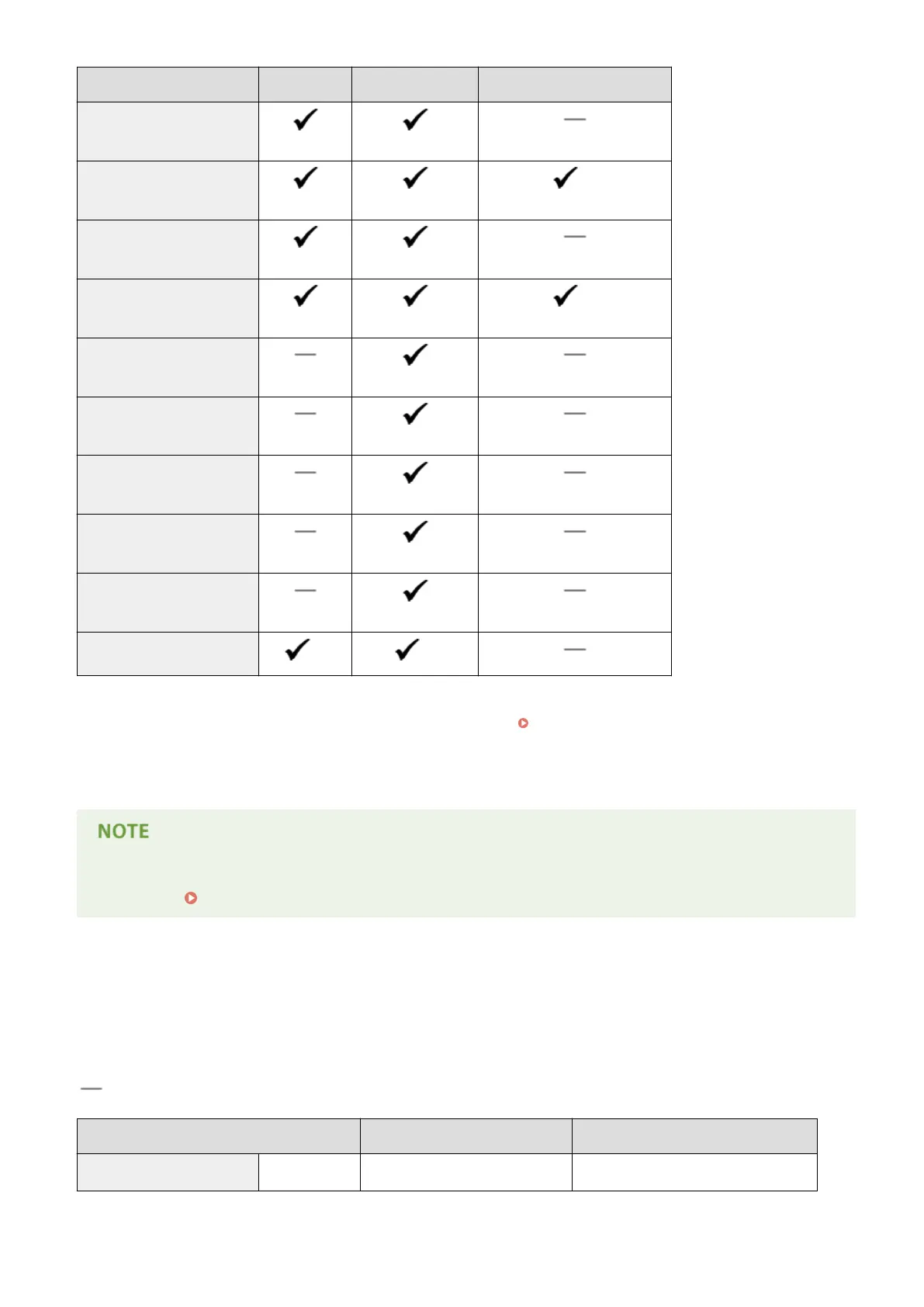
Paper Size Paper Drawer Multi-Purpose Tray Automatic 2-Sided Printing *1
Legal (Government)
(203.2 x 330.2 mm)
Foolscap
(215.9 x 330.2 mm)
*2
Foolscap (Australia)
(206.0 x 337.0 mm)
Legal (India)
(215.0 x 345.0 mm)
*2
Envelope No.10 (COM10)
(104.7 x 241.3 mm)
Envelope Monarch
(98.4 x 190.5 mm)
C5
(162.0 x 229.0 mm)
Envelope DL
(110.0 x 220.0 mm)
3x5inch
(76.2 x 127.0 mm)
Custom
*3
*4
*1
Automatic 2-sided printing is available without necessity of paper reloading.
*2
Set the paper size switch lever in the same position as that for Letter/Legal size. Interior(P. 21)
*3
Custom size paper with width 105.0 to 216.0 mm and length 148.0 to 356.0 mm can be loaded.
*4
Custom size paper with width 76.2 to 216.0 mm and length 127.0 to 356.0 mm can be loaded.
● The default paper size of the machine is set to A4. Change the paper size setting when using a different size
of paper. Specifying Paper Size and Type in the Paper Drawer(P. 51)
◼ Paper Type and Paper Source Capacity
Chlorine-free paper can be used with this machine.
: Unavailable
Paper Type
Paper Capacity for Paper Drawer Paper Capacity for Multi-Purpose Tray
Plain paper
*
60 to 89 g/m² 250 sheets 50 sheets
*
Automatic 2-sided printing is available without replacing paper.
Appendix
441










 To Next Page