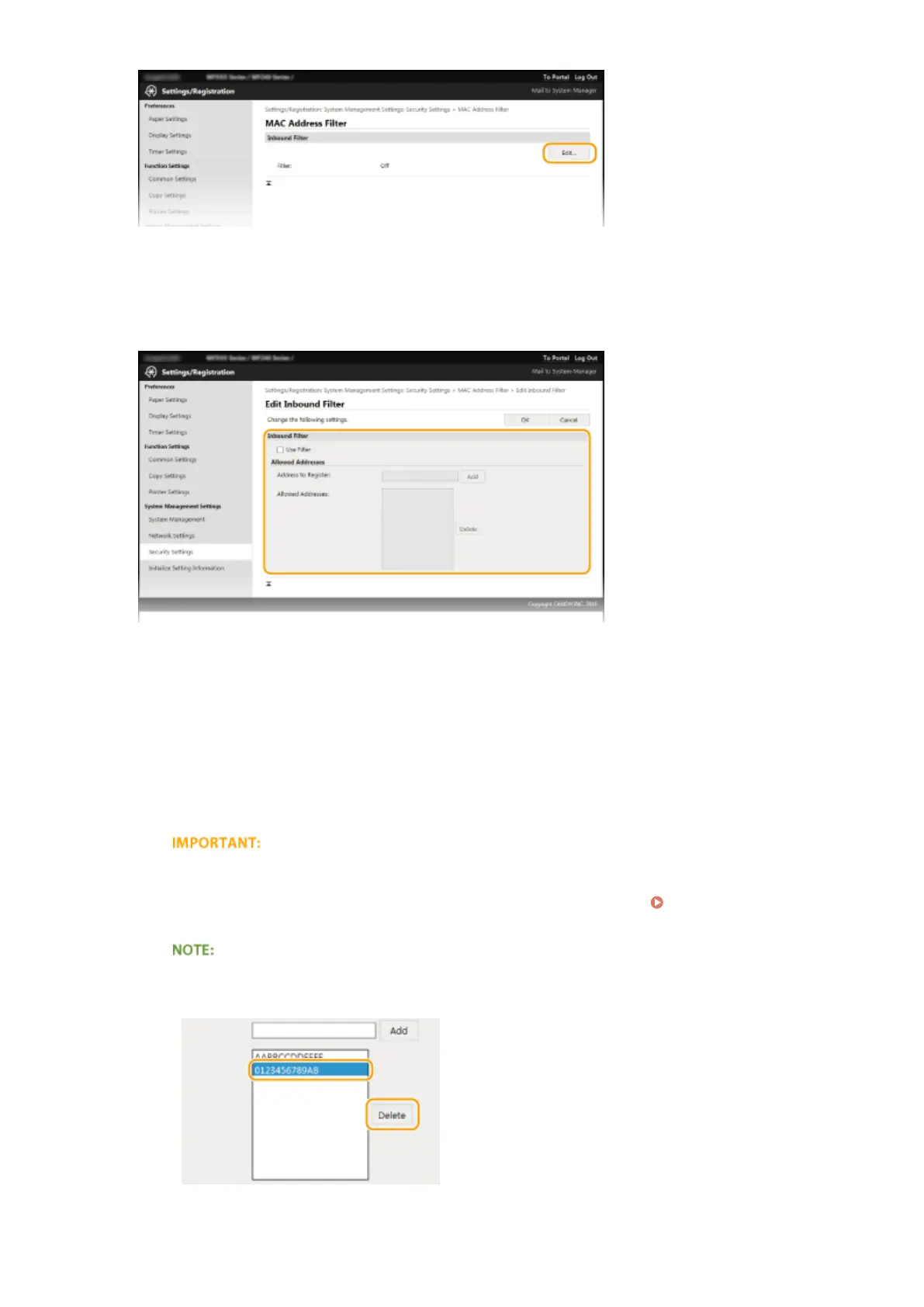
[Inbound Filter]
Select to r
estrict receiving data from the machine to a computer by specifying MAC addresses.
5
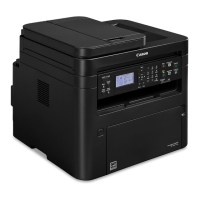
Specify the settings for packet ltering.
1
Select the [Use Filter] check box.
● Select the check bo
x to restrict communication. Clear the check box to disable the restriction.
2
Specify the address.
● Enter the MAC address in the [Address to Register] text box and click [Add]. Allows communication
(received) only with devices having registered MAC addresses, and restricts communication with
devices with any other MAC addresses.
● You do not need to delimit the address with hyphens or colons.
Check for entry errors
If MA
C addresses are incorrectly entered, you may become unable to access the machine from the
Remote UI, in which case you need to set <MAC Address Filter> to <Off>.
MAC Address Filter (P. 332)
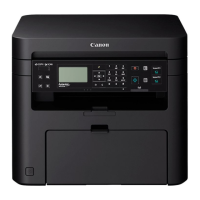
Deleting a MAC address from exceptions
Select a MA
C address and click [Delete].
3
Click [OK].
Security
239



 To Next Page