Viewing Network Settings
15A8-03W
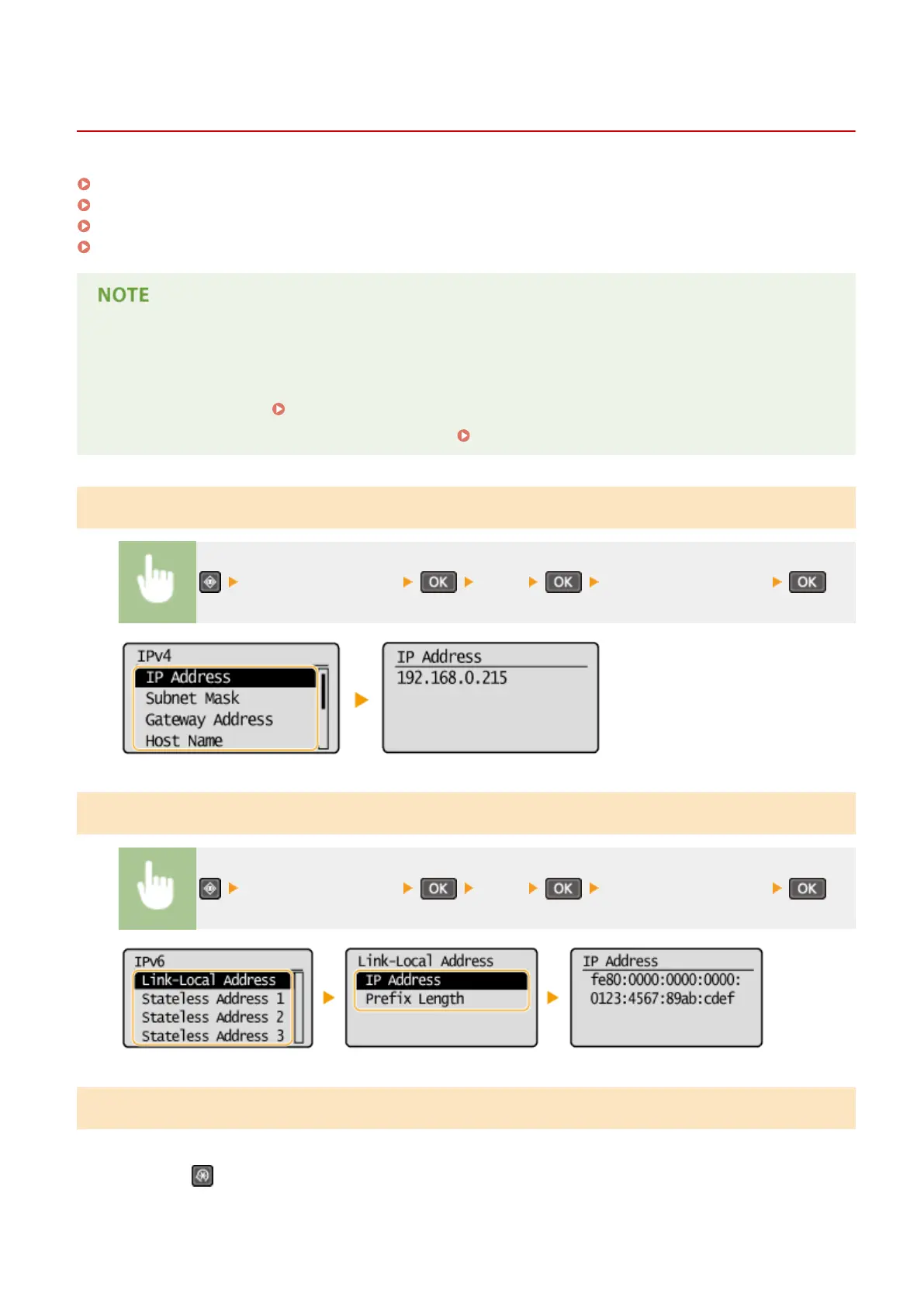
Viewing IPv4 Settings(P. 194)
Viewing IPv6 Settings(P. 194)
Viewing the MAC Address for Wired LAN(P. 194)
Viewing the MAC Address and Information for Wireless LAN(P. 195)
● The IP addr
ess is not correctly congured if it is displayed as "0.0.0.0".
● Connecting the machine to a switching hub or bridge may result in a connection failure even when the IP
address is correctly congured. This problem can be solved by setting a certain interval before the machine
starts communicating.
Setting a Wait Time for Connecting to a Network(P. 211)
● Y
ou can print a list of the current network settings.
Output Reports(P. 297)
Viewing IPv4 Settings
<Network Information> <IPv4> Select the setting to view
Viewing IPv6 Settings
<Network Information> <IPv6> Select the setting to view
Viewing the MAC Address for Wired LAN
1
Press
.
Network (MF244dw / MF232w)
194










 To Next Page