2
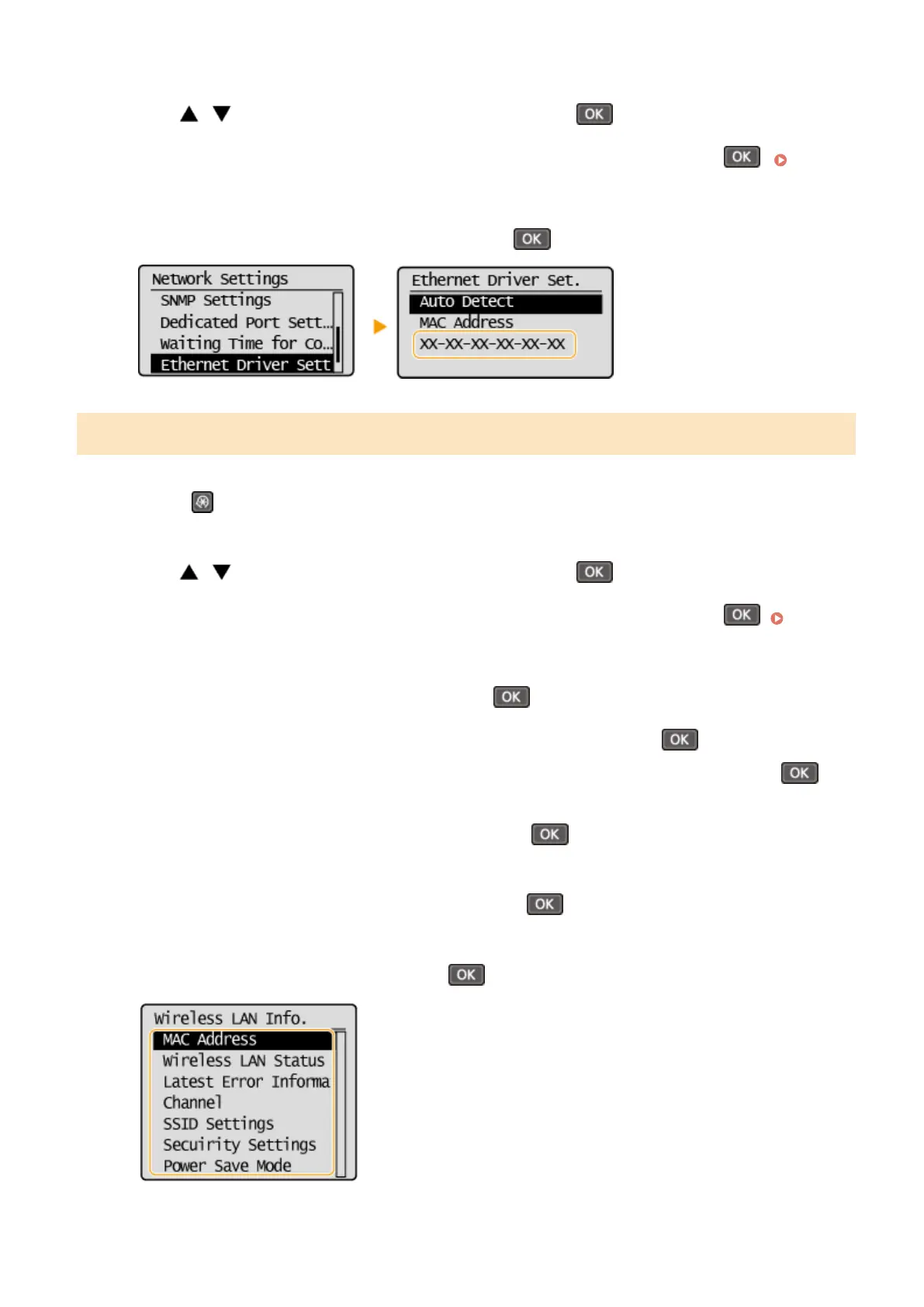
Use / to select <Network Settings>, and press .
● If a scr
een for entering a PIN is displayed, enter the PIN with the numeric keys and press
. Setting
the System Manager PIN
(P. 229)
3
Select <Ethernet Driver Settings>, and press
.
Viewing the MAC Address and Information for Wireless LAN
1
Press
.
2
Use / to select <Network Settings>, and press .
● If a scr
een for entering a PIN is displayed, enter the PIN with the numeric keys and press
. Setting
the System Manager PIN
(P. 229)
3
Select <Wireless LAN Settings>, and press
.
● If the <Enable the wir
eless LAN?> message is displayed, select <Yes>, and press
.
● If the <Dir
ect Connection will be disabled. Is it OK?> message is displayed, select <Yes>, and press
.
4
Read the message that is displayed, and press .
5
Select <Wireless LAN Information>, and press
.
6
Select the setting to view, and press
.
Network (MF244dw / MF232w)
195










 To Next Page