Display
1469-00H
The <Home> Screen for initiating operations and screens for specifying settings appear in the display. You can also
view job progress and messages here. Touch the display to operate it.
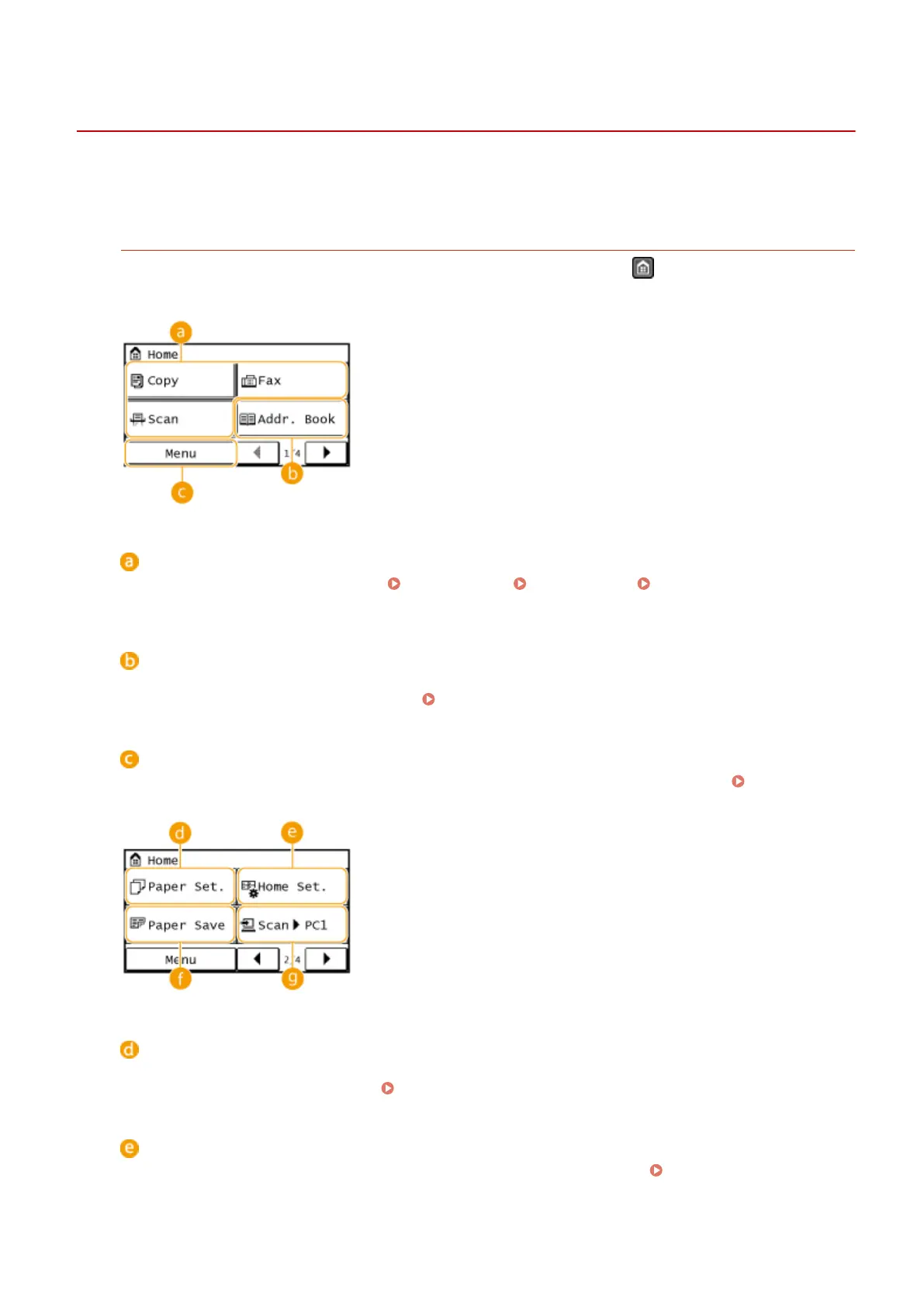
<Home> Screen
The <Home> Screen is displayed when the power is turned ON or by pressing on the operation panel. Use
this screen to specify settings for and register functions.
Toggle functions
Switch to copy, fax, or scan functions. Copying(P. 79) Faxing(P. 103) Using the Machine as a
Scanner(P. 232)
<Addr. Book>
Use this to register or edit the destinations for e-mails and faxes. You can also display a registered
destination when sending an e-mail or fax.
Registering in the Address Book(P. 60)
<Menu>
<Timer Settings>, <Preferences>, and many other machine settings start from this button.
Setting Menu
List(P. 472)
<Paper Set.>
Select the paper for printing. This button is also used for specifying the size and type of paper loaded in the
paper drawer and manual feed slot. Specifying Paper Size and Type(P. 56)
<Home Set.>
Allows you to change the order that <Home> Screen buttons are displayed in. Customizing the <Home>
Screen(P. 33)
Basic Operations
28









 To Next Page