Specifying Destinations with the One-Touch Buttons
1469-05A
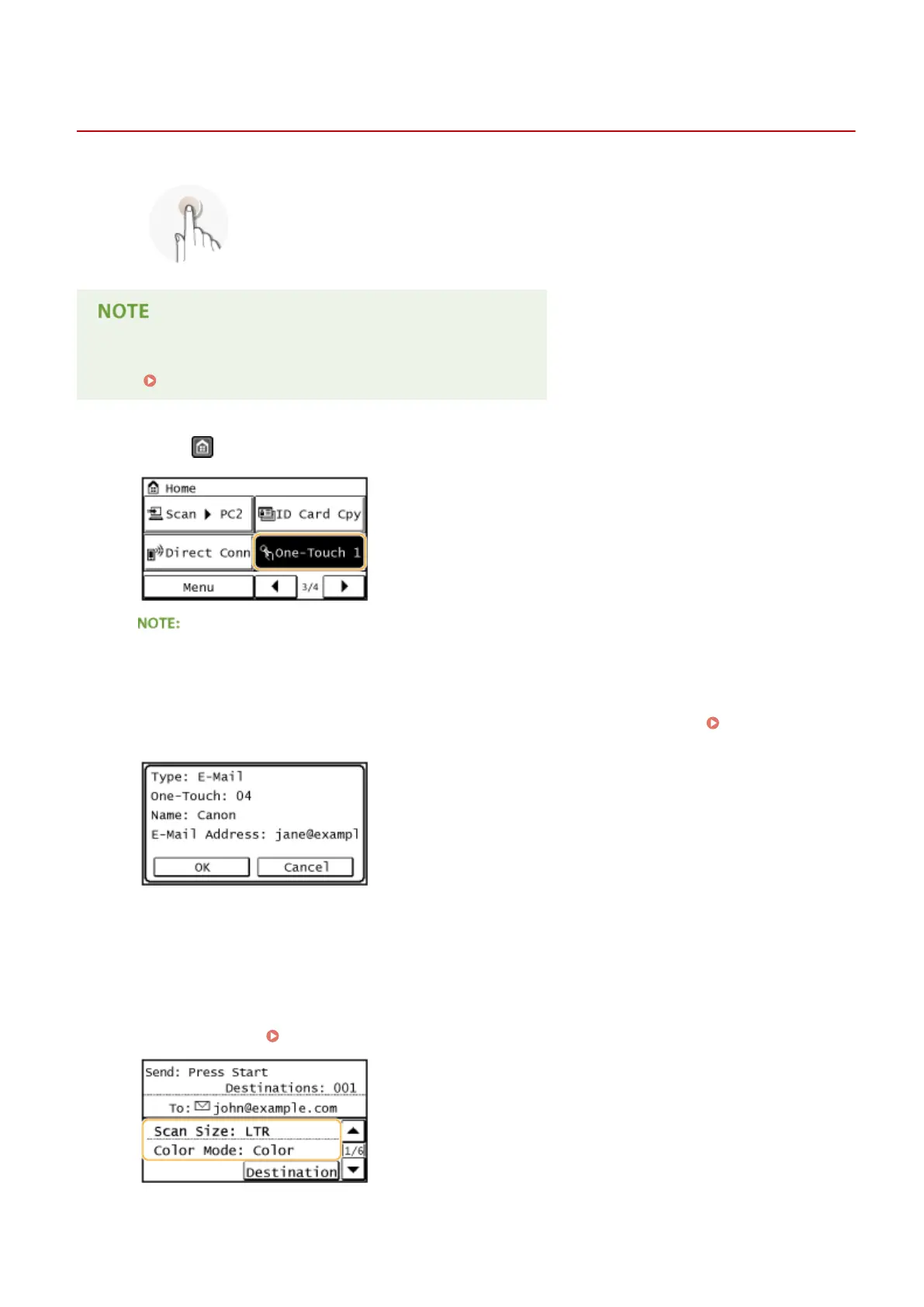
Tap one-touch buttons in the <Home> Screen to specify destinations.
You need to register destinations before using one-touch dialing.
Registering Destinations for One-Touch Dial(P. 65)
1
Press and tap any one of <One-Touch 1> to <One-Touch 4>.
If a conrmation screen appears
If <One-Touch/Coded Dial TX Conrmation> is set to <On>, a conrmation screen appears with the
destination and destination name registered to the one-touch button (if a destination registered for Group
Dial, the group name and number of destinations appears). Conrm the destinations are correct, and tap
<OK>. If destinations are incorrect, tap <Cancel> and tap the one-touch buttons again.
Checking
Destinations before Sending Documents(P. 420)
Selecting several destinations
Destinations can be added from the Address Book, coded dial numbers, One-Touch, and Recall Settings. Tap
<Destination>.
2
Specify the scanning settings as necessary.
● Select the settings. Specifying Detailed Settings(P. 258)
Using the Machine as a Scanner
279









 To Next Page