Support Link
Displays the support link specied in [Device Information] under [System Management].
[Status Monitor/Cancel]
Displays the status of the current print documents and history of print, copy, send, and received documents.
You can also check the status of the machine.
[Settings/Registration]
Displays [Settings/Registration] page. When you have logged on in System Manager Mode, you can change
the settings items and save/load the registered data.
Setting Up Menu Options from Remote UI(P. 461)
[Address Book]
Displays the destinations registered in the Address Book. You can also register or edit the Address Book
when you have logged on in System Manager Mode. Registering Address Book from Remote UI(P. 467)
[Status Monitor/Cancel] Page
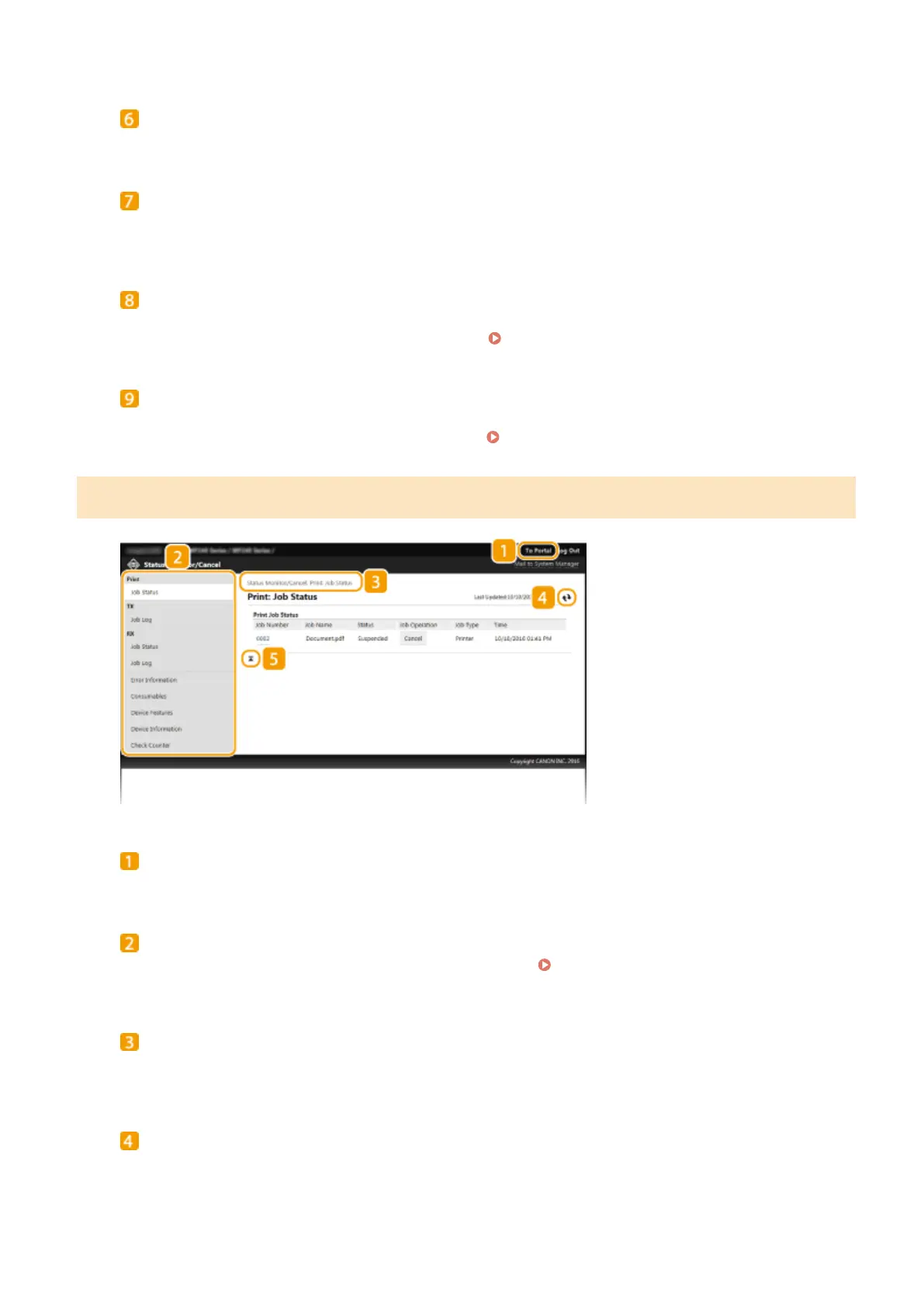
[To Portal]
Returns to Portal Page (main page).
Menu
Click an item, and the content is displayed in the right page. Managing Documents and Checking the
Machine Status(P. 456)
Breadcrumb Trail
Indicates the series of pages you opened to display the currently displayed page. You can check what page is
currently displayed.
Refresh Icon
Refreshes the currently displayed page.
Using Remote UI
453




 To Next Page