4
4
4-58
4-58
Disassembly/Assembly > Laser Scanner System > Removing the Laser Scanner Unit
Disassembly/Assembly > Laser Scanner System > Removing the Laser Scanner Unit
Laser Scanner System
Removing the Laser Scanner Unit
Preparations
1) Removing the Right Cover Unit.
2) Removing the Left Cover Unit.
3) Removing the Controller Cover.
4) Removing the Left Rear Cover.
5) Removing the ADF + the Reader Unit.
6) Removing the Upper Cover.
Procedure
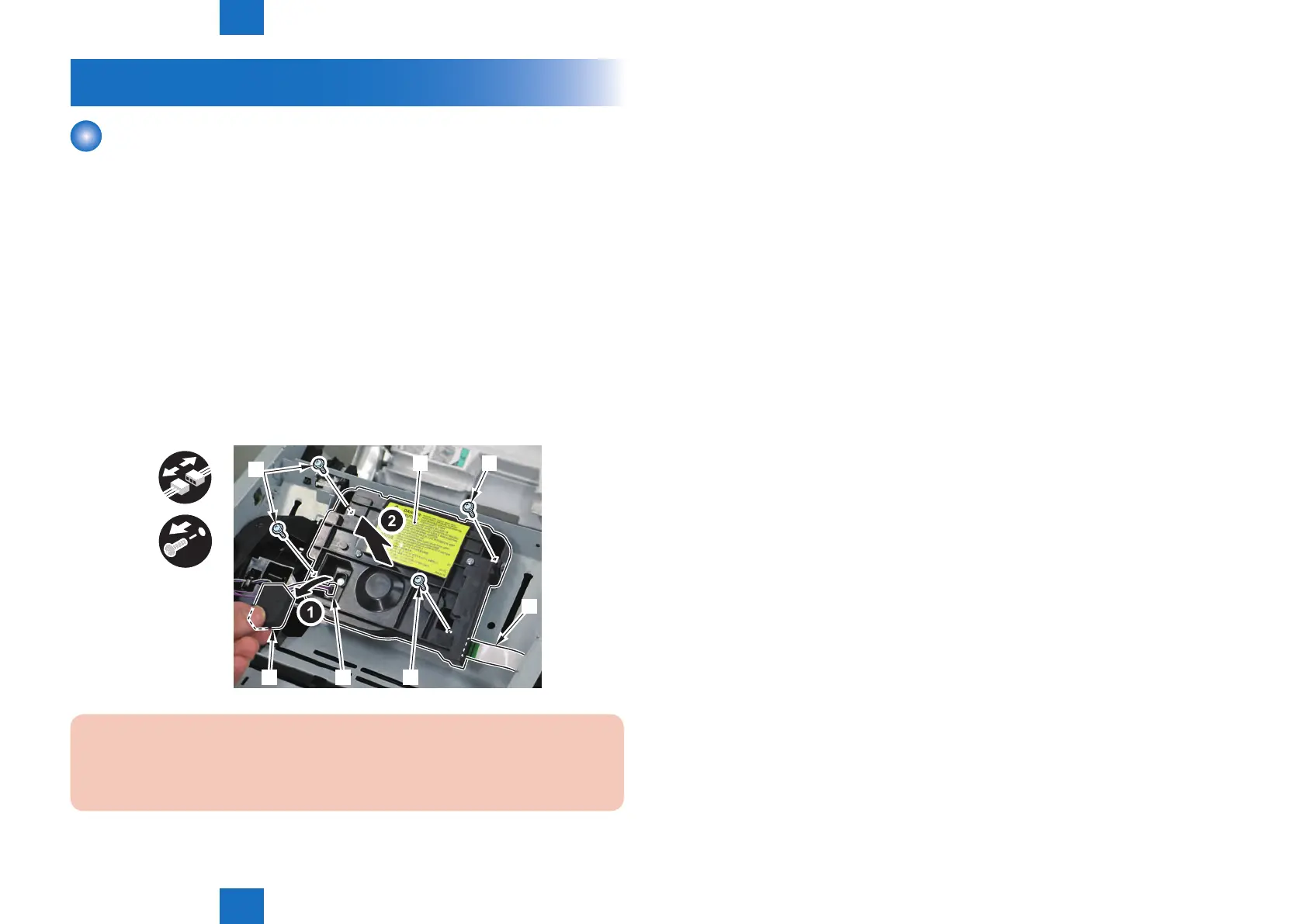
1) Remove the Laser Scanner Unit [1].
• 1 Flat Cable [2]
• 1 Sponge [3]
• 1 Connector [4]
• 4 Screw [5]
x4
x2
[1]
[2]
[4]
[5]
[5]
[5]
[3]
CAUTION:
Do Not Disassemble the Laser Scanner Unit at a Field.
It May Cause a Malfunction.
F-4-145







 To Next Page