4
4
4-30
4-30
Disassembly/Assembly > Document Exposure / Delivery System > Removing the ADF Pickup Roller
Disassembly/Assembly > Document Exposure / Delivery System > Removing the ADF Pickup Roller
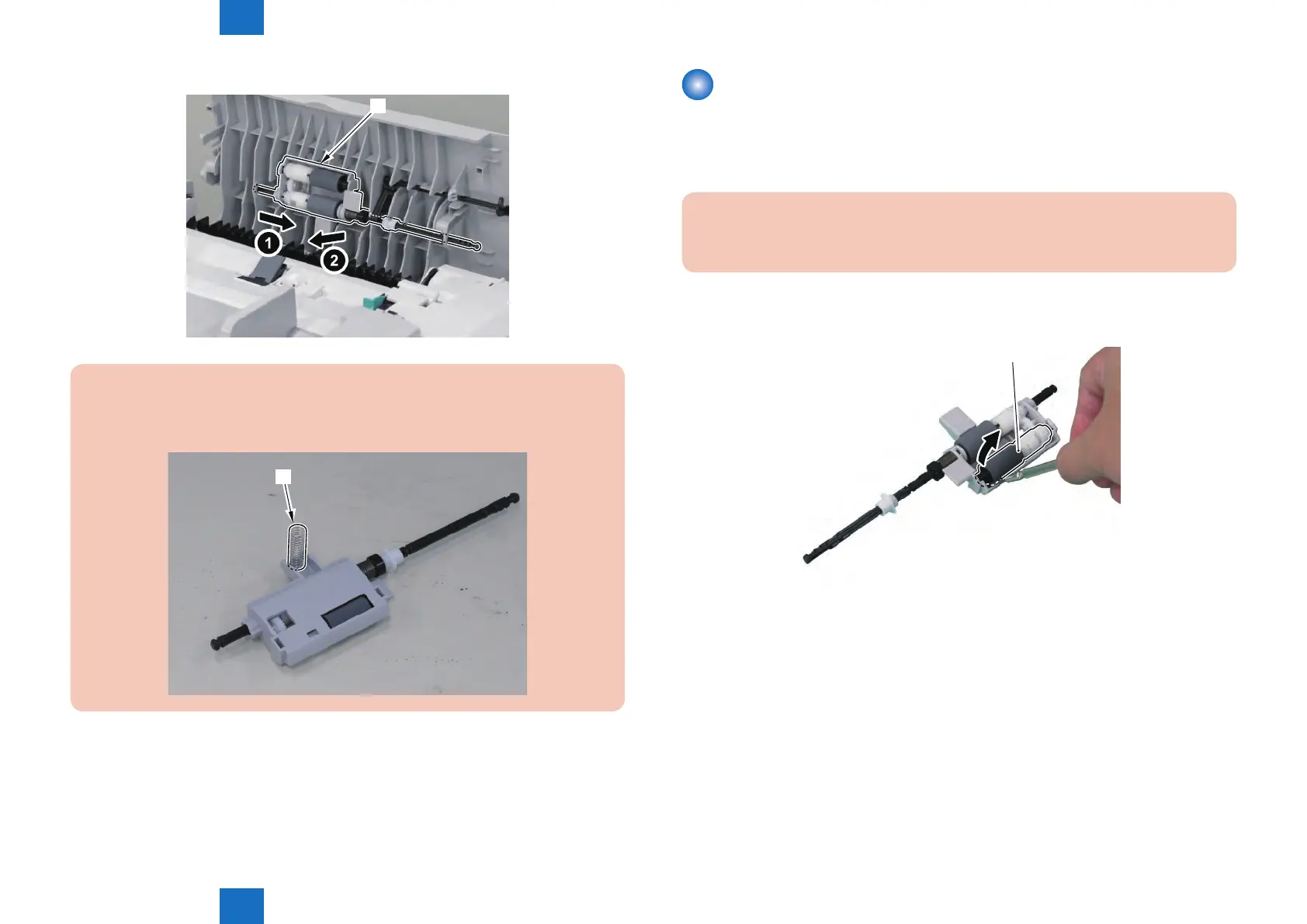
5) Remove the ADF Roller Unit [1].
[1]
CAUTION :
When Removing It, be Careful Not to Lose the Spring [1] Attached to the ADF Roller
Unit.
[1]
F-4-66
F-4-65
Removing the ADF Pickup Roller
Preparations
1) Removing the ADF Roller Unit.
Procedure
CAUTION:
Do Not Touch the Surface of the ADF Pickup Roller When Removing or Mounting it.
1) Insert the Precision Flat-screwdriver and Remove the Pickup Roller [1] Together With the
Shaft.
F-4-67







 To Next Page